

TenTin
Known Participant
October 1, 2025
Question

Text Stroke Problem

  • October 1, 2025
  • 2 replies
  • 394 views

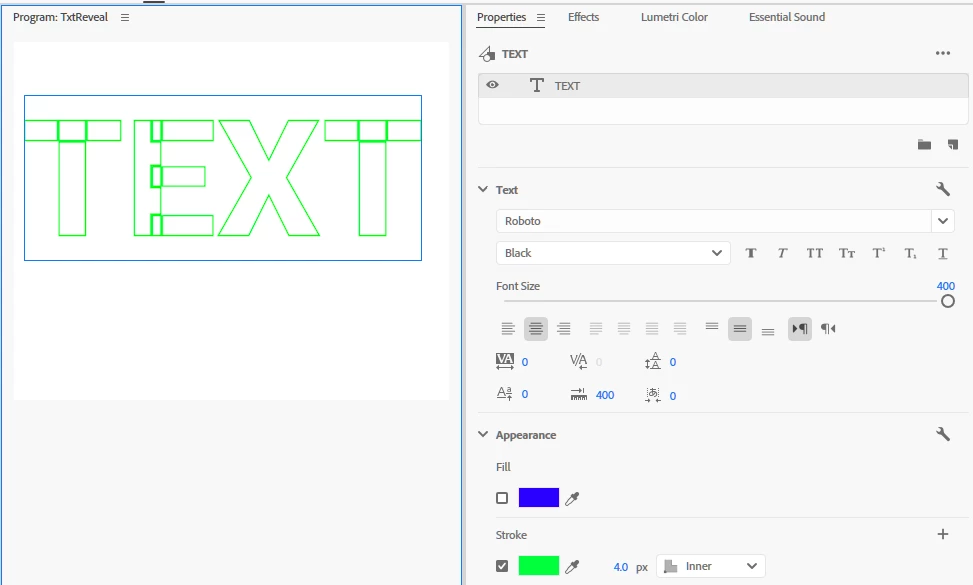
When you add an Inner/Centre Stroke to text with no fill, it results in a specific appearance (see screenshot below). Rather than creating a text image file (in Photoshop) and then importing it into Adobe Premiere, is there a way to avoid this issue?
 

2 replies

MyerPj
Community Expert
Community Expert
October 4, 2025

Looks good here too. (Using beta 25.6 b88)). You might try the actual Roboto Black font rather than Roboto with the Black font style, though here they appear similar.


TenTin
TenTinAuthor
Known Participant
October 5, 2025

I previously mentioned that the issue lies with Adobe's text engine when handling variable fonts. I discussed this problem before the recent two updates in another thread that focused on the text engine issues in Photoshop and Illustrator, and Adobe has acknowledged it.


As you can see, the stroke behaves normally with the Segoe font family (the original Windows 11 font family, not the variable version). However, it exhibits abnormal behaviour with the variable version of Proxima.


Adobe Employee
October 1, 2025

That looks strange. I tried to repro but don't get the same result as you.

Can you share the project somehow?

Here my project: https://drive.google.com/file/d/10zmJZsXMgDpPBaz2X6LRFczmWeNhlA7z/view?usp=sharing

TenTin
TenTinAuthor
Known Participant
October 1, 2025

Your file is the same (on my machine).


My file:

https://www.dropbox.com/scl/fi/i81my52y5zvwroyez1fo0/txtStroke.prproj?rlkey=0cgqi0i0nwj8mrs18usmtiep5&st=pt8fhusk&dl=0


Premiere: 2025 latest 

Windows 11: 24H2 (latest update)

Graphic: IntelArc (latest update)

Adobe Employee
October 4, 2025

Looks correct on my machine and not at all like in your screenshot. Very odd.