
The auto adjustment in the timeline doesnt work on premiere pro
hi, i have recently updates the apps from the creative cloud app and updated all the apps, including premiere pro. ever since i updated it, i saw few changes that they have made, like moving and renaming the title option to legacy, etc.
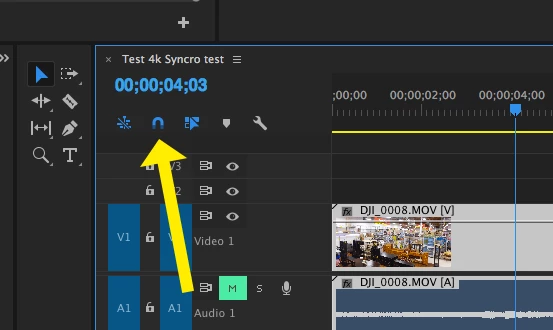
but my problem is that, ever since i updated, the auto adjustment on the timeline is not working. for example. earlier, on the timeline, if i wanted to add a new clip or trip a certain part of an existing clip on the timeline with the razor tool, hovering my mouse on any desired spot would direct it, like the razor tool will slice exactly where my timeline bar is stationary.
similarly, me dragging a clip (instead of ripple edit) nest to one another, with that auto adjustment, the clip would snap together with the next clip like a magnet.
but now that is not working and i have struggle with that because sometime slicing a clip with razor tool wihtout that option (auto adjustment) is very hard as i have to be very precise.
so please can anyone let me know, whats going on? or the solutions please.
Thanks
 AdChoices