
Participant
August 29, 2024
Answered

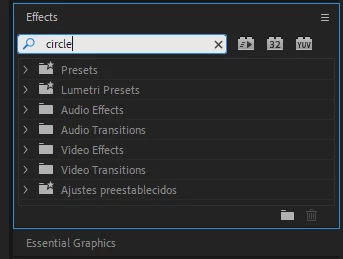
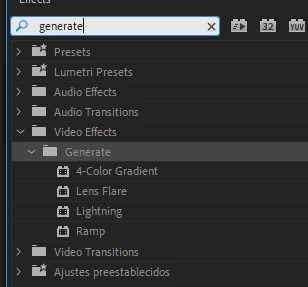
There is no option for circle in generate in the effects panel.

  • August 29, 2024
  • 3 replies
  • 14336 views

Editing a video and want to add a circle preset for a vignette. However, the circle preset doesn't seem to exist. All of the tutorials say that the circle is in the generate tab but I don't see it. I've done this effect before but for some reason it doesn't appear anymore. Any ideas/help?


Correct answer Kevin-Monahan

Hello @Jorge302710524gel,

Thanks for the message. Unfortunately, that was an obsolete effect. All obsolete effects were removed in 24.6. Sorry for the frustration. Try using the Ellipse tool to create a circle shape. Would that work for you?


Thanks,
Kevin

3 replies

Participant
December 16, 2024

why was this effect removed?

R Neil Haugen
Legend
December 16, 2024

Sigh.


For the umpteenth time, as they have posted over and over about this ... all effects in the Obsolete bin were used by less than 1% of the user base; none were capable of GPU use, so using them could pull other effects down to CPU processing from the GPU; and they had ancient code the couldn't be updated, needed a complete from scratch re-creation.


They've been in the Obsolete bin since around 2017. Plenty of time to migrate to things not in the Obsolete bin. As I had to do for a couple effects I had used a lot.

Everyone's mileage always varies ...
Participant
January 27, 2025

So defensive.

Participant
November 27, 2024

I know this has already been answered, but I wanted to share a workaround that works for me. I use the Circle tool daily, and while I’m aware there are other methods, I find it the most convenient for my workflow.

If you have a file where you’ve previously used the Circle tool (or any other obsolete tools), you can copy and paste the attributes. This will transfer the obsolete effect to your new file.

I understand this might feel tedious, especially if you only use it occasionally, but I hope this tip helps someone out! 😅

Kevin-Monahan
Community Manager
Kevin-MonahanCommunity ManagerCorrect answer
Community Manager
August 29, 2024

Hello @Jorge302710524gel,

Thanks for the message. Unfortunately, that was an obsolete effect. All obsolete effects were removed in 24.6. Sorry for the frustration. Try using the Ellipse tool to create a circle shape. Would that work for you?


Thanks,
Kevin

Kevin Monahan - Sr. Community and Engagement Strategist – Adobe Pro Video and Audio
Participating Frequently
September 2, 2024

How do I add a stroke to the video?

R Neil Haugen
Legend
September 2, 2024

Create a shape in the Essential Graphics panel, in the Edit tab, and down below you have many options including stroke, fill, mask with shape, color ...

Everyone's mileage always varies ...