
Participant
August 29, 2024
Answered

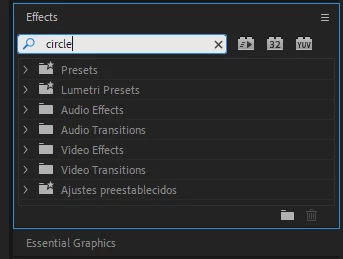
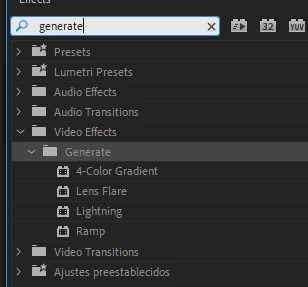
There is no option for circle in generate in the effects panel.

  • August 29, 2024
  • 3 replies
  • 14359 views

Editing a video and want to add a circle preset for a vignette. However, the circle preset doesn't seem to exist. All of the tutorials say that the circle is in the generate tab but I don't see it. I've done this effect before but for some reason it doesn't appear anymore. Any ideas/help?


Correct answer Kevin-Monahan

Hello @Jorge302710524gel,

Thanks for the message. Unfortunately, that was an obsolete effect. All obsolete effects were removed in 24.6. Sorry for the frustration. Try using the Ellipse tool to create a circle shape. Would that work for you?


Thanks,
Kevin

3 replies

Participant
December 16, 2024

why was this effect removed?

Participant
January 13, 2025

Its lame they removed it.  I used it all the time. Now I have to relearn how to make the spotlight follow effect without it. I just followed tutorials I had saved for it. Im not a pro. I dont often use pro as well. But when I do. Thats what I use. It literaly could have stayed that and not bothered anyone.

Participant
November 27, 2024

I know this has already been answered, but I wanted to share a workaround that works for me. I use the Circle tool daily, and while I’m aware there are other methods, I find it the most convenient for my workflow.

If you have a file where you’ve previously used the Circle tool (or any other obsolete tools), you can copy and paste the attributes. This will transfer the obsolete effect to your new file.

I understand this might feel tedious, especially if you only use it occasionally, but I hope this tip helps someone out! 😅

Kevin-Monahan
Community Manager
Kevin-MonahanCommunity ManagerCorrect answer
Community Manager
August 29, 2024

Hello @Jorge302710524gel,

Thanks for the message. Unfortunately, that was an obsolete effect. All obsolete effects were removed in 24.6. Sorry for the frustration. Try using the Ellipse tool to create a circle shape. Would that work for you?


Thanks,
Kevin

Kevin Monahan - Sr. Community and Engagement Strategist – Adobe Pro Video and Audio
Participating Frequently
September 2, 2024

How do I add a stroke to the video?

R Neil Haugen
Legend
September 2, 2024

Create a shape in the Essential Graphics panel, in the Edit tab, and down below you have many options including stroke, fill, mask with shape, color ...

Everyone's mileage always varies ...