
Participant
January 29, 2017
Answered

Tiles in Premiere Pro not fitting in screen

  • January 29, 2017
  • 1 reply
  • 900 views

Alright first I will say I have a lot of googling and experimentation to try and get this working on my own before posting.

Here is the issues, the tiles or work spaces will not size properly when launched on my 1440 monitor. This is different then all the scaling issues I keep finding online, I am not trying to make this bigger on the display so I can see It better.  However, checking the "disable display scaling" option in properties used to make it so the program was usable, just unpleasant to look at. Now It has gotten to the point where no matter how I launch it the tiles are all sized improperly. Its very difficult to explain in words so I uploaded a video of it to youtube.

Adobe Premiere CC Issue - YouTube

I have tried many different settings and completely uninstalled the program and all its preferences multiple times. No fix yet.

I also get this error when closing the program
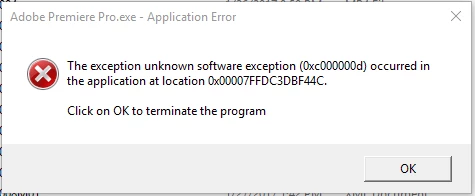
Searching the error code hasn't shown me anything so I'm not sure if it is related to my original issue.

Im hoping somebody has an answer to this so I can continue to get some work done.

Keysystem specs just in case:

Windows 10

fx-8320

r9-290x

24g ram

dell U2515H

    This topic has been closed for replies.
    Correct answer itsi

    Thank you for your response, unfortunately that did not fix the issue.

    What did fix the the issue was a combination of two things:

    1: I was running two displays piggy-back from a displayport connection. I changed that and gave each monitor its own connection to the video card.

    2: the scaling on the monitor was to 125% in the windows config, I changed that to 100% and turned scaling off in Premiere.

    1 reply

    Legend
    January 29, 2017

    Try step 2F.  If that doesn't work, go through the rest of step 2.  If that still doesn't work, move on to step 3, then 4, etc.

    Premiere Pro Troubleshooting Guide

    itsiAuthorCorrect answer
    Participant
    January 30, 2017

    Thank you for your response, unfortunately that did not fix the issue.

    What did fix the the issue was a combination of two things:

    1: I was running two displays piggy-back from a displayport connection. I changed that and gave each monitor its own connection to the video card.

    2: the scaling on the monitor was to 125% in the windows config, I changed that to 100% and turned scaling off in Premiere.

    Legend
    January 30, 2017

    That makes sense.