Participant
Aug 20, 2020 9:08 PM UTC
Answered

Time remapping doesnt work in 2020 14.3.2

Hi,


I've checked several threads and loads of tutorials, but I cant get Time ramping to work.


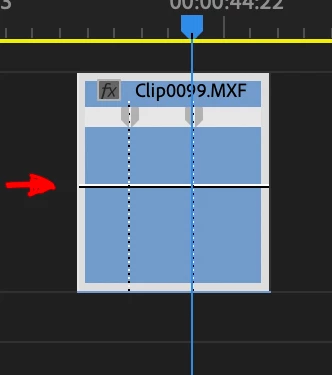
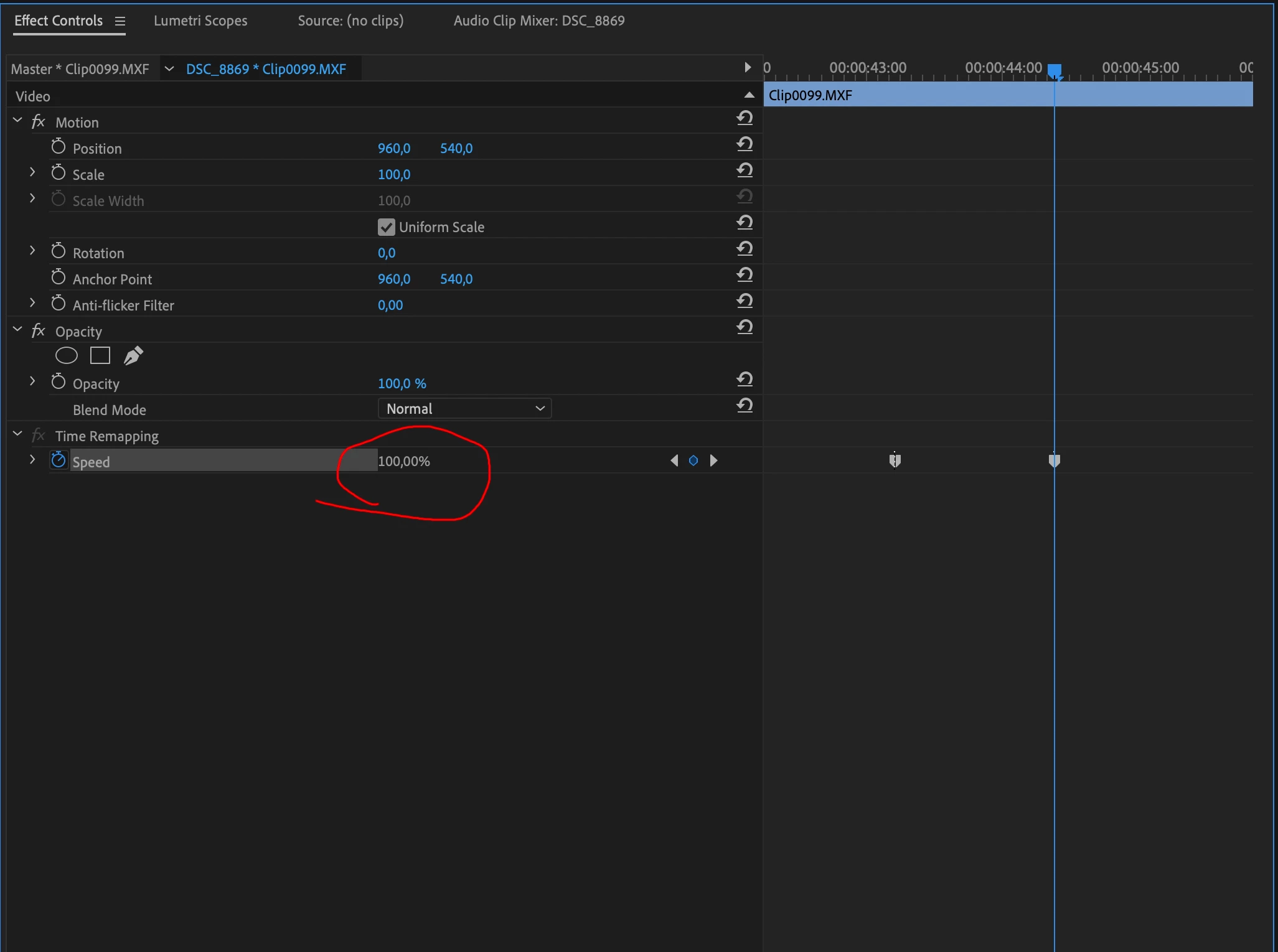
When I've done the "show time remapping keyframes" and added the keyframes I cannot adjust the 100% in the effects panel (it's greyed out) and when I try to drag the white line in the editor panel (which is how it worked in the previous version), it just drags the whole video clip up a track.


I really hope there's a simple solution for this because I've been frustrating myself for hours already now 😞


Thanks for your reply!


Trent HappelCorrect answer
Adobe Employee
Sep 15, 2020 3:15 PM UTC

The time remapping issue should now be fixed in Premiere Pro 14.4, which was just released.

40 replies

felisc96545705
Participant
Sep 16, 2020 12:56 PM UTC

No luck. with 14.4. has it worked for any else?? 

Translate
Ann Bens
Community Expert
Community Expert
Sep 16, 2020 2:20 PM UTC

Works fine now. What does not work for you.

Make sure you have show video keyframes on.

Translate
Trent HappelCorrect answer
Adobe Employee
Sep 15, 2020 3:15 PM UTC

The time remapping issue should now be fixed in Premiere Pro 14.4, which was just released.

Translate
arjent75570866
Known Participant
Oct 16, 2020 2:01 PM UTC

Hi Trent,

It seems the issue is still ongoing for some people. Is this issue still under investigation? Can we use a workaround?

Translate
Adobe Employee
Oct 16, 2020 7:36 PM UTC

Not that I am aware of. I would recommend contacting our Support team to help troubleshoot your issue - https://helpx.adobe.com/support/premiere-pro.html (Contact Us link at bottom)

Translate
Known Participant
Sep 9, 2020 8:00 AM UTC

Same issue.

Translate
Adobe Employee
Sep 2, 2020 4:40 PM UTC

The fix should now be in the latest Premiere Pro Beta build (14.5 beta build 007+), currently available on Creative Cloud for Mac. We hope to have a Windows Beta build posted soon.


If anyone wants to check it out, it would be greatly appreciated.


Thank you.

Translate
felisc96545705
Participant
Sep 16, 2020 12:57 PM UTC

Where can I find the beta version?? 

Translate
Kevin J. Monahan Jr.
Legend
Sep 21, 2020 5:03 PM UTC

FelisC,

Sidebar on the Creative Cloud app. Let us know if you need help installing.

Thanks,
Kevin

Translate
Kevin Monahan - Sr. Community and Engagement Strategist – Adobe Pro Video and Audio
Participating Frequently
Sep 2, 2020 2:38 PM UTC

Thanks Ann!! Good find!

Translate
Adobe Employee
Aug 28, 2020 12:40 AM UTC

Sorry that I can't give a date, but we are working to fix this as soon as possible.

Translate
edwinl76571172
Participating Frequently
Aug 28, 2020 12:08 PM UTC

Thank you Ann. This also works for me, however I've rolled back since it's just feels too unintuitive to work this way. Will wait for a fix. 

Translate
jdizon-leidos
Participant
Aug 26, 2020 8:52 AM UTC

I experienced the same problem!!! Adobe please please please fix this bug!!!

Translate
Participant
Aug 26, 2020 4:20 PM UTC

I've literally just ran into this problem! It was working fine and then suddenly I couldnt move the speed slider at all.

Translate
Inspiring
Aug 26, 2020 4:26 PM UTC

Uninstall the latest version, 14.3.2. Install a previous version and it'll work. Adobe is "investigating." Something is messed up with the newest version.

Translate
Participant
Aug 24, 2020 7:31 PM UTC

Ann your solution worked for me , thank you 


Translate
Participant
Aug 26, 2020 6:46 AM UTC

Same problem over here. Very annoying. it cost me 2 hours of work till I figured out how to work around it......


Please fix this quickly Adobe!

Translate
Adobe Employee
Aug 21, 2020 12:55 AM UTC

Thank you for the reports! This issue is being investigated.

Translate
Participant
Aug 23, 2020 9:45 AM UTC

Time ramping doesnt work in primer pro after update

Translate
Ann Bens
Community Expert
Community Expert
Aug 20, 2020 9:45 PM UTC

Seeing the same thing.

Design is off in the timeline.

If you move your mouse up a bit it will work. But its definitly not correct.

Reported this to the Premiere team.

Translate
Participant
Aug 24, 2020 10:42 AM UTC

Thank you so much! It worked... 

Translate