
Participant
September 18, 2020
Answered

time remapping

  • September 18, 2020
  • 2 replies
  • 790 views

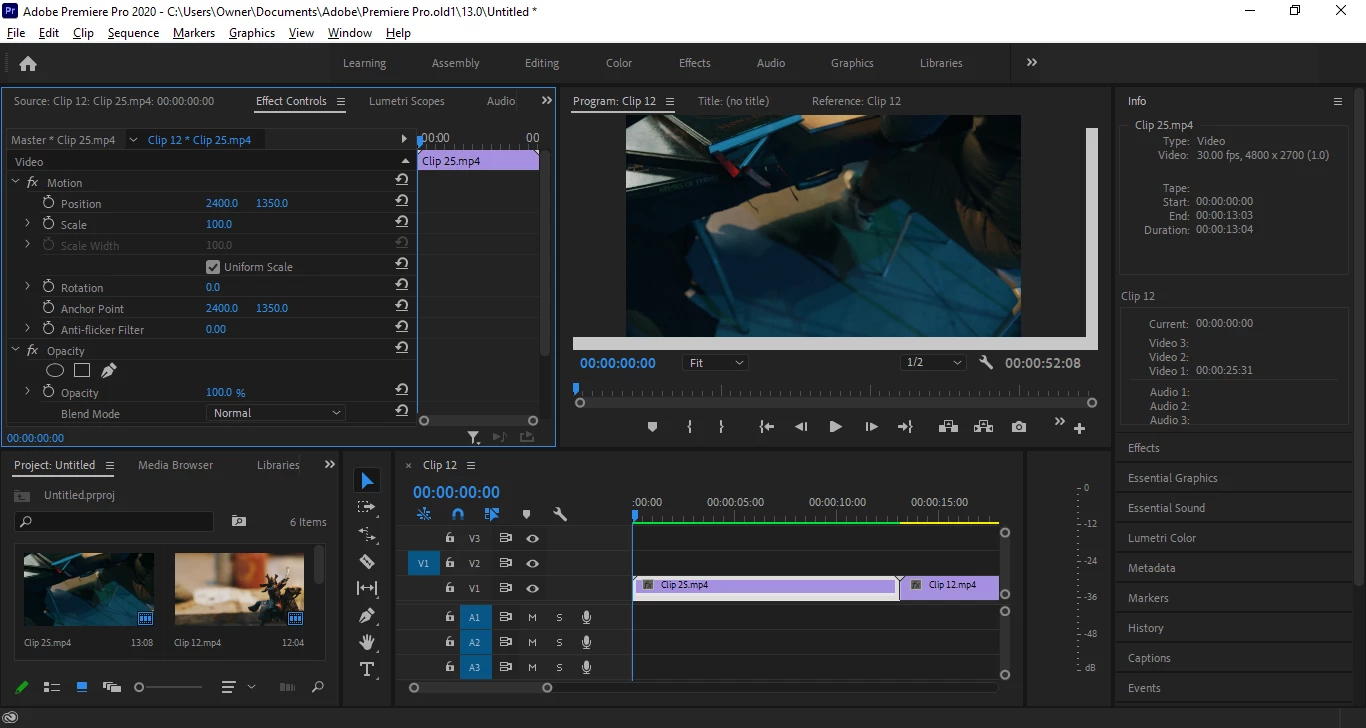
im trying to post a key frame for time remapping and  have opacity show but neither seem to work. For the first  a video says we right click on it  or use pen tool mark it but that doesnt work and for the later even mark opacity lien doesnt show 
 

This topic has been closed for replies.
Correct answer Ann Bens

You need to expand the track.

2 replies

Ann Bens
Community Expert
Community Expert
September 18, 2020

You need a larger screen so you can see what you are doing.

Timeremapping is not even showing in the Effect Control nor in the timeline in your screenshot.

https://helpx.adobe.com/search-results.html?q=time%20remapping%20premiere%20pro&facets_fields=%5B%22applicable_products%22%5D&post_facet_filters=%7B%22applicable_products%22%3A%5B%22Adobe%20Premiere%20Pro%22%5D%7D

Participant
September 18, 2020

How do i get it to show in the timeline dont i just right click on the fx go time mapping and  mark speed?

Participant
September 18, 2020

You need to expand the track.


that is right  i press the rench on that side pressed expand

R Neil Haugen
Legend
September 18, 2020

Like many editors, I normally work more for keyframes in the Effects Control panel. You haven't got any Opacity values selected to change in the Effects Control Panel ... ECP. They would be highlighted with a lighter gray background had you clicked on them.


To set opacity keyframes on the clip in the sequence, you need to click on the wrench icon in the timeline panel header block, and set "show video keyframes".


Neil

Everyone's mileage always varies ...
Participant
September 18, 2020

show video keyframes is alreadu checked. How do I add opacity since right click on a video fx making black dot next to opacity doesnt that mean its there?