
Known Participant
January 1, 2018
Answered

Timelapse of 6 hours of footage into 1 minute: Best Method?

  • January 1, 2018
  • 1 reply
  • 3997 views

Hi,

I have 6 hours of footage which I have to compress into 1 minute of footage. How should I do it? I increased speed of the clips and the video looks really laggy. Should I remove some videos to make it shorter?

Thanks
This topic has been closed for replies.
Correct answer Meg The Dog

Click on anywhere in the timeline. Then type Command (Control) + A to select all the clips in the timeline.

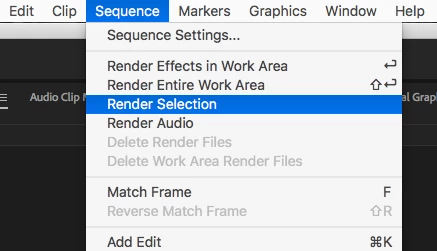
Once selected go to the menu Sequence > Render Selection.

After the sequence is rendered, check your playback.

MtD

1 reply

Inspiring
January 1, 2018

rnprasanna  wrote

I increased speed of the clips and the video looks really laggy.

After you increased the speed of the clips, did you render them?

MtD

Known Participant
January 1, 2018

I did not render it, I just played it back on the preview window

Ann Bens
Community Expert
Community Expert
January 1, 2018

Rendering did not help the playback, but once the video is exported, it was not laggy.But I noticed that I cant increase speed beyond 10,000%. Is there a work around? I want it to be 36,000%


Nest and apply speed to nest.

Dont forget to turn on Optical Flow.