
Timeline clip selection delay and audio level keyframes
Hi, I have been having these two problems for awhile now and just seeing if I can get some help!
Problem 1: Timeline clip selection delay
It's probably best to show a visual example:
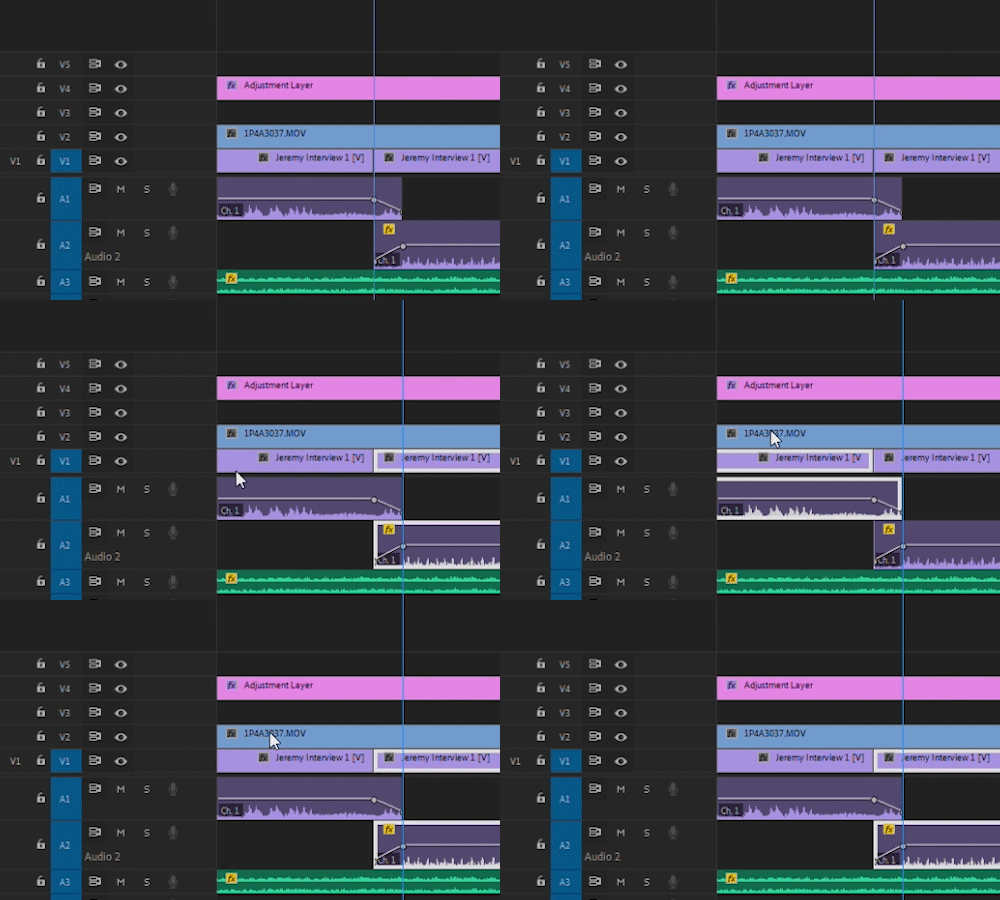
So basically, when I move 1 frame forward with the right key (next frame button), Premiere selects the next clip on the timeline. However, there is a 2-3 second delay, where if I select a different clip with my mouse, Premiere automatically jumps back to the previous selected clip (the clip that was selected by moving the frame forward or backwards with the left/right key). In the GIF, you can see that after I select another clip with my mouse, Premiere jumps back to the other clip without me doing anything.
Problem 2: Audio Level Keyframes
I've noticed this for awhile now but have not seen any posts bringing this up. When I add two audio level keyframes, they don't come out linear. The dB value does not increase/decrease at a constant rate from one keyframe to another.
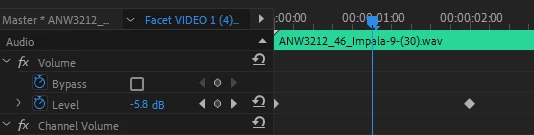
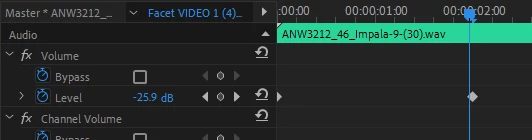
For Example: At 0 seconds, the keyframe is set to 0dB. At 2 seconds the keyframe is set to -30dB. However, at 1 second, the audio level is not -15dB? Is this intentional?
Are there any settings I'm missing that will help with these two problems? Thank you!
 AdChoices