
Participant
November 1, 2009
Answered

Timeline lost

  • November 1, 2009
  • 4 replies
  • 69468 views

Something I did caused the Timeline to disappear on the screen.  I am fairly new to CS4 and can't figure out how to get the timeline back.  The windows that are checked in the Windows menu on my laptop are the same as those checked in the Windows menu on my desktop yet the timeline on the laptop is missing.  The block of the screen at the bottom says "Timeline (no sequences)" but I don't see the video channels and audio channels that show the clips that are dragged into it.  I need to drag clips to the timeline and can't figure out how get the timeline back.  Can someone tell me how to get the timeline back?

Thanks for your help.

RR
    This topic has been closed for replies.
    Correct answer Powered_by_Design

    That doesn't work.  There is no sequence in the Project Window.  Only the orignal .avi

    file.  Double clicking that file just puts it into the Source Monitor pane.  If the program was working like it has in the past I would be able to create the sequence by marking the in and out points at which point I could drag it down to the Timeline Pane or simply click the insert button in the Source Monitor.  The insert button is active in the Source Monitor and it appears to click OK - nothing ever shows up in the Timeline Pane.


    double clicking a video file just opens it in the source monitor.

    you have to double click a sequence to make it open in the timeline.

    If for some reason you dont have any sequences you can create a new one by clicking File-New Sequence.

    Then just drag your footage to the new sequence.

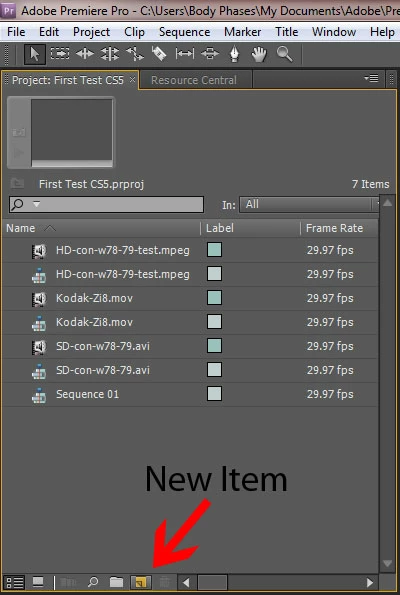
    With CS5 if you dont know how to create a sequence that matches your footage you can drag your footage to the New Item button and it will create a new sequence that matches your footage.

    Glenn

    4 replies

    Participant
    January 6, 2023

    I've got the same sort of problem, but instead I haven't put any video's in my timeline yet. More because my timeline is entirely gone and I can't put any video's in them. This is the second time I got this, cause I've tried it a second time by opening a new project. There is no title saying "timeline" or "timeline no sequinces" it's just black. The only things I see are the options at the sideline like cutting etc. I really need help with this. 

    Ann Bens
    Community Expert
    Community Expert
    January 6, 2023

    Try resetting workspace.

    Participant
    June 6, 2014

    I know this was answered but I just had a similar situation that required a different solution. I just finished re installing the CS5.5 Master Collection on a new PC. I opened a project that was in progress from my old system on the new one and the timeline was nowhere to be found. I found this post and new it wasn't an issue of not having any timelines to click on.

    The issue was that my old system was dual monitor and for now my current system is a single monitor. I had the timeline dragged to screen 2 and it remembered that when I opened it on the new system. Luckily it was just off screen and I was able to pull it over manually. Even resetting the workspace didn't reveal it, I must have saved the master workspace to my configuration. After figuring it out I also tried the color correction workspace and the timeline appeared with the other blocks for that.

    So bottom line, if you can't see your timeline and you know you have them you have a few options.

    1. Reset the workspace until you see the timeline reappear.. Try all of them, even if you don't want to perform the function it was designed for. You can then activate the other panels you want in the Window tab.

    2. Connect a 2nd monitor and drag it back, or just keep the second monitor.

    3. Drag your cursor to the edge of the frame and look to see if it changes to the re-size option. If so, grab the panel and drag it back.

    I hope this helps someone else in a similar situation.

    December 26, 2013

    Go to window up above

    just between help and title

    click on it

    first on top of the list is workspace

    a dropdown menu pops

    go to reset current workspace

    your timeline is afterwards back !

    hope it helps !

    Harm_Millaard
    Inspiring
    November 1, 2009

    Double click on the sequence in your project window.

    Participant
    November 23, 2010

    I'm experiencing the same problem with my Timeline in CS4 Premier Pro.  Double

    clicking the .avi file in the Project Window does put it into t

    he Source Monitor.  I can mark the in and out points of a clip but cannot insert it into the Timeline

    pane no matter what I do.  This used to work but seemed to

    stop functioning whith my last project after I bounced it into Encore via the Dynamic Link.

    I'm not sure if I turned something off or not - but I sure can't seem to get it back to the way it worked prior to that project.

    I can open an older project and everything comes ups including the video and audio clips in the Timeline pane.  I saved that project to a different file name, deleted the clips and attempted my current project - still am not able to insert a clip into the Timeline Pane.  I see the Header Tab which reads:  'Timeline: (no sequences) but all the other icons are greyed out.  The items in the drop-down Sequence menu are all greyed out as well.  To my knowledge, all settings and preferences are the same now as as compared to those of an older project.  This one has got me stumped - any further ideas?

    Powered_by_Design
    Powered_by_DesignCorrect answer
    Inspiring
    November 23, 2010

    That doesn't work.  There is no sequence in the Project Window.  Only the orignal .avi

    file.  Double clicking that file just puts it into the Source Monitor pane.  If the program was working like it has in the past I would be able to create the sequence by marking the in and out points at which point I could drag it down to the Timeline Pane or simply click the insert button in the Source Monitor.  The insert button is active in the Source Monitor and it appears to click OK - nothing ever shows up in the Timeline Pane.


    double clicking a video file just opens it in the source monitor.

    you have to double click a sequence to make it open in the timeline.

    If for some reason you dont have any sequences you can create a new one by clicking File-New Sequence.

    Then just drag your footage to the new sequence.

    With CS5 if you dont know how to create a sequence that matches your footage you can drag your footage to the New Item button and it will create a new sequence that matches your footage.

    Glenn