
Participant
July 14, 2018
Answered

Timeline not working as it should.

  • July 14, 2018
  • 7 replies
  • 39780 views

Greetings,

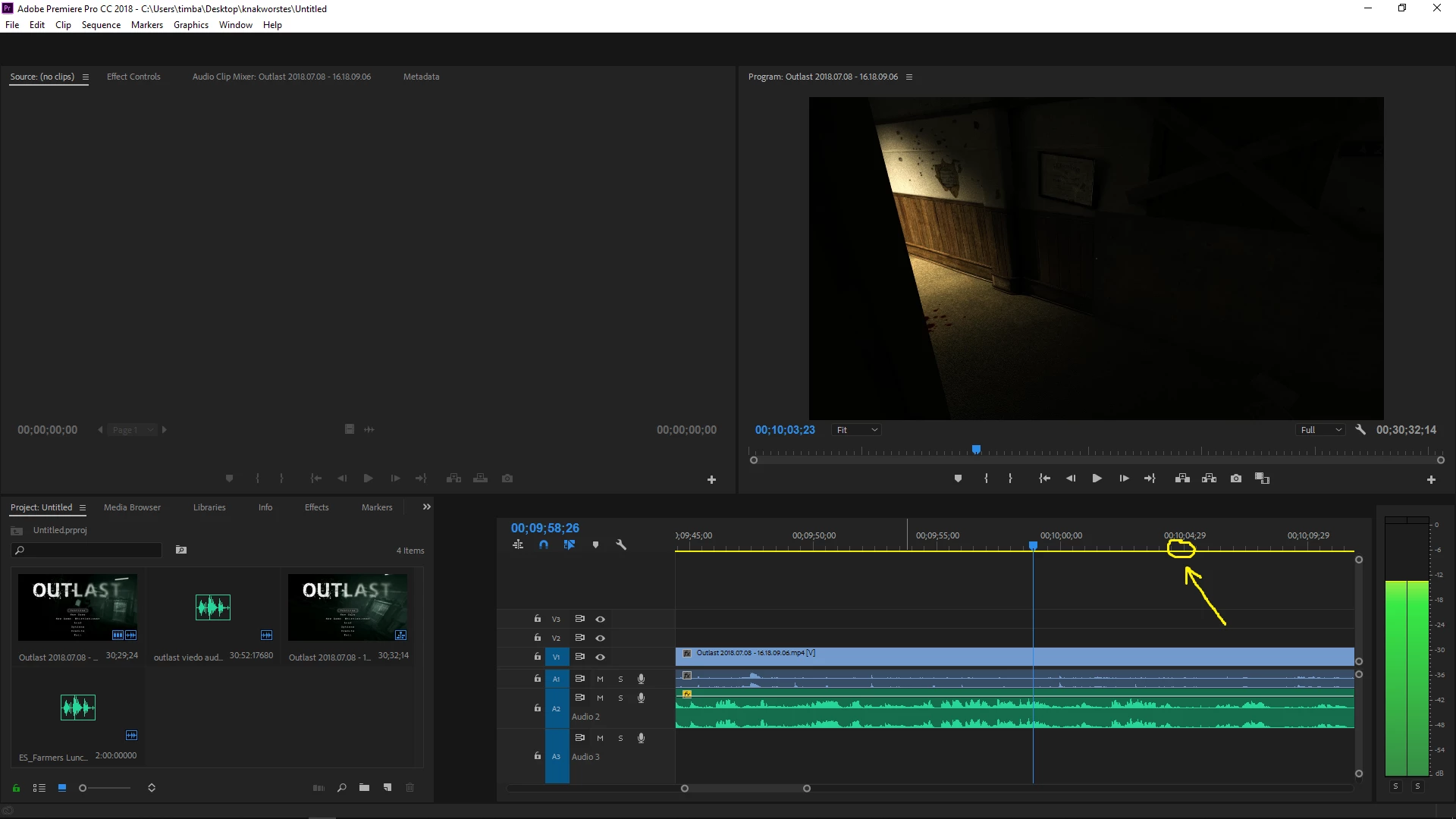
since the last adobe premiere cc update my timeline hasn't been working properly. It is hard to explain in words since I do not know the terms, so I will try explaining with pictures.

                                                                                        |

The problem has to do with the thing shown down here V

don

When I try to drag across the timeline it disappears, but it does go where I dragged it, but only shows up when I press play.

it's supposed to be where the arrow is pointing but doesn't go there until I press play and pause the video again.

Here:
Would appreciate some help,

thanks :^)

This topic has been closed for replies.
Correct answer Smallmachine

This is an old thread but I found it while having the same issue.  My timeline would not update unless there was a preview playing in the program panel, and then only choppily.  Other solutions in the thread, such as clearing the preferences & cache, starting a new project, and closing other applications did not work for me.

The (bizzare) solution that did work was to drag the divider within the Pr workspace.  I wish I had tried this earlier as it would have saved me a lot of time and a number of restarts, but simply adjusting the size of the Timeline pane seems to have sorted whatever refresh issue was occurring.

7 replies

Participant
September 25, 2024

Very old thread, but in case someone is still reading this like I have and the above did not work.... (in my case timeline preview didn't not budge but still able to scrub through the timeline + tried clearing preferences, cache, re-boot, pane sizing etc). Noticed it stopped working twice on the same clip, checked the file name and discovered a sneaky fullstop in it. Removed the full-stop, used Replace Footage option to re-link the file - and VOILA. 🙂 

Participant
July 1, 2023
  1. It's not working
  2.  
Participant
February 9, 2021

Hours of searching for a solution until coming to this thread and finding that the answer was just, "give up, your project's broke". Neat.


Yours was the closest description to what I've been experiencing, though it's not just my timelines, every panel but my project bins have been completely unresponsive. I can poke around the bins but as soon as I go to load up a source, bubkis. 


Guess I'll be backtracking from an autosave several hours old praying I don't make the same unknown mistake to corrupt the project again. I'm going to bet it had something to do with Premiere crashing every 10 minutes. Thanks Adobe.

Participant
October 21, 2019

Same probem, but it occurred after updateing an older project. New projects seem to run nomrally.

Smallmachine
SmallmachineCorrect answer
Participant
January 26, 2019

This is an old thread but I found it while having the same issue.  My timeline would not update unless there was a preview playing in the program panel, and then only choppily.  Other solutions in the thread, such as clearing the preferences & cache, starting a new project, and closing other applications did not work for me.

The (bizzare) solution that did work was to drag the divider within the Pr workspace.  I wish I had tried this earlier as it would have saved me a lot of time and a number of restarts, but simply adjusting the size of the Timeline pane seems to have sorted whatever refresh issue was occurring.

Participant
May 26, 2019

Man, that solution worked for me too! I wish I had found this before I completely reinstalled Windows... Oh well, thank you so much for your bizarre solution.

Participant
January 10, 2020

I undocked the time line so everything worked but only in that way. If I docked it again it wouldnt work for me

Legend
July 14, 2018
Legend
July 14, 2018

hmmm, that's weird.  Close all your other programs and just use PPro by itself. Like, if you have games or other stuff open, close all of that stuff. See if it still happens. If it does still happen minimize PPro and refresh your screen. See if that didn't fix it when you maximize PPro.

It looks to me like some kind of refresh rate problem with the screen of computer. At any rate, to fix stuff having to do with problems, it's always best to eliminate other things that might be interfering. After you test that refresh thing then you best tell us your computer and graphic card specs and all that.

Participant
July 15, 2018

Thanks for all the quick responses!

I tried running premiere on my desktop computer as well, but ran into the exact same problems. I don't think it's an hardware problem. desktop is running the latest version of Premiere CC. The program ran fine on my laptop until I updated to the latest Premiere CC version.

I tried all the steps mentioned but nothing worked.

Community Expert
July 14, 2018

01. try to trash the preferences :

Premiere Pro: Trash Preferences | Larry Jordan

02. delete the media cache

03. delete render files

try these first, and let us know what happens to proceed further

Participant
July 15, 2018

Thanks for all the help guys, I have found the problem.

I think my project may have gotten corrupted somehow. Other project also seem affected, but new project work perfect.

Thanks again for all the help.

Community Expert
July 15, 2018

oh.. okay, you replied at the same time i did !