Legend
October 8, 2019
Answered

Timeline- Still Image Default Duration Issue

  • October 8, 2019
  • 6 replies
  • 3351 views

Hello Everyone.

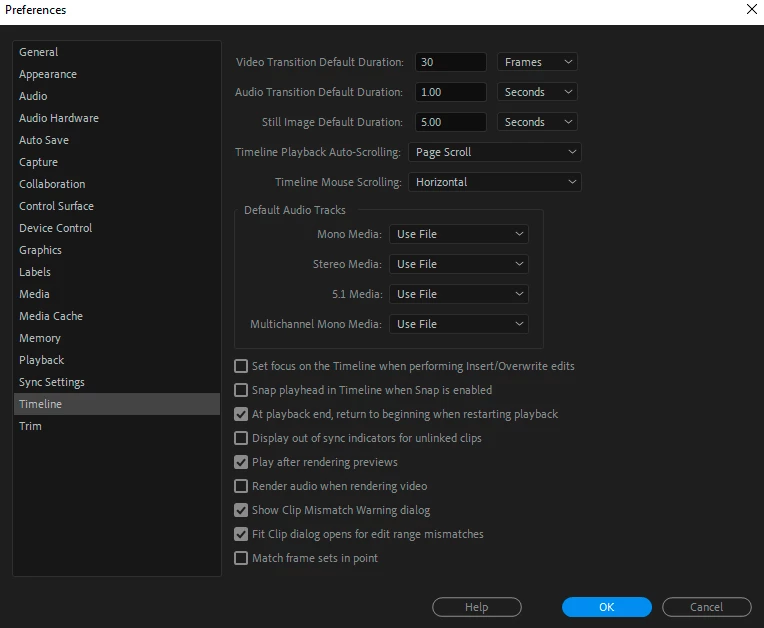
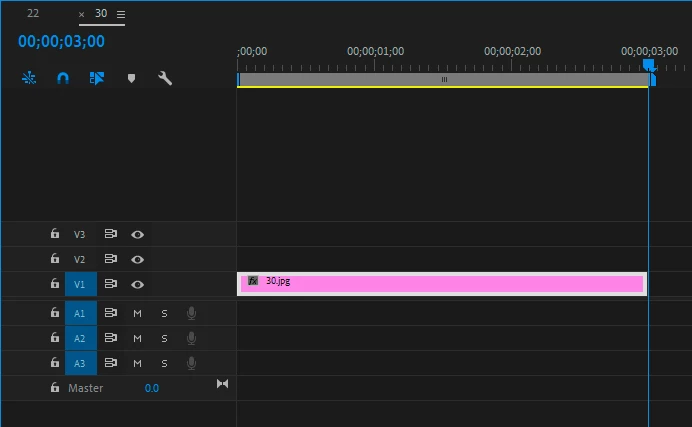
Inside Edit- preferences- Timeline- Still Image Default Duration, when I change It for example to 2.00 Seconds or 1.00 Seconds, or 5.00 Seconds, the Timeline Duration dose not change, It Is 3.00 Seconds.

Here is the Screen Shots

Thanks.
    This topic has been closed for replies.
    Correct answer Ann Bens

    You need to adjust the still image duration before bringing in stills into Premiere.

    If you have stills already brought in and want to change the duration you can do that in the project window.

    Select all stills, right click, Speed/Duration.


    6 replies

    Community Expert
    April 29, 2020

    Is your sequence true 24 fps or 23.97. It could be that Premiere is rounding down your 2 second still duration to the nearest whole second.

    Ann Bens
    Community Expert
    Community Expert
    April 29, 2020

    No, should still say 1 seconds

    Participant
    April 29, 2020

    Sequence is 23.976, that's just what the tutorial file was.

    Participant
    April 29, 2020

    Hi, I am doing the Premiere Pro Tutorials and have arrived at the Work with graphics and titles module. when setting the Still Image Default Duration and then dragging in images to the sequence from the Media Browser, the image do not match the duration I have set why would this be? It seems to be 1 frame short of my 2 sec set duration.


    Ann Bens
    Community Expert
    Community Expert
    April 29, 2020

    Chaging Default Duration will only take effect on newly imported images.


    Participant
    April 29, 2020

    Yes I understand this, but if you see my images you can see the duration is set to 2.00sec and when importing a new image onto the sequence from the media browser it is 1 frame short of my set duration.

    Legend
    October 9, 2019

    Legend
    October 9, 2019

    Ms. Ann.

     I did adjust the still image duration before bringing in stills into Premiere.

    Here Is the Screen-Shots.

    Also, So Technically. you can not add the Correct like we used to do?

    Thanks.

    Ann Bens
    Community Expert
    Community Expert
    October 9, 2019

    Setting default duration in the Preferences is done before import. It does not affect the images already imported.


    Only mods and staff can set the correct answers.

    (on a side note I do not set my own answers as correct)


    Ann Bens
    Community Expert
    Ann BensCommunity ExpertCorrect answer
    Community Expert
    October 8, 2019

    You need to adjust the still image duration before bringing in stills into Premiere.

    If you have stills already brought in and want to change the duration you can do that in the project window.

    Select all stills, right click, Speed/Duration.


    Legend
    October 8, 2019

    Dear Ms. Ann.

    I know the Technique that you are referring, which is Right-click on an image or all the images Speed/Duration: and change it there. But I have seen many Video Tutorials, that explain that you can also change it from the Edit-Preferences- Timeline-  Still Image Default Duration. Is this possible? 

    because I can't get it working? But It does work with your Technique.

    Also, If I want to check that the Answer Is Correct, In this new Forum, I don't see It anymore. Also, inside the Reply Box If I Type, and click on Return, I can not Type anymore, unless I go to Edit.

    Thank you very much