Participant
September 21, 2025
Answered

Tiny clip taking over 2 hours to export?

  • September 21, 2025
  • 2 replies
  • 222 views

I am new to Premiere Pro.  Used to use Sony Vegas, and switched recently. I am trying to export like a 30 second clip from a larger video, and it's taking over 2.5 hours for the encoding. Here is the file info I copied from premiere:

File Path: D:\RECORDINGS\2025-09-20 10-10-44.mkv
Type: Matroska
File Size: 93.74 GB
Image Size: 1920 x 1080
Frame Rate: 60.00
Total Duration: 08:20:18:41
Pixel Aspect Ratio: 1.0
Alpha: None
Color Space: Rec. 709
Color Space Override: Off
Input LUT: None

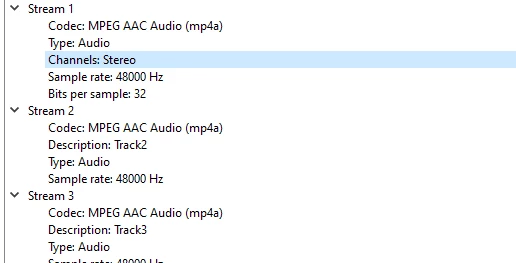
As well as some additional file info from VLC:
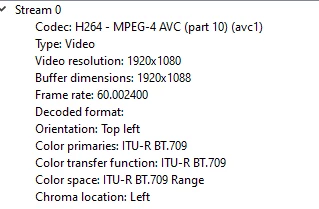
 

What needs to be changed here for this to work significantly better? This is only a tiny clip, and soon I'm going to be working with much longer exports that also involve 4k video from my camera.

Here's my specs as well:

Processor AMD Ryzen 9 3900X 12-Core Processor 3.79 GHz
Installed RAM 31.9 GB
Graphics Card NVIDIA GeForce RTX 2080 SUPER (8 GB)
System Type 64-bit operating system, x64-based processor

Correct answer Ann Bens

Your file is 93 GB !!! and over 8 hours.

That will take a long time to export, even though the timeline contains a short section of the clip. 

Dont know if this is going to speed things up but try a subclip or render and replace.

2 replies

Community Manager
September 22, 2025

Hi jesse_6198,


Welcome to the community! Is this happening with that specific source media or with other media as well? Also, do you have sufficient storage space on your drive & have you applied any effects to the clip in the timeline? We're here to help, just need more info.


Thanks,

Sumeet

Ann Bens
Community Expert
Ann BensCommunity ExpertCorrect answer
Community Expert
September 22, 2025

Your file is 93 GB !!! and over 8 hours.

That will take a long time to export, even though the timeline contains a short section of the clip. 

Dont know if this is going to speed things up but try a subclip or render and replace.

Participant
September 22, 2025

Render and replace and then exporting the clip worked. Thanks. Will need to work on my obs settings to get smaller file sizes