Inspiring
April 21, 2017
Answered

Title panel doesn't work in Premiere pro cc 2017.1

  • April 21, 2017
  • 9 replies
  • 17423 views

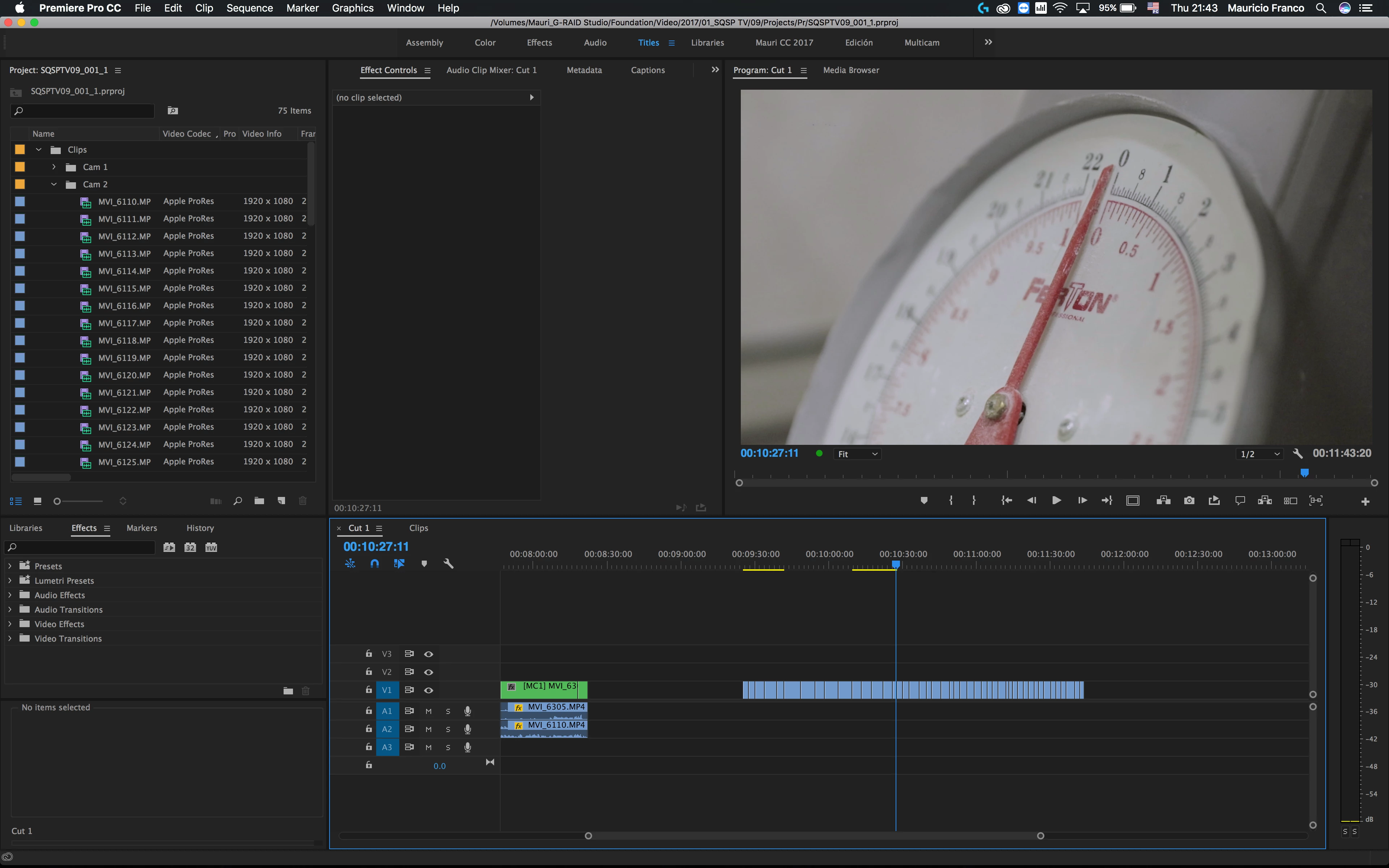
when i click the title panel button doesn't make any changes to my workspace, has someone the same problem or this happen only to me?

This topic has been closed for replies.
Correct answer Kevin-Monahan

Hi,

If you want a workspace with the new Title tools, you need to reset your Layouts: FAQ: I don't see the Graphics Workspace, how can I use it?

The old Titler workspace should be deleted. If you want to create a workspace with the Legacy Titler, create a new one from scratch. That should work.

Thanks,
Kevin

9 replies

Participant
August 21, 2020

Hello guys,

Even I have a problem, My problem is when I give a new title in Premiere Pro CC 2017  ...That gives me a black video and when I double click it, then I am not able to open the tool and the title workspace to type ...What I get is just a black or blank video of Five Seconds ...what are the problems.


Participant
August 21, 2020

Hello guys,

Even I have a problem ,,,,, My problem is when I give a new title in Premiere Pro CC 2017  ...That gives me a black video and when I double click it , then too I am not able to open the tool and the title workspace to type ...What I get is just a black or blank video of Five Seconds ...what is the problems.


Participant
August 21, 2020

Hello guys,

Even I have a problem ,,,,, My problem is when I give a new title in Premiere Pro CC 2017  ...That gives me a black video and when I double click it , then too I am not able to open the tool and the title workspace to type ...What I get is just a black or blank video of Five Seconds ...what is the problem


chrfraje68
Participant
May 12, 2017

Same thing for me. No title workspace and the Adobe help says that it should be there. I just bought this so am pretty disappointed.

R Neil Haugen
Legend
May 12, 2017

They made some major changes in this release ... including the addition of a new graphics workspace that will eventually replace the old Title module. And it's not particularly clear how to work the new process. That said, the new Essential Graphics Panel has some very good capabilities, and they'll be rolling out more with each even dot-update. You just have to find tutorials online on how to use it. I have found the reTooled ones work quite well for starters, there are more.

reTooled.net – After Effects & Premiere Pro – April 2017- The Essential Graphics Panel in Depth

Essential Graphics in Premiere Pro CC 2017.1 on Vimeo

The second one is by James Strawn, an Adobe staffer who's been posting on some of the threads involving titles, the Legacy titler, and the new EGP.

To use the old titler, go to File/New/Legacy Title

For the new EGP and its capabilities, watch the above videos.

Neil

Everyone's mileage always varies ...
chrfraje68
Participant
May 13, 2017

Thank you!! These videos were enough to get me where I needed to be. I also appreciate the quick response!

Participant
April 26, 2017

I also get no change from the Titles workspace button. Further, when I open the Essential Graphics panel, I can't get it to dock anywhere.... it just remains floating no matter where I drag it.

Any help on this would be good. I want to use the new titler, but don't want the EG panel floating.

Darryl

Participant
April 26, 2017

OK, so I just created my own workaround. I hope this is temporary.

1. Under Window/Workspaces - choose All Panels.

2. The Essential Graphics panel turns up as one of the many options in the panel on the right. I closed all the panels I didn't want.

3. Note, the legacy titler panels are there if you want.

4. Go back to Window/Workspaces and choose "Save as new workspace"

5. I called my new workspace Titles2.

6. Now to Window/Workspaces again, choose "Edit Workspaces...". This allows you to move your new workspace name were you want, and if you drag the existing/original Titles workspace down, it can go into a "Do not show" category until this bug gets fixed up.

Hope this helps,

Darryl

Participant
April 26, 2017

I'm also looking forward to a few of the old functionalities of the Legacy Titler in the new EG panel.

I do use rolling credits regularly, and am used to their functionality.

I also use the Bezier drawing tools. This tutorial shows a few nice, simple motion graphics effects using the pen tool:

SCRIBBLE Animation in PREMIERE PRO (That's what I like - Bruno Mars) | Cinecom.net - YouTube

Darryl

Inspiring
April 23, 2017

If you go to "Window" and then click on "Essential Graphics" this activates the new "Titles" panel. I found this from this tutorial.

Not sure if thats the way its supposed to work but it now works for me.

The NEW Essential Graphics Panel in Premiere Pro CC 2017 (Spring Update) - YouTube

Participant
April 21, 2017

Ok, thanks to this thread's comment Re: Essential Graphics Panel vs. Title Tool (Titler) I have found a workaround that will do for now:

  • Click on File -> New -> Legacy Title.

This action does display the old Titles panel, complete with title styles. The top menu option and the option under Workspaces still don't work, but at least the Titles panel is accessible following the path above.

Participant
April 21, 2017

YES THANK YOU for posting this! I was going crazy thinking I had done something to the Titles panel by accident. I have exactly the same problem, the Titles panel does absolutely nothing when clicking it and I'm 100% sure I didn't make any changes to the workspace.

Ashley7 I got no grid popup window, nothing. Clicking on the Titles option at the top menu does absolutely nothing, selecting it from the workspaces menu does nothing as well; trying to reset workspaces is also futile. Back to the previous version for me, another Adobe product broken with the newest update.

mauri_frmAuthor
Inspiring
April 21, 2017

when i click the titles button adobe does nothing

Legend
April 21, 2017

With Titles workspace active, try Window/Workspaces/Reset to Saved Layout... maybe something changed inadvertently. I just updated to latest CC and going from Editing Workspace to Titles Workspace changes things slightly as shown in screenshots below. Note, the first time activated Titles, a window popped with a grid and then disappared, then I got the below... after that, switch workspaces no longer produces that grid window.

Maybe you changed the Titles workspace in the prior version... not sure if Adobe honors retaining your changes until you Reset the layout. Perhaps you can give that a try and see.

My Editing workspace...

My Titles workspace...

8interactionsp16035854
Participant
October 11, 2017

Thank YOU!