Participant
February 7, 2018
Answered

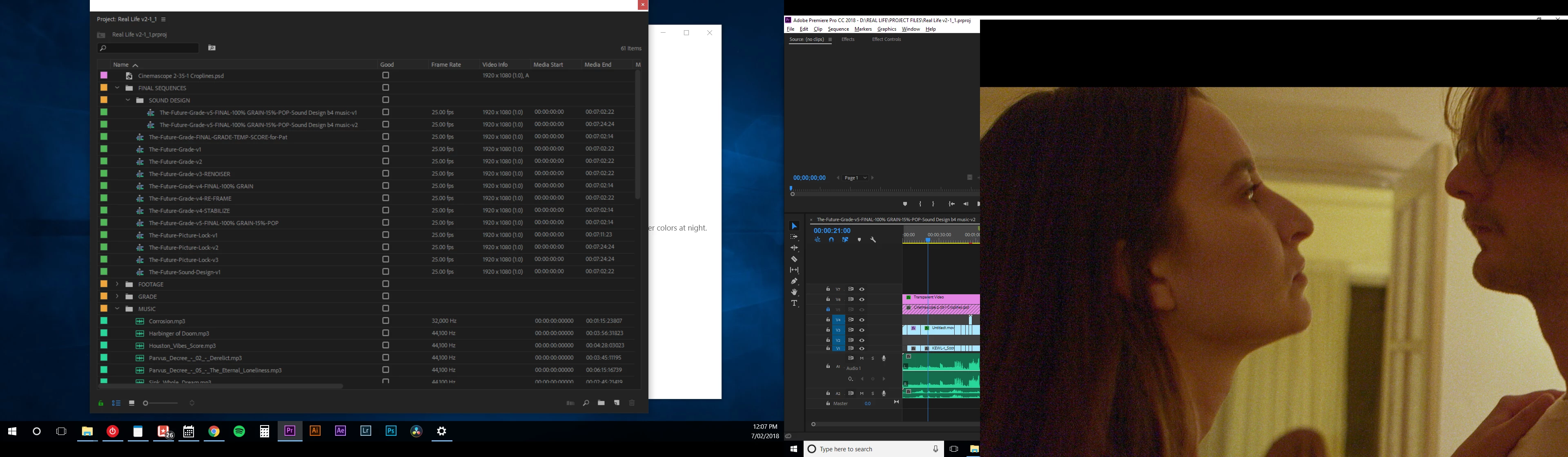
Toggle Full Screen doesn't display the whole frame

  • February 7, 2018
  • 2 replies
  • 3829 views

I'm on a Windows 10 Home, Metabox laptop, Nvida Geforce Gtx graphics card, and when I toggle full screen in Premiere Pro CC 2018 it cuts off the bottom part of the frame. When using 2 monitors it does something ever stranger. See screenshots below:

This topic has been closed for replies.
Correct answer R Neil Haugen

Sounds like you haven't. This sort of thing happens most often when someone sets the scaling for screen pixel display to something other than 100% in the OS controls. The fix then is to return the pixel display to actual pixel dimensions of the monitor screens.

Neil

2 replies

Participant
August 9, 2020

How do I return the pixel display to actual size dimensions?

R Neil Haugen
Legend
February 7, 2018

Do you have scaling enabled & set to other than 100% percent on those monitors?

Neil

Everyone's mileage always varies ...
Participant
February 8, 2018

How do I do that?

Thanks!

R Neil Haugen
R Neil HaugenCorrect answer
Legend
February 8, 2018

Sounds like you haven't. This sort of thing happens most often when someone sets the scaling for screen pixel display to something other than 100% in the OS controls. The fix then is to return the pixel display to actual pixel dimensions of the monitor screens.

Neil

Everyone's mileage always varies ...