

Editing Ninja
Inspiring
November 12, 2022
Question

Transcript doesn't work on certain videos.

  • November 12, 2022
  • 1 reply
  • 1922 views

Hello, I have a weird problem. I got a few videos from my client which are 1 hour podcasts (clean, english audio) and the transcript doesn't work for those videos. My client provided me those videos with a google drive, but since the transcript didn't work on them I also downloaded those videos directly from YouTube and the transcript still doesn;t work on them. 

Transcript works perfectly for other videos. I even have put on the same timeline podcast video from my client and another random video and then I transcripted timeline; it only shows me the texts for the second video.

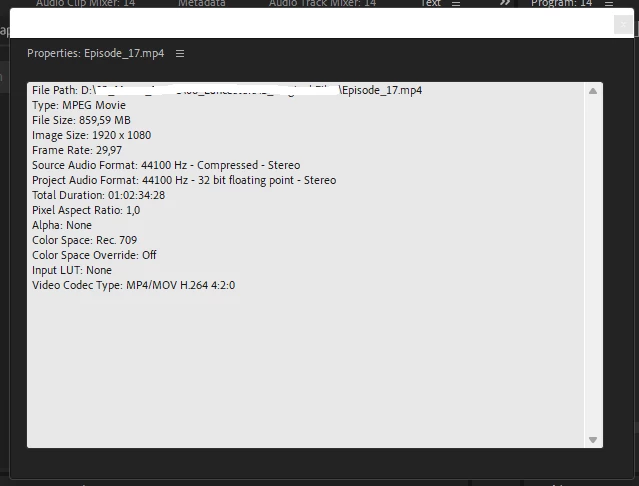
I'm attaching properties of the podcast video clip:  
This topic has been closed for replies.

1 reply

Stan Jones
Community Expert
Community Expert
November 12, 2022

Very strange. "How" does it not work? It transcribes and there's nothing there? Or what?


I don't think anbyone has reported this issue.


I can't imagine anything other than the audio that would be an issue.


Screenshots of the problem areas (e.g. empty transcript tab) might help.


Stan


Editing Ninja
Inspiring
November 20, 2022


This only happens on these (podcasts) videos. Audio is super clear, cause they are podcasts recorded on hi-end gear.


Other videos works perfectly.

Stan Jones
Community Expert
Community Expert
November 20, 2022

I don't see anything that should prevent transcription.


It hangs on the rendering audio?


Try picking A1 rather than Mix.


What is that on V2, an adjustment layer?


Try removing the in/out markers (yes, shouldn't matter; just trying anything), and the item on V2. Does that maker any difference?


If none of that helps (and I'm not optimistic), I would export as audio only to a wav (or really anything), and import that to try. What is the format of the audio?


Stan