
Question
Transition issue after trimming clips (Extendscipt)
I have script that automatically inserts clips and trim them to match beats in music track.
But sometimes transitions are not working between clips and in timeline you can see some gap:

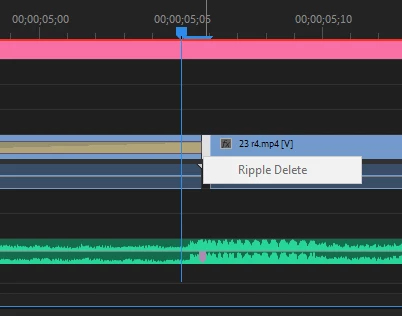
(I can even select it in UI but can't remove it using UI also)
Than i found that i have some empty objects:
qeSequence = qe.project.getActiveSequence(0);
qeTrackOne = qeSequence.getVideoTrackAt(0);
qeTrackOne.getItemAt(2).type
Result: Empty
So i have object type empty

tried to remove it using:
qeTrackOne.getItemAt(2).remove()
Error: Unknown error exception
Any ideas why i have this gaps and way how to remove it...
P.S. If i not trim clips using inPoint outPoint i not have those gaps...
Code:
for(var im=0;im<job_data.media.length;im++) {
	cMedia = getMediaByName(job_data.media[im].split("/").pop(),media);
	sequence.videoTracks[0].insertClip(cMedia,start);
	length  = get_next_beat(1,start,job_data.beats)-start; // getting next beat time - start = needed duration of clip
	// Trimming to needed duration
	clip = getClipByName(cMedia.name, seq[video_type].videoTracks[0]);
	trim = clip.duration.seconds-length;
	cutTimeStart = new Time();
	cutTimeStart.seconds = clip.inPoint.seconds + trim/2;
	clip.inPoint = cutTimeStart;
	cutTimeOut = new Time();
	cutTimeOut.seconds = clip.start.seconds + length;
	clip.end = cutTimeOut;
	//

	start = clip.end.seconds; // start time for next clip
}
 AdChoices