Known Participant
November 6, 2016
Answered

Transitions. Effects missing?

  • November 6, 2016
  • 3 replies
  • 12764 views

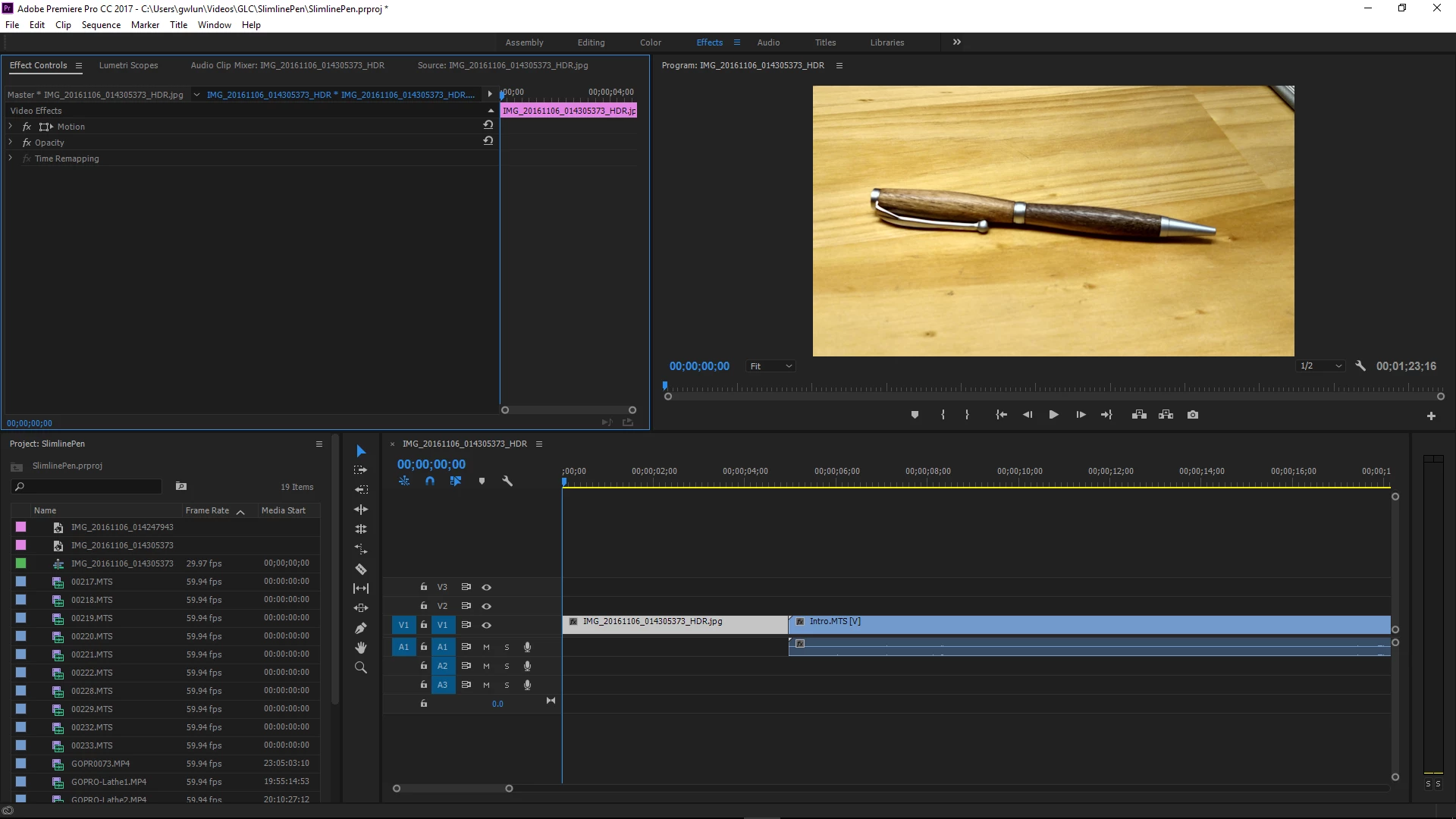
I click on Effects and in that panel I only see fx motion, fx opacity, time remapping.

Where do I find the effects if not listed here, or are they not included in the trial version?

Thanks, Gary
    This topic has been closed for replies.
    Correct answer Ann Bens

    You have highlighted the Effect Controls.

    You need the Effects panel.

    Twirl down Window at the top and click on Effects (shift+7)

    Or click on the Editing workspace. There you will find Effects as one of the tabs (bottom left.).

    3 replies

    Peru Bob
    Community Expert
    Community Expert
    November 6, 2016
    Known Participant
    November 6, 2016

    Thank you everyone.

    I am on the Premier trial and it is quite different than Pinnacle Studio. Some basics, but more control in Premier. It's easy to quickly click on something unknowingly and wind up in Never Never Land with Michael Jackson. Then, I can't find my way back.  :-(

    I have 3 days left on this trial. Apart from a 4 yr college degree in video production, how can one learn the basics of this?  I have perused YouTube, Studio Backlot, Help, and this forum. Many terms I don't know what they mean. Is there a glossary of terms?

    I like how quickly I can do editing.  Now trying to learn more tricks as I did in Studio.

    I found the transitions. I drag it to the timeline, but nothing happens. While the pointer indicates it's Ok to place it where I drag it to, the transition just doesn't appear.  I know I must be doing something wrong.

    Thanks!  Gary

    Peru Bob
    Community Expert
    Community Expert
    November 6, 2016

    gwlundgren@atlanticbb.net wrote:

    It's easy to quickly click on something unknowingly and wind up in Never Never Land with Michael Jackson. Then, I can't find my way back. :-(

    CTRL Z is the redo shortcut.

    gwlundgren@atlanticbb.net wrote:

    Now trying to learn more tricks as I did in Studio.

    See here:

    Getting Started with Adobe Premiere Pro (CS4, CS5, CS5.5, CS6, & CC)

    I found the transitions. I drag it to the timeline, but nothing happens. While the pointer indicates it's Ok to place it where I drag it to,

    See here:

    Patching source sequences in Premiere Pro

    You may also have to press Enter to render the timeline.

    See here, too:

    Handles & Transitions - What are They?

    Peru Bob
    Community Expert
    Community Expert
    November 6, 2016

    Those are only the "Fixed Effects."

    Window > Effects from the menu will give you the Effects and Transitions Panel.

    EDIT: Ann types faster than I do.

    Ann Bens
    Community Expert
    Ann BensCommunity ExpertCorrect answer
    Community Expert
    November 6, 2016

    You have highlighted the Effect Controls.

    You need the Effects panel.

    Twirl down Window at the top and click on Effects (shift+7)

    Or click on the Editing workspace. There you will find Effects as one of the tabs (bottom left.).

    Known Participant
    November 6, 2016

    Thank you!
