

AndrewTheGreat
Known Participant
November 14, 2024
Question

Transparent and black video - what's the point now?

  • November 14, 2024
  • 2 replies
  • 1304 views

A question I couldn't answer to one of my colleagues - what's the point of black video and transparent video now in Premiere Pro v.25?
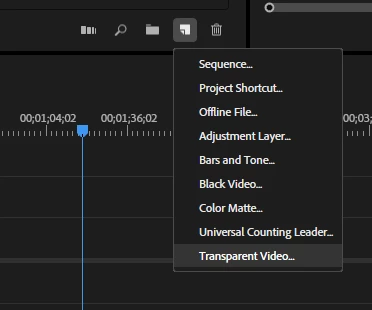
 

The point is that in versions like 23.x there still were the effects that now have been removed like grid, circle, ellipse, checkerboard that worked some on the transparent video and some on the black one. So what is the point in having those?

The black video: to create cinematic black bars? There's color matte and EG-layers for that. To apply an effect that demands a black background like Lens flare? You can apply it to your video layer directly (and it doesn't load your system more than when you apply it on a black video - I checked it). To make parts of the video appear black? You can cut parts of the video or apply the Color matte.

The transparent video: to create some kind of a timer or apply effects that need transparency? There's the adjustment layer for that. To apply paint bucket? Well there's none anymore.

So what's the point in them now? 

2 replies

R Neil Haugen
Legend
November 14, 2024

As noted, black video is still used in especially broadcast or streamed deliverables, where you have to have X time of black video with probably some required pre-content data screen or countdown or whatever included.


And "black video" is fast and direct.


I also saw ... I think it was Richard, actually ... commenting about using black video over-all to set in/out of the project, with fade-in and fade-out after some years ago now. And have done that for quite a few things, works well.

Everyone's mileage always varies ...
AndrewTheGreat
Known Participant
November 15, 2024

Can't think of a situation when you cannot use color matte instead of black video. Color mattes support data and countdowns, the have length - this all I mentioned in the first message.

Again, color matte is fast and direct as well. You place both and the title aside you won't be able to tell what is what.

And again you can use it for fade-ins\outs. So what is the difference?

Stop trying to edit and EDIT!
R Neil Haugen
Legend
November 15, 2024

As noted, there's no color to set with "black video". Drag, pull out, done.

Everyone's mileage always varies ...
Community Expert
November 14, 2024

I always put a layer of black on V1 for the total length of the video with the WAB set to match. This makes sure when exporting video and audio separately that they match. I often use black if I want  a fade to black on a stacked video sequence. I could use a colour matte but using black makes sure it is black and not slightly grey.

AndrewTheGreat
Known Participant
November 14, 2024

But color matte set to black is black

Stop trying to edit and EDIT!
Ann Bens
Community Expert
Community Expert
November 14, 2024

Transparant and black video are synthetic clips.

Transparant video has become kind of obsolete.

It was used for certain effects:

•Timecode
•Checkerboard
•Circle
•Ellipse
•Grid
•Lightning
•Paint Bucket
•Write-On

but these effects have all been removed.


Black Video behaves as a still image.

If you want a colored one, you can use a color matte.


I often use black video to fill up gaps or make an vignette.

A black video is directly available, a black color matte you have to make first.