
Exit
  • Global community
    • Language:
      • Deutsch
      • English
      • Español
      • Français
      • Português
  • 日本語コミュニティ
  • 한국 커뮤니티
0

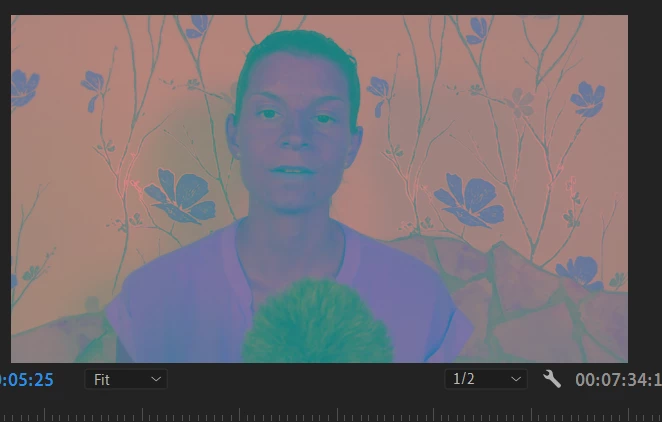
Tried to change the color of my text, instead I did something to my video
New Here ,
Jun 12, 2020 Jun 12, 2020

problem.PNG


I'm just learning Premier Pro and while I was looking for a text color change, I did something that went terribly wrong. I saved my work by the time I realized this, so I couldn't undo it, what did I do? how can I get rid of this weird filter or color?


Thank you

TOPICS
Error or problem
345
Translate
Report
Community guidelines
Be kind and respectful, give credit to the original source of content, and search for duplicates before posting. Learn more
community guidelines
Community Expert ,
Jun 12, 2020 Jun 12, 2020

You need to update your graphics card driver.

Translate
Report
Community guidelines
Be kind and respectful, give credit to the original source of content, and search for duplicates before posting. Learn more
community guidelines
Adobe Employee ,
Jun 12, 2020 Jun 12, 2020
LATEST

Hi StephanieML,


We understand your concern. Please check a few things to isolate the cause of this preview.

  • Select the video clip on your timeline and navigate to Effect Controls panel (Window > Effect Controls)
  • By default, under the Video tab of the Effect Controls panel, there will be three effects - Motion, Opacity & Time Remapping.
  • If you see any other effect listed under the Video tab, select it and hit the delete key to remove that effect.
    LM.jpg
  • If you don't see any other video effect apart from Motion, Opacity & Time Remapping. Then try switching the Renderer to Mercury Playback Engine Software Only and check if it's working properly.

Let us know if it helps.


Thanks,

Sumeet

Translate
Report
Community guidelines
Be kind and respectful, give credit to the original source of content, and search for duplicates before posting. Learn more
community guidelines