Inspiring
July 6, 2020
Answered

Trouble Dragging Images onto Timeline

  • July 6, 2020
  • 2 replies
  • 2029 views

Hello,


EDIT: This seems to mainly be an issue when 24 FPS is selected (23.976 or 25 FPS don't result in this issue). My standard Image timeframe is 1 frame (Under Timeline Settings).


I've done some intensive searching on google and cant find aything relating to this problem.

When I create a new sequence, usually a custom one to match my Cameras image settings it will not let me drag Images I imported onto the timeline (screenshot of Sequence settings attached). Though when I create a sequence with SOME presets it lets me drag the images onto the timeline no problem.


I have tried most of the solutions that concern enabling the 'V1' settings, but it doesn't seem to work. Pressing insert on the Source editor also does not work. When Trying to drag I just always get the hand with a 'No' sign in the corner.


My current workaround is creating a sequence from all items and then Copy Pasting that onto a different Sequence, this however is clunky.


Attached are some screenshots of the custom settings for the Sequence.

And some with a sequence where I CAN add them (the PAL one).

And one where I cannot do this (Custom Canon Profile).


An example sequence that lets me drag the files into the Timeline is DV-PAL Standard 48kHz


Link of the Problem: https://youtu.be/m7A7Qvyac8E


I'd be glad to provide more info concerning this problem.


Kind Regards


Joseph


This topic has been closed for replies.
Correct answer Steelmint

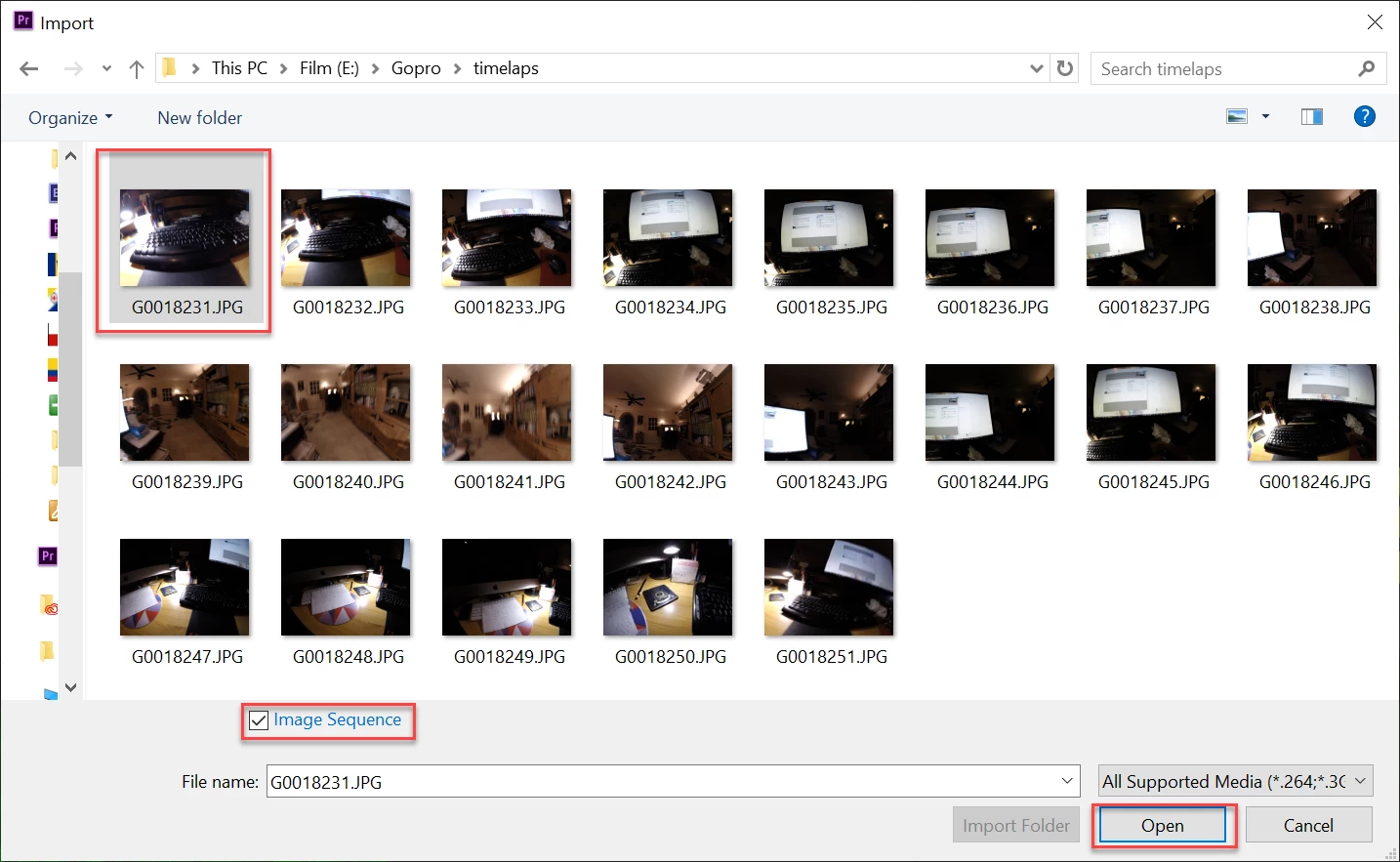
If you are trying to make a timelaps with 1 frames images you might want to look at image sequence.

https://helpx.adobe.com/premiere-pro/using/importing-still-images.html


Thanks, I have tried this and it does circumvent the issue.


Though I still find it strange as to why I cannot add single images at 24 fps.


Thanks for the help so far! I've gotten to a point where I can continue working on my project, mainly solved it by changing all sequences to 23.976 fps.


Joe

2 replies

Kevin-Monahan
Community Manager
Community Manager
July 7, 2020

How frustrating SM,

Two words: Source Patching. It's always Source Patching. You should know about Source Patching, as should everyone. It's a basic 101 in editing. A thing I used to teach in the first 15 minutes of the 101 class I used to have. 


It is a shame that everyone blows right by it when trying to learn Premiere Pro. Suggest you bang through a 101 course on Lynda.com or another quality training site to fill in these gray areas which are preventing you from moving forward in your editing pursuits.

Good luck,
Kevin

Kevin Monahan - Sr. Community and Engagement Strategist – Adobe Pro Video and Audio
SteelmintAuthor
Inspiring
July 7, 2020

I came accross source patching tried to adjust it with numerous tutorials on youtube. As already mentioned I discovered that this issue only arises when my sequence FPS is set to 24, not on 25fps or on 23.976 fps, and 1 frame default for image inserts.


Im not sure if this is a bug or to do with the time value for an image at 1 frame and 24fps.


Joe

Ann Bens
Community Expert
Community Expert
July 7, 2020

If you are trying to make a timelaps with 1 frames images you might want to look at image sequence.

https://helpx.adobe.com/premiere-pro/using/importing-still-images.html

Ann Bens
Community Expert
Community Expert
July 6, 2020

Please do NOT add images via the "attach files" box, as you are then forcing everyone to DOWNLOAD the file to view it outside their browser. Drag/drop the image files directly ONTO your reply box so other users can see them without needing to download unknown strange files.
Thank you! 

SteelmintAuthor
Inspiring
July 6, 2020

Sorry! Will edit!

Ann Bens
Community Expert
Community Expert
July 6, 2020

Try source patching the track.