Chaz144
Participating Frequently
January 18, 2017
Answered

Ultra Key - background mixes with people

  • January 18, 2017
  • 3 replies
  • 1459 views

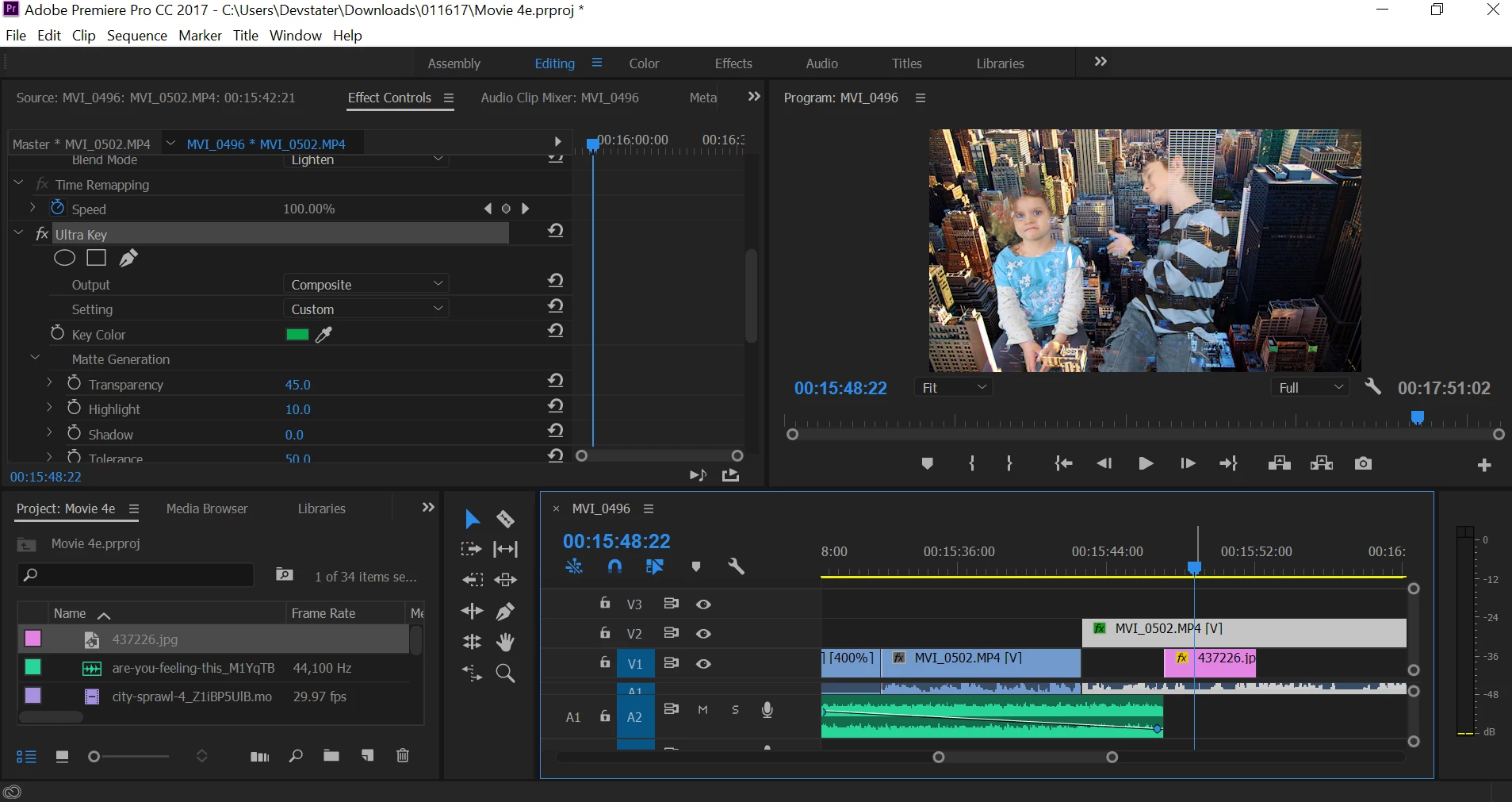
Hello, I have applied Ultra key to my green screen. When I do, it turns black perfectly. I add in a video or picture and it mixes with the two people. It won't work. Any suggestions?
This topic has been closed for replies.
Correct answer shooternz

Your actors are far too close to the chroma BG (and without any back/rim light)... and you also have not set the Ultra Key Parameters fine enough.  Its a bit trial and error but a well shot key makes it simpler.

Adjust Transparency  and Shadow Parameters

3 replies

Aleska-AP_D
Participant
January 24, 2017

"Green" horn. lol.

shooternz
shooternzCorrect answer
Legend
January 18, 2017

Your actors are far too close to the chroma BG (and without any back/rim light)... and you also have not set the Ultra Key Parameters fine enough.  Its a bit trial and error but a well shot key makes it simpler.

Adjust Transparency  and Shadow Parameters

Warren Heaton
Community Expert
Community Expert
January 18, 2017

A handy phrase to remember when planning a "green screen" shoot: Blue is for blonds.  Of course, if your actors need to wear blue (which your subjects are) you add another level of complexity to pulling your key.

Like shooternz mentioned, ideally your actors would be further away from the green screen, far enough away that you are able to light the green screen separately from them.

Shadows on a green screen/blue screen can also be problematic if not well planned for.  Based on the city image being used for the background in your screenshot, you would want no shadows on the green screen.

As shot, you're probably going to have to keep some of the shadow when pulling the key.  If your background was a brick wall directly behind your subjects, this would work.

shooternz
Legend
January 18, 2017

He should be able pull a full key by using 2 instances of Ultra Key.  One for the lit BG and the other for the shadow BG.

Eye Dropper to select the areas in each instance.

Inspiring
January 18, 2017

Maybe when you see it on black it seems to be perfect but it's not. You see black stripes of the boy's shirt black because of the background not because the superimposed clip. Maybe it's just a matter of settings, try to change the ultra key effects when you have a not-black background.

Daniele

Chaz144
Chaz144Author
Participating Frequently
January 18, 2017

It's a green screen. Then I use the eye-dropper selecting green. Then when you do this, it turns the background black. This is correct form the videos I've seen. But on videos, they then insert a pic or video below the green scene footage. When I do this, my two actors are not clean, they have part of the city (the pic I chose) mixed in with them. Here is before eyedroper. what it looks like

Chaz144
Chaz144Author
Participating Frequently
January 18, 2017
