
Copy link to clipboard
Copied
Hello all!
My son has been working on a project and is unable to get the mic icon on subsequent timelines to appear bright which then allows for adding audio. I've attached a pic below showing how one track allowed for adding audio, but the others have a dim mic icon which doesn't allow it.
Any help or guidance would be greatly appreciated!
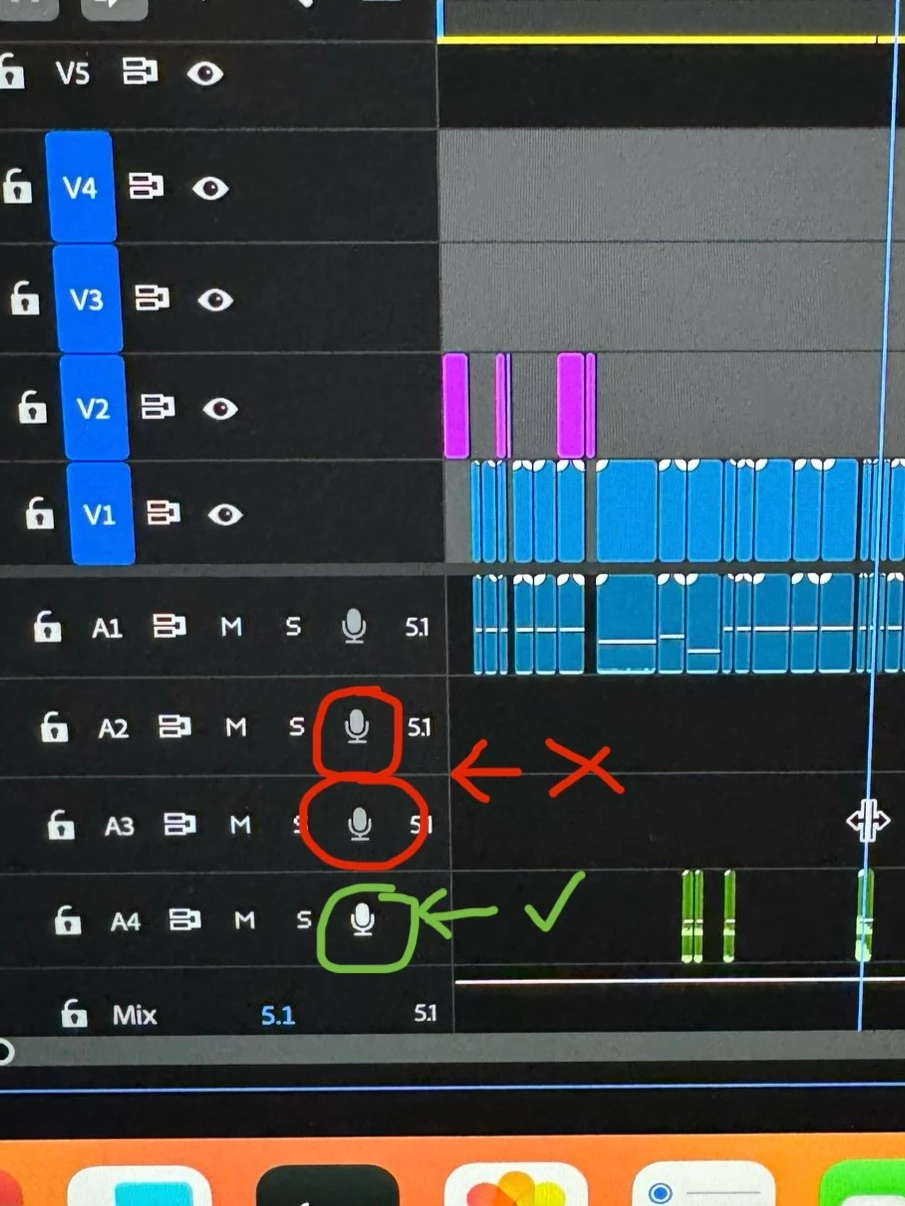
 
The tracks are 5.1 and wont work with a mic which is usually mono (or stereo).
Copy link to clipboard
Copied
The tracks are 5.1 and wont work with a mic which is usually mono (or stereo).
Copy link to clipboard
Copied
Thanks Ann! I apologize for my ignorance, but what would he do to correct that? Where would I be able to change out of 5.1 to mono or stereo if that's appropriate for use with a mic?
Thanks again in advance!
Copy link to clipboard
Copied
Thanks again! I think I have it now. Sounds like he added the wrong type of track entirely. Basically, he needs to delete those tracks and add tracks specifically for mono or stereo.
Copy link to clipboard
Copied
Your sequence is also set to 5.1. Best is to start with stereo.
Make a new sequence with the audio set to stereo and copy everything over.
Copy link to clipboard
Copied
Excellent...thank you so much!!
Find more inspiration, events, and resources on the new Adobe Community
Explore Now