
Inspiring
March 30, 2023
Answered

Unable to drag black video in project panel into timenline panel

  • March 30, 2023
  • 2 replies
  • 1025 views

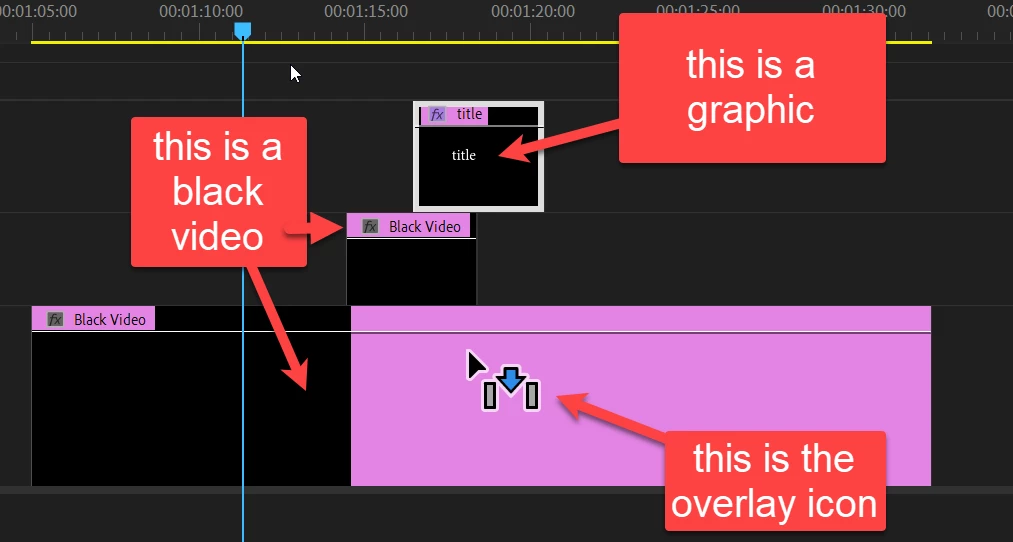
Hello, I work on a MACbook pro. I want to drop a black video (and later add a title) onto my timeline. However, the program will not allow. The blue arrow with grey bars appears. Why is this happening, and how can I correct it?

Thank you.
    This topic has been closed for replies.
    Correct answer Ann Bens

    When dragging from the project panel to the timeline your are suppose to have the blue arrow with the two gray bars.

    It indicates you want to make an overlay.

    Just drag it to the timeline to V1 and let go of the mouse.


    You cannot write a title on a black video.

    Use the Type tool to write a title in the Program monitor, it will create a separate clip which actually is a graphic.


    2 replies

    Inspiring
    March 31, 2023

    Hello Peru Bob, thank you for replying to my question. I am familiar with the A/V patching, and have checked to insure everything is correct. The problem is this: https://www.youtube.com/watch?v=65-xuqGHXTY&list=RDCMUCCOCVxg0ZiLo6GQ0xctkM7g ..... Another kind soul on this discussion group sent some links to show me how to include text/graphics from essentials graphics > text > type text, etc. This method semi-worked, but the sequence is not pink. It's still black in the timeline. My main question is: After I choose "black video" in project panel, I am unable to drag and drop onto my timeline. Everytime I try to drag and drop I receive that blue arrow with the gray lines on either side.  .... I have googled videos trying to understand, but to no avail. Any suggestions or additonal videos to help me fix this problem in premeire pro are welcome. Thank you, for your kindness. J

    Peru Bob
    Community Expert
    Community Expert
    March 31, 2023

    Can you post a video of what you are doing and what happens?

    John T Smith
    Community Expert
    Community Expert
    March 30, 2023

    When you post a question you always need to tell the Adobe program you are using
    There are MANY programs in a full subscription, plus other non-subscription programs
    Please post the exact name of the Adobe program you use so a Moderator may move this message to that forum

    Inspiring
    March 31, 2023
    Hello, I am using Premiere Pro Video. I want to create a title card. I have tried dragging to my source monitor and into timeline. Quit the program, restarted my computer, looked at tutorial videos. Checked the GPU rendering, and so on. ... It's maddening that something that I know is simple is not working for me. Thank you in advance for any guidance you can provide.

    Jennifer
    Ann Bens
    Community Expert
    Community Expert
    March 31, 2023