
Participant
July 29, 2020
Answered

Unable to Edit Speed/Duration

  • July 29, 2020
  • 2 replies
  • 8691 views

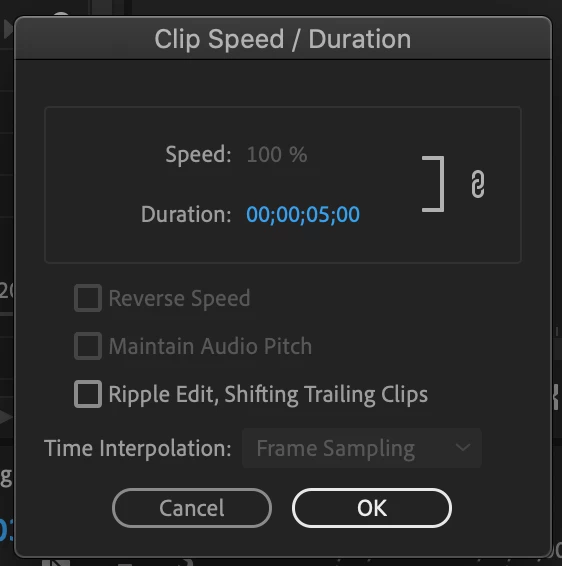
I'm trying to slow down one layer of a clip I've put together. I went into Speed/Duration to edit the speed, but for some reason the element is unclickable. Additionally, I'm not able to access the dropdown menu for Time Interpolation. Does anyone know how to fix this problem and access these features?
This topic has been closed for replies.
Correct answer Averdahl

You are trying to change the speed of a still image. Stills have no speed, only duration. So if you want the still to be 10 seconds instead of 5 seconds, change the duration to 00;00;10;00. (Or adjust it manually on the timeline using more or less any edit tool.)

2 replies

Averdahl
Community Expert
AverdahlCommunity ExpertCorrect answer
Community Expert
August 3, 2020

You are trying to change the speed of a still image. Stills have no speed, only duration. So if you want the still to be 10 seconds instead of 5 seconds, change the duration to 00;00;10;00. (Or adjust it manually on the timeline using more or less any edit tool.)

Participant
July 5, 2021

I have a follow-up question to that.  What if I wanted the duration to be 2.2 seconds uinstead of 2 seconds?  It seems to ignore any decimals I add in.  Also, should the last two numbers on the right be the frame rate?  What does "00' mean?  Thanks!

Ann Bens
Community Expert
Community Expert
July 5, 2021

00;00;00;00

hours ; minutes ; seconds ; frames

If you want 2.2 second: 00;00;02;06 assuming timeline is set to 30 frames/second

R Neil Haugen
Legend
July 29, 2020

What is the option selected at the bottom of the left-side window of the export screen? Whole sequence, Work area only, sequence in/out?


Neil

Everyone's mileage always varies ...
Participant
August 3, 2020

It appears to say sequence in/out.