
Question
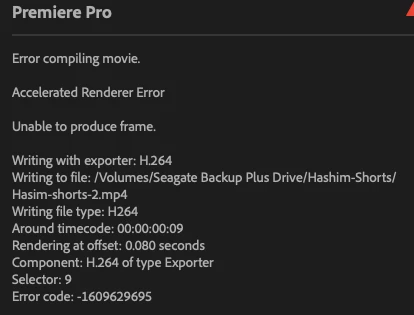
Unable to export the files. I get the error " Accelerated Renderer Error"
- Issue –Unable to render the file or export the file as i get "Accelerated Renderer Error"
- Steps to reproduce –When i just click on render or try to export , i get this error.
- Expected result – should be able to export or render
- Actual result – got the error "Accelerated Renderer Error" " Unable to produce frame".
- Adobe Premiere Pro version – version 25.3.0 (build 84)
- Operating system – Mac OS Sequoia ver 15.5
- Video format – mp4 format
- Comparative information helps us understand more about when the issue occurs:
- Does it affect all projects or only some projects? - only the [resnet working project
- When did the problem begin? - I used a motion graphic file, it works fine in premeire pro but does not render or let me export the video.
- I wanted to try switching renderer to "software only" but appranely with my curret version i see that option disbaled , i dont see the option even after clicking on shift while opening the premier pro. Kindly help me resolve this ASAP as i need to export the file. Kindly find the error below.
 AdChoices