
Mayjer1275
Inspiring
May 15, 2019
Answered

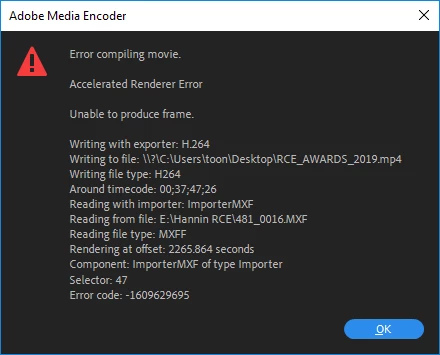
Unable to Export

  • May 15, 2019
  • 2 replies
  • 442 views

I have a fairly simple project of 2hr 7 min in length.
Original footage is .mxf files shot on a Sony.

I have tried exporting in different formats: match source, youtube 1080, youtube 720 etc.
I've also pull down the target bitrate to 2mbs

I've tried exporting to a different drive than the project.

Any advice of what I might try please.
Intel Xeon E5-2630 v3 2.4 GHz
32G ram
Win 10 64

Pem Pro v13.0.2

Nvidia GTX 1070

    This topic has been closed for replies.
    Correct answer Mayjer1275

    Update.

    I had not noticed it pointed to a timecode spot.

    I checked it out on the timeline....was a few seconds off.....but I did find a glitch in my video !  Not sure of the cause, looks like a frame or two froze in recording.
    I replaced the troubled clip and it exported fine.

    Thank you.

    2 replies

    Christian.Z
    Community Expert
    Community Expert
    May 15, 2019

    Try turning off GPU acceleration.

    Project setting --> General --> Renderer --> Set to: Software only

    Participant
    September 7, 2023

    It Helped buddy. Thanks

    Peru Bob
    Community Expert
    Community Expert
    May 15, 2019

    What is happening on the timeline at the timecode listed?

    Mayjer1275
    Mayjer1275AuthorCorrect answer
    Inspiring
    May 15, 2019

    Update.

    I had not noticed it pointed to a timecode spot.

    I checked it out on the timeline....was a few seconds off.....but I did find a glitch in my video !  Not sure of the cause, looks like a frame or two froze in recording.
    I replaced the troubled clip and it exported fine.

    Thank you.

    Peru Bob
    Community Expert
    Community Expert
    May 15, 2019

    You're welcome.