Participant
November 13, 2024
Answered

Unable to grab and drag transitions or trimmed clips into timeline

  • November 13, 2024
  • 1 reply
  • 451 views

I am new to Premiere Pro. I had used Corel Video Studio for many years but the resolution was poor. I would really like it if Adobe was as simple as the tutorials I have reviewed but I am running into a very frustrating issue. Every time I try to drag a transition or drag a trimmed clip (video only, without audio) from the source panel there is a circle with a slash icon over the hand grab. Please simply state what is the problem. I looked at other tutorial and viewed your community board and there is no solution. Please help me. 
This topic has been closed for replies.
Correct answer Ann Bens

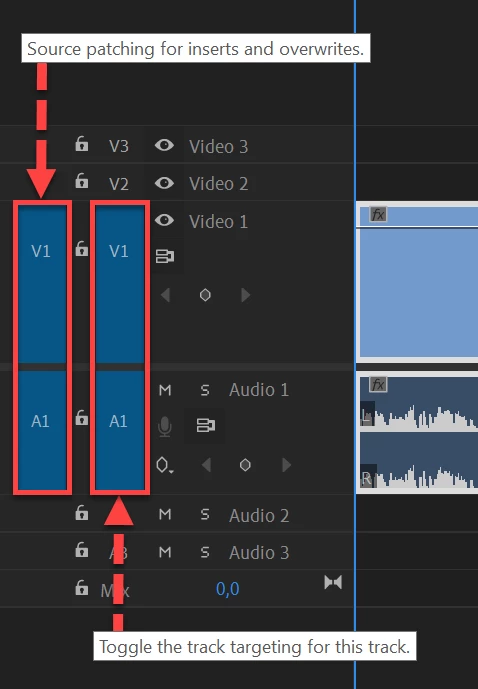
The most common user error is not source patching the track.
Solved by first opening clip in Source Monitor. Then drag/insert into timeline.

Adobe Premiere Pro Help | Source patching and track targeting

1 reply

Ann Bens
Community Expert
Ann BensCommunity ExpertCorrect answer
Community Expert
November 13, 2024

The most common user error is not source patching the track.
Solved by first opening clip in Source Monitor. Then drag/insert into timeline.

Adobe Premiere Pro Help | Source patching and track targeting

Ann Bens
Community Expert
Community Expert
November 13, 2024

Premiere Pro has a steep learning curve.

I suggest you take out a subscription at LinkedIn Learning and follow some basic training.