
edwinl76571172
Participating Frequently
March 31, 2017
Question

Unable to install codec - path or access error

  • March 31, 2017
  • 6 replies
  • 15274 views

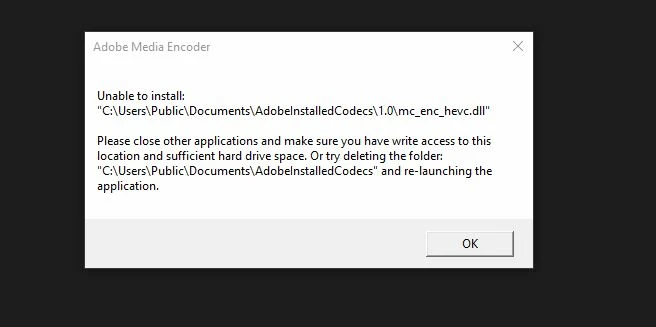
I'm trying to encode to HEVC, so Premiere (or Media Encoder) prompts me with a pop-up that says it's needs to install the codec. I click OK, but then another prompt comes up that says "Unable to install ...".

It points to a path: "c:\Users\Public\Documents\AdobeInstalledCodecs\1.0\mc_enc_hevc.dll" and says that it cannot write to it. I've deleted the path (as suggested by the prompt) and restarted the app, but no luck.

This problem isn't specific to HEVC though - it's universal for any codec that needs to be installed after the fact. I do notice though, that when restarting the app, it creates a folder in users\public\documents called "Public Documents" and not "Documents" - so I don't know if that's the problem.

To note, I am the Admin on my system with full access to everything. I'd appreciate any assistance. Many thanks!
This topic has been closed for replies.

6 replies

Participant
August 29, 2024

SOLUCIÓN:

En caso que hayas agregado material grabado desde un iphone, debes pasarlos a MP4 o jpg
no sé por qué, pero es lo que me ha funcionado, anteriomente había colocado una imagen en Premiere y un clip en After, el clip en After lo exporté en H264 y lo reintegré
y con la foto, la pasé a jpeg y la reintegré
ya con los elementos del iphone adaptados, pude exportar la secuencia

Participating Frequently
January 14, 2022

Did you ever find any fix for this?

Participant
August 25, 2022
Participant
May 24, 2019

- Go to the location "C:\Users\Public\Documents\"

- Right click on the folder "AdobeInstalledCodecs" and select "Properties"

- Go to tab "Security"

- Modify Groups by adding the group "Everyone" and setting it to full control.

- Restart adobe and try again

This worked for me to fix the error, the files got updated by Adobe Media Encoder.

Participant
June 12, 2021

This didn't work for me. 

Any other way?!

Participant
August 26, 2021

I am having the same issues with Premiere pro 2021 paid version. I tried reinstalling, sign out and in, adding Everyone to the Public Documents folder... nothing helps 😕😕 I am really angry, I have a video cut, and not able to export it as I need HEVC codec.

Participant
June 25, 2017

I have exactly the same issue. Don't have H.265 and Dolby codecs, among others but H.264 is there. Tried deleting the public folders - zip. Tried most of the suggestions under Features and sequence presets missing | Premiere Pro CS6 and later but that did not work. Will try totally uninstalling and reinstalling next (Use the Creative Cloud Cleaner Tool to solve installation problems ).Noticed that windows seems to have made small portions of the public directories read only and it can not be changed. Running Win 10 Pro on a Z820 workstation.

Participant
June 26, 2017

Go figure -  I did all of the suggested fixes with no positive results.  Then, two days later everything is working, so now I can get back to working on the movie edits....

Legend
June 26, 2017

Computers, eh?

Legend
May 19, 2017

Is Public folder sharing turned on?

Participant
May 18, 2017

I'd love to have an answer as well!