
Known Participant
February 21, 2019
Answered

Unable to open Project file in timeline

  • February 21, 2019
  • 3 replies
  • 7092 views

I did a wee Video Ad in early January 2019 and tried to make an alt today 21-2-2019 and it just won't open in my timeline. I can see all the sequences and other files but I just can't get the project file to open in my timeline to work on it.

I thought it was due to a recent upgrade but no as I can open older files in it. One thing I did do was to copy the whole folder back from my back up drive and tried to open it from there. I even created a new file and it won't open from that folder either.

I am sure I have had this once before but I can't remember what I did to fix it. Any ideas? Pulling hair out!!!
    This topic has been closed for replies.
    Correct answer Ann Bens

    Also might want to reset your workspace.

    3 replies

    Known Participant
    February 22, 2019

    Thank you for responding but I am afraid, I must have stated this wrongly - sorry. I am referring to the PR file itself. When I open other PR files they open in the timeline. I thought that is what is called the project file!!

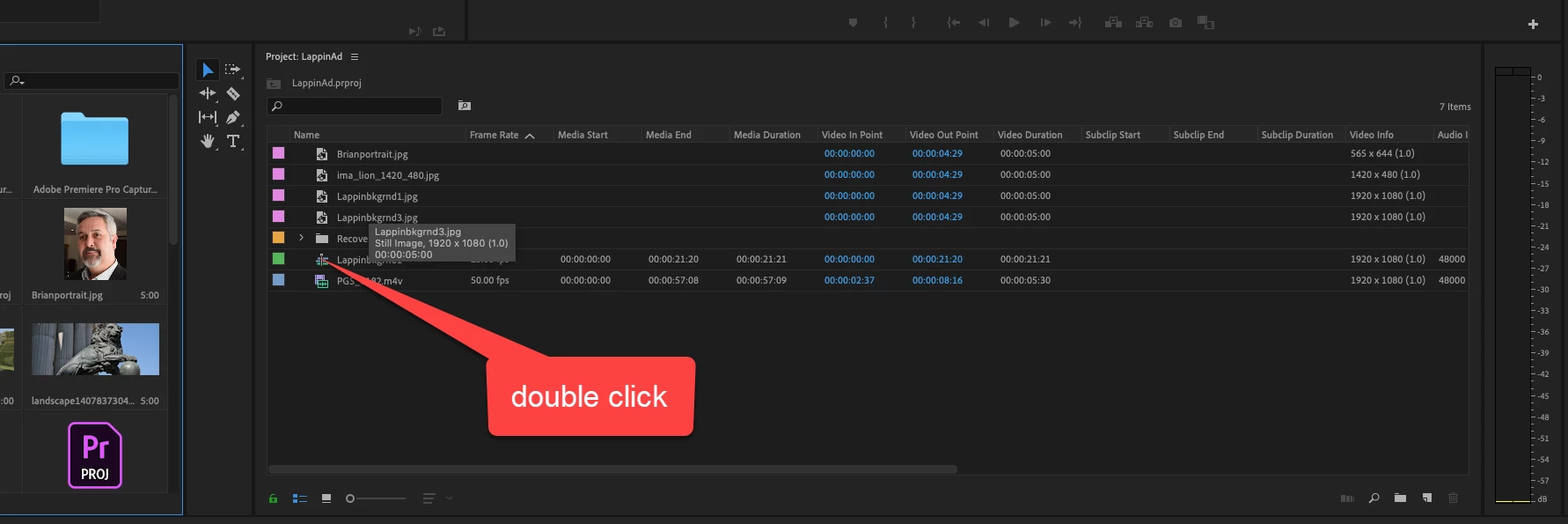
    The file I am referring to is the file that opens up all the sequences in the timeline. It just doesn't open in the timeline showing all the sequences like it did before and others do too. I have attached a screen dump of it.

    Hope this helps - thanks again for responding.

    Ann Bens
    Community Expert
    Ann BensCommunity ExpertCorrect answer
    Community Expert
    February 22, 2019

    Also might want to reset your workspace.

    Known Participant
    February 22, 2019

    OK, that worked. Thank you Ann Bens. Can you tell me, do you know why it opened up the way it did and not like the others?

    Do you think that might have been to do with working from a copied back folder from my back up drive?

    Anyway, thanks again

    Kind regards

    keith

    Legend
    February 21, 2019

    You don't open a project file in a timeline.

    You open the project file, and it contains all the sequences, which you can open with a double click.

    R Neil Haugen
    Legend
    February 21, 2019

    You don't open a project file in a timeline ... that's for sequences only.

    Use the Media Browser in Pr to navigate to the older project file, and do a simple "click" to select it. All the assets of that project will then appear in the Media Browser. Select the sequence/s and any other assets you wish to work with, right-click, "Import".

    Then double-click a sequence in the Project panel to get it open in the Timeline panel to work.

    Neil

    Everyone's mileage always varies ...