Participant
November 15, 2024
Answered

Unable to select UK English in spell checker

  • November 15, 2024
  • 1 reply
  • 428 views

Hi all, 


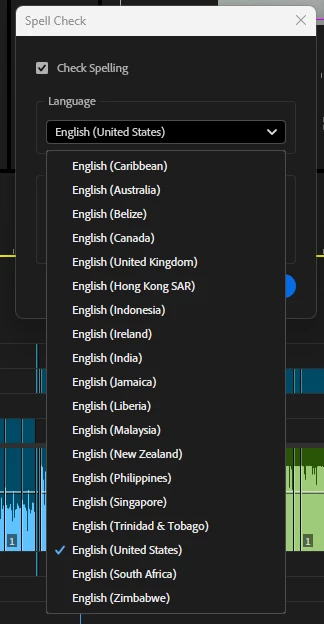
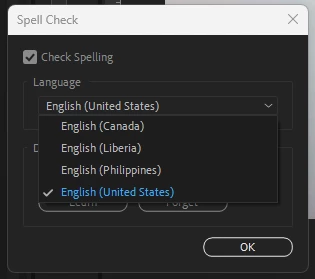
I'm struggling with this one - I'm unable to select UK English as a spell checking option. UK English is set as my system language, and as Premiere's language. The English language pack is also installed by default.  but I can't see how to change the spell checker? Am I missing something? 


This topic has been closed for replies.
Correct answer Matt325890642ahm

Yep, I found the problem - the English UK language pack wasn't installed on my machine. 


Going into Settings > Language and Region > Options and installing English (UK) (basically installing everything) fixed the problem for me, but it's probably just the language pack. 

Honestly don't know why it wasn't installed by default!

1 reply

Mike Dziennik
Community Expert
Community Expert
November 17, 2024

I'd try reinstalling.

You should have loads of languages available. My system is also UK English but I have just over 40 languages available for spell check...including 9 English variants.

Participant
November 22, 2024

No dice unfortunately. If Premiere is pulling its spell check functionality from Windows (in Win11) though, I've spotted something that could be causing it and if it fixes it I'll post what I found later. 

Matt325890642ahmAuthorCorrect answer
Participant
November 22, 2024

Yep, I found the problem - the English UK language pack wasn't installed on my machine. 


Going into Settings > Language and Region > Options and installing English (UK) (basically installing everything) fixed the problem for me, but it's probably just the language pack. 

Honestly don't know why it wasn't installed by default!