
Participant
August 27, 2025
Question

Unable to transform or scale after freeze frame in 25

  • August 27, 2025
  • 1 reply
  • 247 views

If you apply "add frame hold" and then add any effect like "scale" from the beginning to end of the clip the motion will stop where the clip originally ended.

This didn't happen in previous versions of premiere. I regularly cheat footage by freeze framing and then scaling, or adding a hand held motion effect so I can sit on essentially a still image for 3-5 seconds.

You can see in the screen grab below I have keyframes at the beginning and end of the clip - but the clip actually stops moving at the end of the yellow bar (original clips time). The work around is to nest it, freeze within the nest and then apply the motion but that sure is annoying.
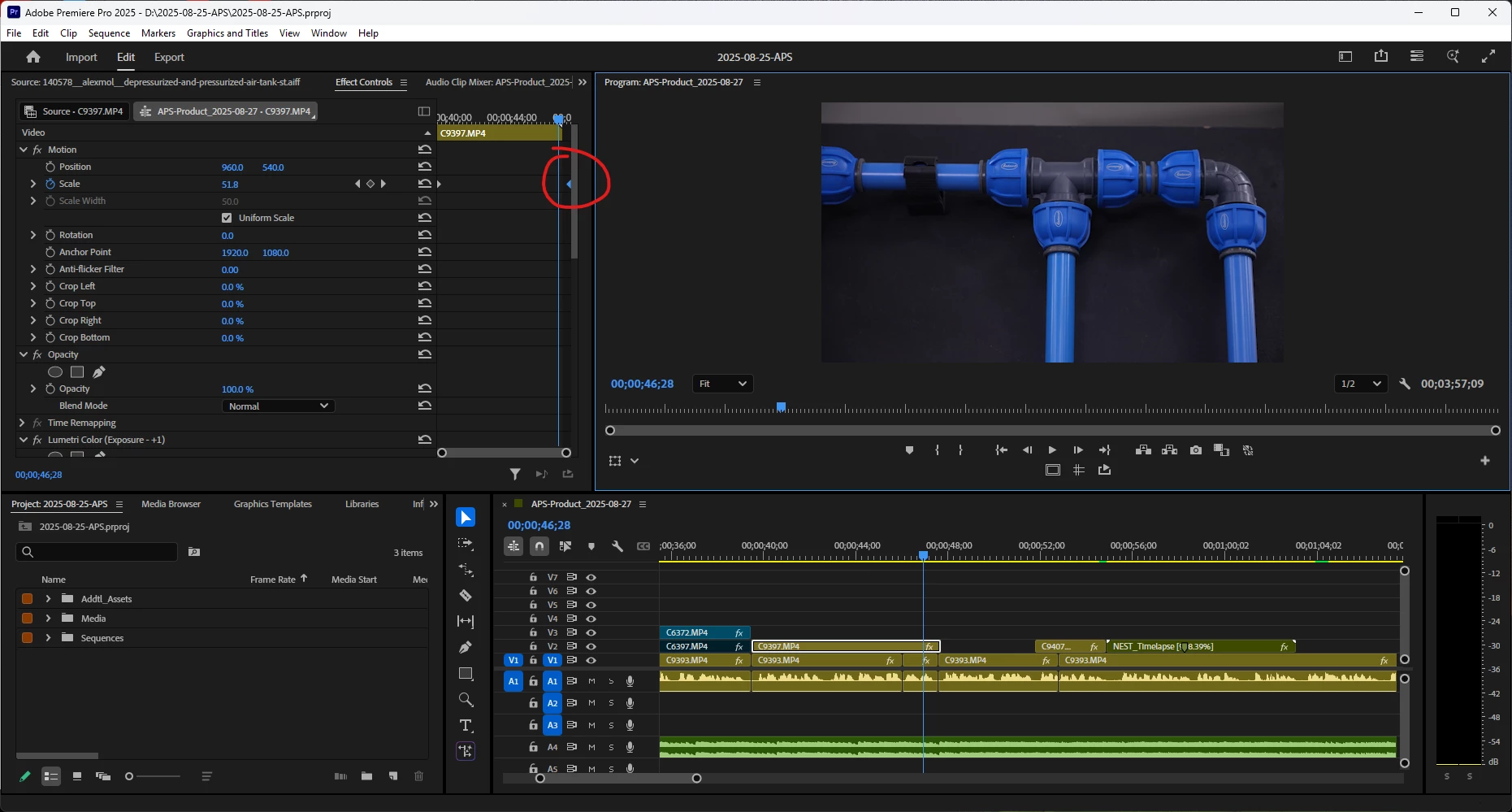


Would be great if it could be fixed.

1 reply

Kevin J. Monahan Jr.
Community Manager
Community Manager
August 27, 2025

Hi Adam,

Premiere Pro keeps the original clip's internal duration for motion keyframes, even if you extend the clip in the timeline (e.g., via time remapping or speed changes). So if you keyframe beyond the original duration, the motion stops because there's no more "real" footage to interpolate.


Your workaround of nesting is the best, but probably the fussiest.

Another thing you can try is to create a freeze-frame, edit it to the clip, and then apply an effect to the freeze-frame.

You can also create a hold frame and then apply motion keyframes to that.


I hope that explains the situation. Let me know if you have any questions.


Thanks,
Kevin


Kevin Monahan - Sr. Community and Engagement Strategist – Adobe Pro Video and Audio
Participant
September 15, 2025

Thanks for the explanation of what's going on "under the hood". The frustrating part is that it has changed my workflow from 2024 to 2025 and not because of some improvement such as re-working the graphics panel to properties kinda thing.