Participating Frequently
April 28, 2017
Answered

Unable to use Essential Graphics templates created in AE

  • April 28, 2017
  • 33 replies
  • 65471 views

- Latest licensed Premiere and After Effects is installed

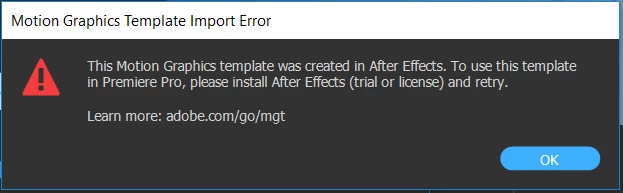
When attempting to use an Essential Graphics template I create in AE, in Premiere I get the following error message:

I am able to use the built-in templates in Premiere without issue.

This topic has been closed for replies.
Correct answer James Landy

I think I figured it out.  It appears that you are using the root directory of a drive for Media Cache, which is not supported by AE.  It's possible to get into this state because PR and AE share the same cache directory.  And if you migrated your AE preferences when updating to 14.2, AE will use the root directory settings from the older AE preferences.  That is the actual problem, which results in the failure to use the (.mogrts) in PR.

We'll look into changing that behavior.  In the mean time, you can try to workaround it by setting the AE preference for Conformed Media Cache, to use the default location, or a non-root directory.

33 replies

Participating Frequently
May 4, 2017

Having the same issue.  Uninstalled and reinstalled both apps on Created Cloud with no luck.  I am currently subscribed to the Creative Cloud Student and Teacher edition.  Not sure if that makes a difference.

Kevin-Monahan
Community Manager
Community Manager
May 4, 2017

Hi TimB,

Creative Cloud Student and Teacher edition.  Not sure if that makes a difference.

Contact the IT administrator for installation of the current versions of the software. It looks like either one or both of these applications are not the current version. Let us know if you need assistance with that.

Thanks,

Kevin

Kevin Monahan - Sr. Community and Engagement Strategist – Adobe Pro Video and Audio
Participating Frequently
May 5, 2017

TimB: Actually the latest versions of both PR and AE are different than just "2017," so you may not have the exact (or proper) versions of both installed. Do you see these when you view the About screens?


Ok ... so I have exactly what is pictured above, how do I update Pr to correspond with Ae?  In the CC Desktop app, it says all applications are updated.  Appreciate the help so far.

stefan_gru
Inspiring
April 28, 2017

I bet that both PR and AE need to be the latest release.

Participating Frequently
May 1, 2017

they are.

stefan_gru
Inspiring
May 1, 2017

Chris: What sort of CC account do you have? Is it Individual or Enterprise (or Teams)?

R Neil Haugen
Legend
April 28, 2017

This looks like PrPro doesn't "see" AfterEffects ... can you do a "replace with AfterEffects comp" action?

If not, you may need to uninstall & reinstall AE as then PrPro will probably see it.

Neil

Everyone's mileage always varies ...