Participating Frequently
April 28, 2017
Answered

Unable to use Essential Graphics templates created in AE

  • April 28, 2017
  • 33 replies
  • 65478 views

- Latest licensed Premiere and After Effects is installed

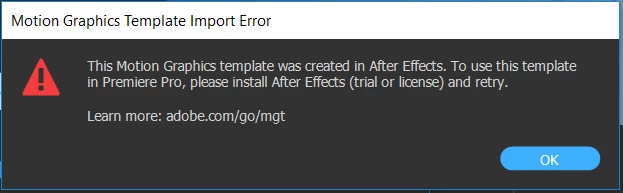
When attempting to use an Essential Graphics template I create in AE, in Premiere I get the following error message:

I am able to use the built-in templates in Premiere without issue.

This topic has been closed for replies.
Correct answer James Landy

I think I figured it out.  It appears that you are using the root directory of a drive for Media Cache, which is not supported by AE.  It's possible to get into this state because PR and AE share the same cache directory.  And if you migrated your AE preferences when updating to 14.2, AE will use the root directory settings from the older AE preferences.  That is the actual problem, which results in the failure to use the (.mogrts) in PR.

We'll look into changing that behavior.  In the mean time, you can try to workaround it by setting the AE preference for Conformed Media Cache, to use the default location, or a non-root directory.

33 replies

James Landy
Inspiring
May 25, 2017

If Dynamic Link is working between AE and PR, and you’re not running into licensing problems, this is another area to check:

User Read and Write Permission/Privileges.

Overview:

An AE Motion Graphic template (.mogrt) file, is a wrapper that contains all the bits required by PR, to access and render frames from an AE comp.  After the (.mogrt) file is installed into the open PR project, and then added to a sequence, PR unpacks the (.mogrt) file, and places an (.aegraphic) file into the PR users scratch disks directory.  So that would be the first location to verify that you have read and write privileges.  The Scratch Disks directory is defined in the PR project settings dialog.

Test Case:

1. Open the user defined PR scratch disks directory in the Finder/Explorer.

2. Install an AE (.mogrt) file into the open PR project.

3. Observe the PR scratch disk directory.

Expected Result: An (.aegraphic) file should be created, and added to the scratch disks directory.

Overview:

After adding an AE (.mogrt) file, into a PR sequence, AE opens a temporary project for that unique instance. The default location for the temp project files is:

Mac, Users\username\Library\Application Support\Adobe\Common\com.adobe.ae.cap

Win, C:\Users\username\AppData\Roaming\Adobe\Common\com.adobe.ae.cap.

Test Case:

1. After PR places the (.aegraphic) in the user defined PR project scratch disks directory, open the temp directory.

Expected Result: A folder is created in the temp directory, and the name starts with acap, and is appended with a randomly generated unique identifier.  For example; acap-518a-1085-86c2-a638.

Solution: If PR fails to open the (.aegraphic) file, and AE fails to load the temp project, you'll need to modify your system settings for your user account to allow read and write access to the above mentioned directories.

Known Participant
May 30, 2017

I GOT IT WORKING!

I was also getting the same error when loading a custom .mogrt template - every time at 15%

So based on James' info on permissions, I completely deleted the media cache files and folders for both AE and Premiere (I hold these on a very fast M.2 drive). I also gave 'full control' permissions to all users to the entire cache drive. After loading Premiere and checking the cache drive (and cleaning any old files) it now works

Known Participant
May 31, 2017

Glad you got through that.

As to moderation ... I've no clue how Jive chooses what it wants to send to the mod queue. Apparently it in general hits better than 50% correct on what needs to be checked ... but it's an automatic filter of some sort, and the parameters are perhaps not as subtle as they should be.

​Anyone​ ... even a mod ... can have a post sent to the Moderation queue ... for no apparent reason whatever.

Neil


Thanks Neil - glad I'm not the only one!

VitoFanelli
Participating Frequently
May 24, 2017

Hi,

I had the same issue and today it is resolved after 4 weeks waiting.

The problem is that premiere pro loose the dynamic link for loggin to the account and have to be reset. After reset it will works.

Hope that helps you.

Best regards,

Vito

WHMB TV40
Known Participant
May 24, 2017

Hi Vito,

Glad someone figured out a way to fix this.  What steps did you take to reset your account?

Rob

VitoFanelli
Participating Frequently
May 24, 2017

I have sean that Anand Sachan has described the way to do it

After you have done the steps below it will popup a windows with an error message. Just click OK and try to open Premiere again.

For Windows:

  • - Close AE and PP
  • - Go to this location ‘C:\ProgramData\Adobe’ ( It is a hidden folder)
  • - Rename the ‘SLStore’ folder to ‘oldSLStore’
  • - Then go to this location: C:\Program Files (x86)\Common Files\Adobe
  • - And rename the SLCache folder to oldSLCache
  • Open PP and AE and check on the issue

For Mac:

  • - Close AE and PP
  • - Go to this location ‘Library>Application Support>Adobe’
  • - Rename the ‘SLStore’ folder to ‘oldSLStore’
  • - And rename the SLCache folder to oldSLCache
  • Open PP and AE and check on the issue
Anand Sachan
Adobe Employee
Adobe Employee
May 24, 2017

Hi Everyone,

Please try the below steps and check if it fixes the issue for you. It appears to be an issue with the licensing where Premiere is not able to communicate with After Effects.

For Windows:

  • - Close AE and PP
  • - Go to this location ‘C:\ProgramData\Adobe’ ( It is a hidden folder)
  • - Rename the ‘SLStore’ folder to ‘oldSLStore’
  • - Then go to this location: C:\Program Files (x86)\Common Files\Adobe
  • - And rename the SLCache folder to oldSLCache
  • Open PP and AE and check on the issue

For Mac:

  • - Close AE and PP
  • - Go to this location ‘Library>Application Support>Adobe’
  • - Rename the ‘SLStore’ folder to ‘oldSLStore’
  • - And rename the SLCache folder to oldSLCache
  • Open PP and AE and check on the issue

Let us know if it works for you.

Regards

Anand Sachan

Participating Frequently
May 24, 2017

Thanks Anand. When I change those 2 folders names as you described and I try to open Premier, I encounter a 'Configuration error' and am unable to open Premier or After Effects. Screenshot of error below.

WHMB TV40
Known Participant
May 24, 2017

I got the same error message here as well.  I couldn't get it to work by acknowledging the error by clicking ok and re-opening PP like Vito later in this thread.

James Landy
Inspiring
May 23, 2017

Hi everyone, I’m on the AE team, and was involved with developing this feature.  I’ve read the entire thread.  I have a few ideas of what could be causing the problem you are encountering, but first I need more information.

It appears we have some commonalities.

Assumptions:

  1. Everyone who is encountering this problem, is using AE 14.2.0 with PR 11.1.0.
  2. Issue occurs on Mac and Win, and is not OS version specific.
  3. Everyone can connect to AE from PR, using Dynamic Link workflows.
  4. Everyone can add MGT’s from the installed sample templates ([AE] News Package, [AE] Sports Package, and [AE] Video Gaming Package), into a PR sequence.

Action: If these assumptions are not true, then please correct them.

Trouble Shooting:

Please execute the following test cases.  Your results, will help us to isolate the cause.

  1. Launch AE and PR.
  2. In AE, create a comp that only has one solid layer, and nothing else:
    1. No text.
    2. No 3rd party fonts.
    3. No 3rd party effects.
    4. No 3D layers.
    5. No footage items.
  3. Open the comp in the EGP.  Add an opacity controller for the solid layer.
  4. Name the MGT.
  5. Save the AEP.
  6. Export the MGT to the Essential Graphics directory.
  7. Export the MGT to a folder on your local drive.
  8. Export the MGT to your CC library (My Library).
  9. Import the comp from the open AEP, into PR.

Expected Result: Comp from the open AEP is added to the open PR project. This proves that AE and PR versions are in sync, and that Dynamic Link is working correctly.

  10. Quit AE.

Expected Result: Headless AE, is launched and runs as a background process.  On Mac, it’s called aerendercore, on Win, it’s called AfterFX.exe, and can be observed using the Activity Monitor/Task Manager.  This proves that PR can connect to headless AE, using Dynamic Link.

  11. In PR, bring the EGP into focus.

  12. Select the Browse tab.

Expected Result: The comp you exported from AE, as a MGT, appears in the Essential Graphics folder, Local Drive, and Library directories.

13. Drag the MGT from the EGP Browse tab, into an existing sequence.

Expected Result: You should be able to install and add MGT’s from any directory.  The MGT gets added to the sequence, and you can see rendered frames from the comp.  This test result can help us to determine if the problem is global to MGT’s, or if the issue is specific to an install method when accessing MGT’s.

I have a few more test cases, but let’s start with these for now.

Thanks - James

R Neil Haugen
Legend
May 23, 2017

James ... um ... delighted to have you pop in! The specificity of the steps listed should help "us" get down where in the whole chain a link or to is perhaps sub-optimal.

Neil

Everyone's mileage always varies ...
Kevin-Monahan
Community Manager
Community Manager
May 19, 2017

Hi Chris E.,

Can you try the normal dynamic linking behavior between Premiere Pro and After Effects (Replace with After Effects Composition). Is that working normally?

Thanks,
Kevin

Kevin Monahan - Sr. Community and Engagement Strategist – Adobe Pro Video and Audio
Participating Frequently
May 19, 2017

Same as everyone here. Same error message of AE not being installed. I have updated Premier and AE to latest versions.

Using Windows 10.

Participating Frequently
May 17, 2017

5/17/2017  Just received Premiere update notification for 11.1.1 which states the new Essential Graphics and Sound panel are included.  Perhaps this will resolve the issue....

Known Participant
May 17, 2017

Nope. Installed the new Premiere update out this am and same problem when trying to use an AE graphics template - error message falsely reports I need to have current version of After Effects. I DO have the most current version of AE !

WHMB TV40
Known Participant
May 17, 2017

Just spoke to Adobe support regarding this issue.  I saw there was an update for PP released today, and installed it, but it didn't correct it.  They said it was a "known" issue and that an update to correct it is in the works.  He gave an estimate of 10 days.  Good to know that a fix is in the works, but I have to say it would be nice if Adobe would say that on the several threads regarding this issue on the forums so people aren't floundering around trying to troubleshoot it.

Known Participant
May 14, 2017

Having the same issue - have the full CC subscription and current Premiere Pro 2017.2 and AE versions.

Cannot get any of the AE mogrts to open in Premiere Pro even after uninstall/reinstall/reboot procedures.

Win 10

Participating Frequently
May 15, 2017

Yep, I'm afraid we'll have to wait for Adobe to do some updating to get this to work. 

Participating Frequently
May 12, 2017

I spoke with an Adobe support person last week who told me this is a known issue and that they're working on it.  From what I can tell, reinstalling will not fix the problem, and some installations (regardless of OS) just work while others do not.  I keep waiting for Premiere Pro updates which will hopefully resolve this issue....

Known Participant
May 6, 2017

I am having this issue as well. Contacted adobe support today. Told me to contact them back on Monday as the people that handle this are gone on the weekend. Really frustrating.

Jim

Participating Frequently
May 7, 2017

Same.  Ridiculous.