Participating Frequently
April 28, 2017
Answered

Unable to use Essential Graphics templates created in AE

  • April 28, 2017
  • 33 replies
  • 65473 views

- Latest licensed Premiere and After Effects is installed

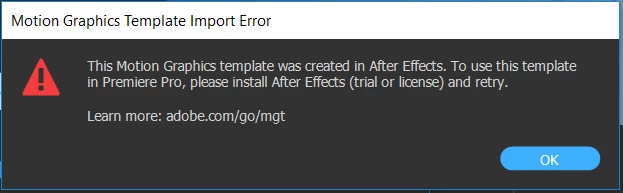
When attempting to use an Essential Graphics template I create in AE, in Premiere I get the following error message:

I am able to use the built-in templates in Premiere without issue.

This topic has been closed for replies.
Correct answer James Landy

I think I figured it out.  It appears that you are using the root directory of a drive for Media Cache, which is not supported by AE.  It's possible to get into this state because PR and AE share the same cache directory.  And if you migrated your AE preferences when updating to 14.2, AE will use the root directory settings from the older AE preferences.  That is the actual problem, which results in the failure to use the (.mogrts) in PR.

We'll look into changing that behavior.  In the mean time, you can try to workaround it by setting the AE preference for Conformed Media Cache, to use the default location, or a non-root directory.

33 replies

Participant
January 26, 2022

This problem apears after I updated the OS system and Adobe programs

I have the latest version of Premier 22.1.2 and AE 22.1.1 and have this problem with just one .mgrt file (others work without this problem). (and worked properly before updates) I even tryed to export it form AE as a .mgrt file and problem still there.
What can I do to fix it?

R Neil Haugen
Legend
January 26, 2022

Could you share that via a CC Library for others to test?


Neil

Everyone's mileage always varies ...
Participant
April 6, 2022

Hello. Question about the Premier PRO program. The question is that when adding downloaded or created texts through essential graphics. The program freezes at 15% and nothing can be done about it. Standard presets work but they are very poor and not beautiful. I tried to put different versions from 18 to 22. everywhere the same error. Updated the driver, removed all previous versions of the program. I'm attaching the screenshot. I downloaded the drivers from the AMD website. Rebooted, tried a few more times and options. Everything is the same, it freezes when adding any file from essential graphics to the timeline except for the native preset. At what the program freezes and does not close. Only reboot via ctrl+alt+del. I have tried all the suggestions in this thread. Any other thoughts on how to beat this?

(PP 22.2.0)  (AE22.2.1)

 http://joxi.ru/Rmz8Wj3tVVvL4A  

http://joxi.ru/KAgQpRjfOO5Dvm

Participant
December 4, 2020

This might as well be a different language.  Can you provide a step-by-step solution?  I've tried googling phrases in your answer and am coming up short.

R Neil Haugen
Legend
April 3, 2020

Winstan,


Where are your Premiere and Ae cache files located? As noted in the original post, if in a folder directly on the root of a drive that can be problematic, having them a second folder 'down' in a folder-tree can fix that issue.


Second ... who did you purchase the mogrts from? And which number-dot-number versions of Premiere and Ae do you have? As in Premiere Pro 14.0.4 and Ae 17.0.5 ...


Neil

Everyone's mileage always varies ...
Participant
March 21, 2020

For anyone else still stuck on this issue. Took about 30 minutes of googling before I found a random video with the solution. 


Make a copy of the .mogrt file, then change the extension to .zip. Unzip file and you'll get an AE file called project.aegraphic. Change the extension again to .zip, extract, and you will have the original AE file. I was then able to open it in AE and then save it out as a motion graphics template for using in Premiere. This saved me a lot of drama, and from installing a newer version of Premiere. 

Participant
April 3, 2020

Hi Sonjah,


I purchased 8 .mogrt files yesterday and I've encountered the problem on this thread.

When I try your method, it just tells me that the file type is not supported in After Effects.

Could you possibly provide screenshots of the solution?

izabelab48804377
Participant
May 28, 2019

hi, i have the newest version premiere pro cc 2019 and i face same problem. i installed trial version of ae but it didn't help.

any ideas how can this be solved?

Participating Frequently
May 28, 2019

I was able to resolve this issue by removing third-party plug-ins. In Windows, navigate to C:\Program Files\Adobe\Common\Plug-ins\7.0. As a backup, make a copy of the MediaCore folder in this same directory (just name it MediaCore_backup or similar). Delete all files from the MediaCore directory. Restart Premiere.

You can then copy plug-ins from the backup directory to MediCore one-by-one to try and determine which one is causing the issue.

One other thing you might want to try... with the most recent version, I noticed that some of the default panels in Premiere didn't work quite the way I thought they should (specifically Graphics). Creating new panels with the same stuff as the originals seems to have taken care of that.

Good luck!!

Chris

izabelab48804377
Participant
June 3, 2019

Hi Chris,

I managed to solve this issue;) In my case the problem wasn't in third party plug-ins but in old version of Adobe CS. I delated all traces of CS5 and things started working me. You suggestion kind of pushed me in this direction. Thank you;))

Participant
October 15, 2018

Same exact problem here, none of my cache folders are in non-root directories. Has this been solved?

Roland Kahlenberg
Legend
January 11, 2018

I think you should get in touch with your Adobe Sales Representative or contact Adobe directly.

Very Advanced After Effects Training | Adaptive & Responsive Toolkits | Intelligent Design Assets (IDAs) | MoGraph Design System DEV
Roland Kahlenberg
Legend
January 11, 2018

CC 2018 is the latest version for AE, PPro, Audition etc etc etc.

Very Advanced After Effects Training | Adaptive & Responsive Toolkits | Intelligent Design Assets (IDAs) | MoGraph Design System DEV
brucew65991919
Participating Frequently
January 11, 2018

Maybe in your country or with a business account. Its not showing up for teachers and or students. I only see 2017 in adobe creative cloud application. So not sure why there is no 2018 offering for me.

brucew65991919
Participating Frequently
January 11, 2018

SEE WHAT I MEAN>>>>>

brucew65991919
Participating Frequently
January 11, 2018
  • I got one word for ADOBE - can you say (boondoggle)

Ive spent over an hour today and yesterday just screwing around with this issue.

Then to have someone at the end of the thread say its all good with CC2018

?? Where the heck is cc2018
I tried setting the adobe after effects to a spare ssd drive that i not on my os see pic

what makes all this laughable and tragic is we are in the 21st century and this bug error seems so 20th century especially when its been happening since may of last year.

Also all the MOGRTs that Im using are coming from the adobe stock page! Even more tragic.


Someone at adobe either needs to loose there job and or someone needs to do there job.

Sorry but this is ridiculous.

Roland Kahlenberg
Legend
January 10, 2018

Are you guys using CC2018? I used to have the same issue with CC2017 - all good now with CC2018.

Very Advanced After Effects Training | Adaptive & Responsive Toolkits | Intelligent Design Assets (IDAs) | MoGraph Design System DEV