
CalvinJHIV
Participant
December 14, 2017
Answered

Understanding and Optimizing Timeline Performance

  • December 14, 2017
  • 1 reply
  • 1345 views

For the longest time I have been editing with Adobe Premiere Pro, though the more projects I do it seems that my editing gets better but my projects having higher demands with effects, transitions, etc.

I want to figure out what exactly goes into play with "Timeline" NOT exporting but understanding how to optimize a project in whole so viewing playback on the timeline isn't being sluggish. So I have a some questions that someone might be able to answer to help me understand.

When creating a project, will the "Capture Format" does the DV = Standard Def / HDV = High Def settings impact performance whatsoever, or does it only have to do with Tape recordings?

When creating a sequence, the "Editing Mode", how do you learn what selection is appropriate via what type of footage you have? For example, I record 4K IPhone footage, would I just choose Custom, my frame size and corresponding audio sample rate, and is there a good choice when choosing the Preview File Format, will the type of file format have some sort of affect on the performance of the timeline playback? (Along with the choice of Codec if the option is provided)

The reason I am asking all of this has to do with Performance issue I've been experiencing in Premiere Pro. Whenever I've been trying to edit some Simple IPhone 4K footage, using any effects or what not has been hard to playback to footage even when lowering the playback resolution.

I wouldn't think I would need to be using Proxies for IPhone footage? Unless the codec for IPhone is currently optimized (Which I think is the H.265) because of the update to IOS 11.

If someone could point me in the right direction with learning how to properly optimize my timelines and understanding everything that goes into play with timeline playback performance I would be very grateful.  

My current specs

CPU : 5820K (OC to 4.0Ghz)

GPU : GTX 960 4GB

RAM : 32GB Adata @ 2800Mhz

SSD : for Programs

SSD : for Footage

SSD : for Cache

1TB HDD : for Extra footage space
This topic has been closed for replies.
Correct answer R Neil Haugen

1) Capture format ... yea, that's only for ingesting tape material.

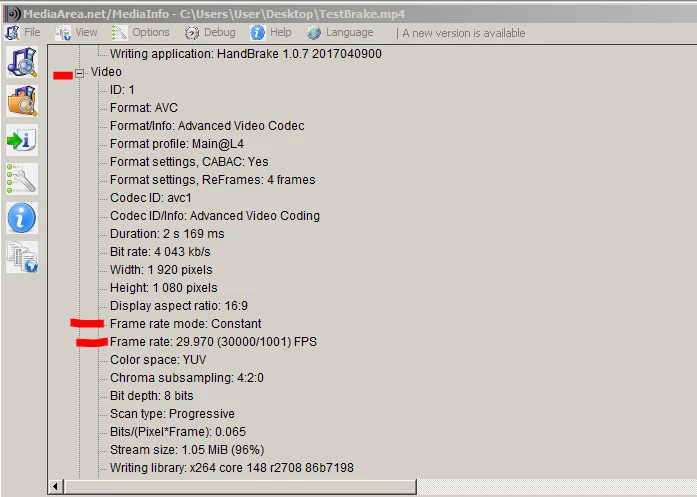
2) You're using phone media, which is almost assuredly VFR ... variable frame rate. PrPro doesn't handle that well, even though it will do so with many phones these days. Check by downloading/installing MediaInfo ... drag/drop a clip onto that app's icon on the desktop, and then select 'tree view' when it starts up. Look for the frame-rate mode as shown here:

If that shows as Variable, then you need to convert the media to CFR before importing to PrPro. The tool for that is Handbrake, another free download. Set the Video tab roughly as follows ... and note, I set the "Quality" to close to 'placebo' in order to minimize re-compression artifacting.

One thing to check ... on the Picture tab of Handbrake ... is whether it's choosing to create the same size frame as original media, or to create a 1920x1080 export. If the latter, reset so it's using original media for frame size.

After setting this, and testing an output file, save this as your preset and then you should be able to batch process entire folders of media, perhaps overnight so you've got everything ready to go the next day.

And 4k H.264 media is precisely the kind of media that may well need proxies for smoothest playback ... because of the long-GOP nature of the media. So on ingestion into PrPro, use one of the included Cineform presets for proxies. Do NOT use an H.264 proxy preset ... no gain in playback really.

Neil

HandBrake download page:  https://handbrake.fr/downloads.php

Media Info:        https://mediaarea.net/en/MediaInfo

1 reply

R Neil Haugen
R Neil HaugenCorrect answer
Legend
December 14, 2017

1) Capture format ... yea, that's only for ingesting tape material.

2) You're using phone media, which is almost assuredly VFR ... variable frame rate. PrPro doesn't handle that well, even though it will do so with many phones these days. Check by downloading/installing MediaInfo ... drag/drop a clip onto that app's icon on the desktop, and then select 'tree view' when it starts up. Look for the frame-rate mode as shown here:

If that shows as Variable, then you need to convert the media to CFR before importing to PrPro. The tool for that is Handbrake, another free download. Set the Video tab roughly as follows ... and note, I set the "Quality" to close to 'placebo' in order to minimize re-compression artifacting.

One thing to check ... on the Picture tab of Handbrake ... is whether it's choosing to create the same size frame as original media, or to create a 1920x1080 export. If the latter, reset so it's using original media for frame size.

After setting this, and testing an output file, save this as your preset and then you should be able to batch process entire folders of media, perhaps overnight so you've got everything ready to go the next day.

And 4k H.264 media is precisely the kind of media that may well need proxies for smoothest playback ... because of the long-GOP nature of the media. So on ingestion into PrPro, use one of the included Cineform presets for proxies. Do NOT use an H.264 proxy preset ... no gain in playback really.

Neil

HandBrake download page:  https://handbrake.fr/downloads.php

Media Info:        https://mediaarea.net/en/MediaInfo

Everyone's mileage always varies ...
CalvinJHIV
Participant
December 14, 2017

Ah. I had a feeling that the Variable Frames would cause an issue in Premiere Pro. I just wanted to make sure that I wasn't a complete idiot and before I go putting all of my files through handbrake that something in specific would be the issue. I know that I have been having to convert the latest H.265 files before being able to view the videos in Premiere. I appreciate the reassurance and help. Thanks!

R Neil Haugen
Legend
December 15, 2017

Biggest happiness from trying to help people is seeing them back getting work through and OUT.

Neil

Everyone's mileage always varies ...