

Unspecified error occurred while performing a conform action
Hi, all! I just got the new 14in macbook and I'm having some trouble editing in premiere. I got this message after I finished syncing up all of my footage.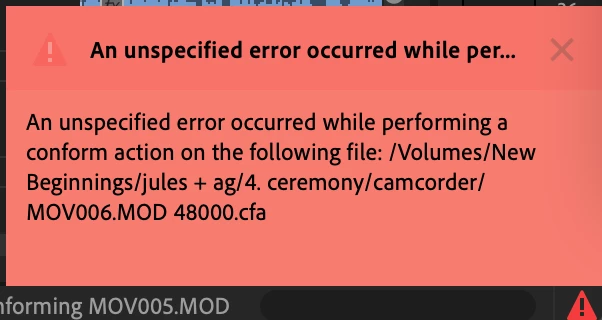
I do have a handful of old camcorder footage that I synced as well. Some of the audio did not transfer over but when I went back onto my hard drive there was sound. Those camcorder clips only open in vlc media player so I just econverted the audio and imported it onto my timeline to match with their respective videos. About 20 minutes after me doing this, nothing on my timeline is working. I cannot play anything through or preview anything. I don't know if it's just a glitch or if it's me messing with the audio, or something else entirely. Just a bit confused because I have never run into a problem like this and I have been using these programs for years. I don't want to have to resync all of the wedding footage that I have if I have to, but if you all suggest that I may need to and do something else with that camcorder footage (if it's the root of my problems) then I guess I will have to. 😞
Any advice would be super appreciated!! Thanks in advance!
--Alisha
 AdChoices