
pahlito
Participant
August 31, 2022
Answered

Unwanted glitch / twitch between clips

  • August 31, 2022
  • 2 replies
  • 757 views

Hi,


I'm editing a video and after exporting it out of Premiere, I get a weird unwanted wavy glitch between the clips. This screenshot (last frame of a clip) best describes it:
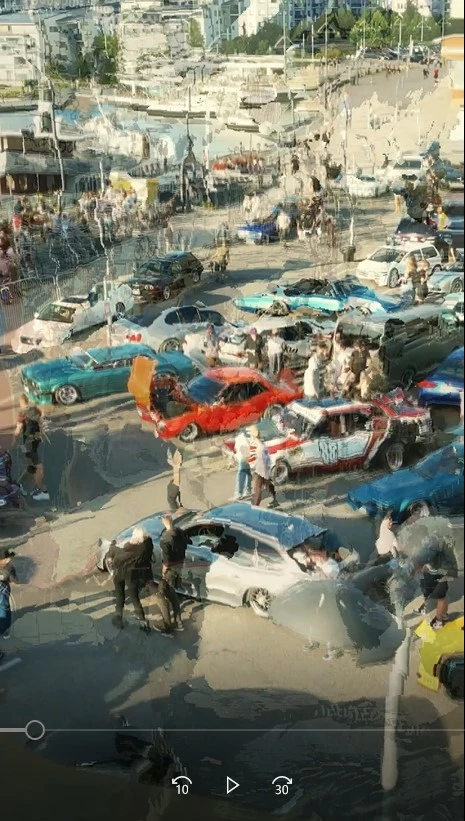


The video itself is very very simple. Just 20 or so clips, no transitions. some sped up clips but this occurs with all of them. Only effects I'm using are scaling, lumetri and rgb curves.


I'm not seeing the issue when previewing the video in Premiere, only after exporting. I'm using (what I reckon is relevant):

H.264

25fps

square pixels

Optical flow

Hardware encoding

VBR 1 pass

10mbps

Multiplexer: MP4


I have various sized source material, different dimensions, various frame rates etc. However, this also occurs between still JPG pictures within the video.


Any ideas on how to fix this?

This topic has been closed for replies.
Correct answer Ann Bens

Turn off Optical Flow. This is only relevant when export framerate differs from sequence framerate.

Try CBR.

2 replies

Ann Bens
Community Expert
Ann BensCommunity ExpertCorrect answer
Community Expert
August 31, 2022

Turn off Optical Flow. This is only relevant when export framerate differs from sequence framerate.

Try CBR.

pahlito
pahlitoAuthor
Participant
August 31, 2022

This worked, thank you!


The frame rate is different as some of my footage is 30fps and some 25fps, I tried encoding with both but both had the weird effect at transition. However, I noticed that footage from my Pixel 5 phone had actually made the sequence frame rate 30.1, is this normal...? could this be what was throwing everything off?


Ann Bens
Community Expert
Community Expert
August 31, 2022

30.01 sounds very much like variable framerat: check this with MediaInfo 

If the footage is variable framerate convert to constant framerate with Handbrake or Shutter Encoder before bringing into Premiere.

Peru Bob
Community Expert
Community Expert
August 31, 2022

Try turning off Hardware encoding in the Video tab of the export settings.

pahlito
pahlitoAuthor
Participant
August 31, 2022
quote

Try turning off Hardware encoding in the Video tab of the export settings.


By @Peru Bob


I tried this, no difference.

I also removed the effects (Lumetri and RGB curves), didn't have any effect