


Update: Cut In Multi-Cams as Nests or Individual Clips is back!
There has been a lot of active discussion on the forums around recent changes to the way in which multi-cam clips interact with the Insert and overwrite sequences as nests or individual clips setting in Premiere Pro (pictured below).
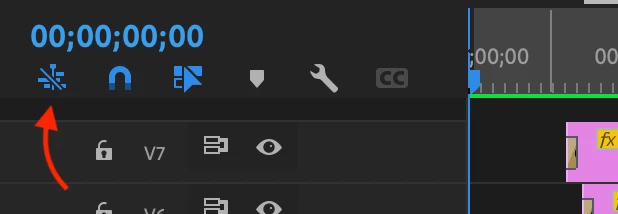
In Premiere Pro 24.1, the behavior of multi-cams was modified to no longer be influenced by the Insert and overwrite sequences as nests or individual clips setting. As a result, regardless of whether this setting was enabled or disabled, multi-cam clips would always be added to a sequence as a nest (multi-cam). This change was deliberate to allow multi-cams to function more seamlessly as the source media items they are intended to be. It was a correction that was especially important for workflows where both multi-cams and sequences are being loaded into the Source Monitor for review prior to being added to a sequence.
We have heard a lot of feedback regarding this change. Many users have grown to see the ability to unpack the contents of a multi-cam using the Insert and overwrite sequences as nests or individual clips setting as a feature, and have built workflows around it. In response, we have brought this functionality back to Premiere Pro.
As of Premiere Pro 24.2, we have added a new sequence contextual menu option called Multi-Camera Follows Nest Setting. When enabled, multi-cams will respect the Insert and overwrite sequences as nests or individual clips setting and follow the original behavior that many were used to when multi-cams are added to a sequence. When disabled, multi-cams will always be added to sequences as nests (multi-cams) regardless of the state of the Insert and overwrite sequences as nests or individual clips setting.
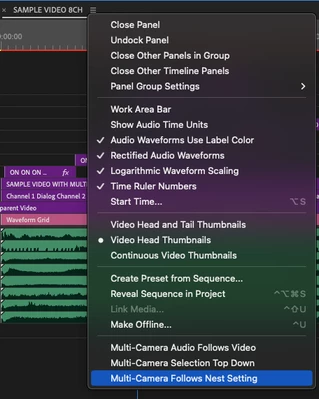
Multi-Camera Follows Nest Setting is disabled by default, making the new multi-cam behavior introduced in 24.1 the default behavior for Premiere Pro. The state of Multi-Camera Follows Nest Setting is, however, persistent, so it only has to be enabled once to affect any sequence you are working with.
For anyone interested in a more in-depth discussion around the changes described above, please feel free to read the thread here.
 AdChoices