
Participant
July 10, 2013
Answered

Upper half of video is missing (black screen)
  • July 10, 2013
  • 9 replies
  • 101104 views

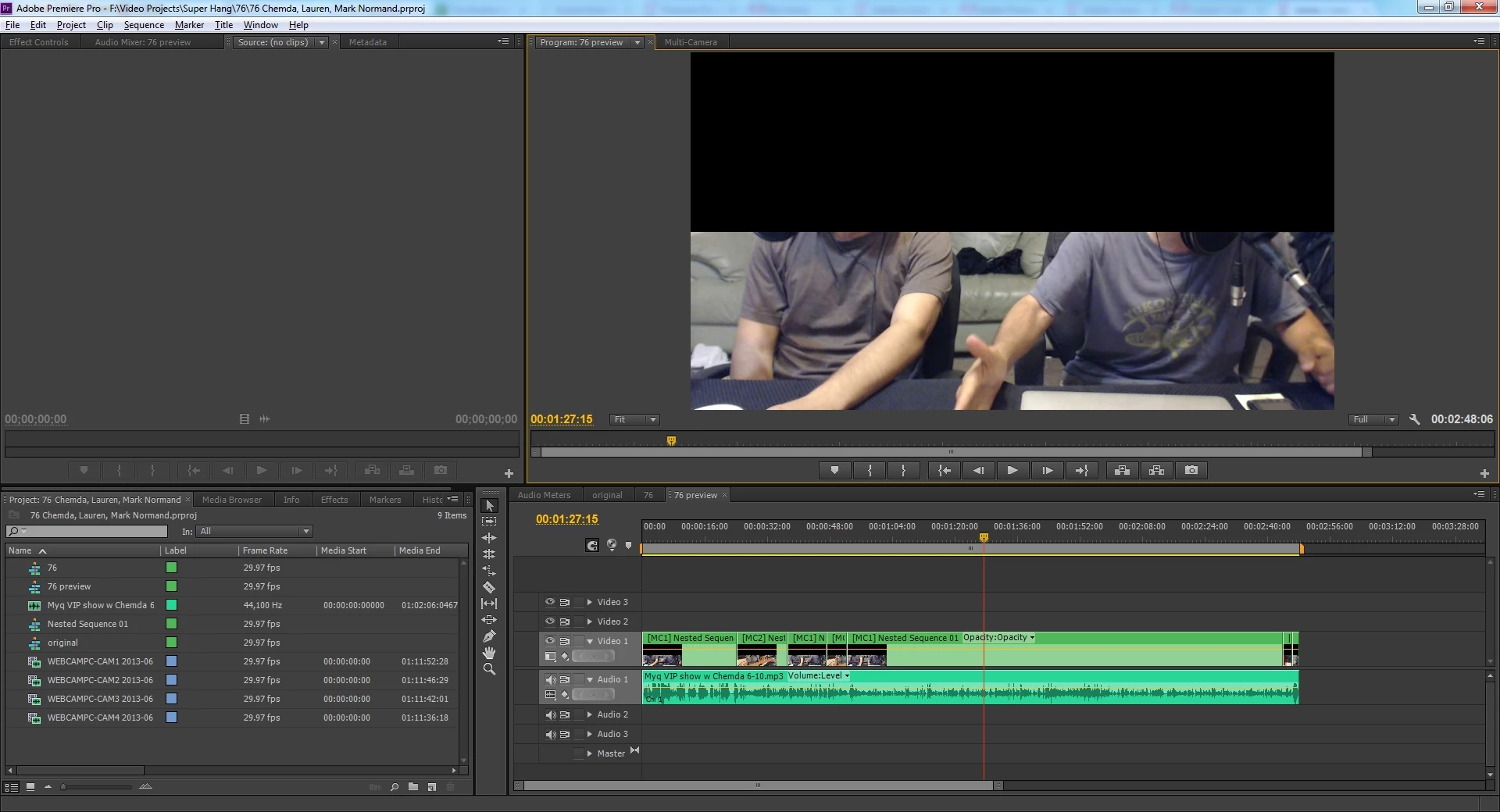
I'm working with Adobe Premiere Pro CS6 and I have all updates installed. This is my first time posting and I've only been using CS6 for a few months so I'm still a newbie. That being said here's my dilemma: a project I had worked on yesterday without any issues is now missing the upper half of the video. I didn't have a problem before and this is the first time I'm having to deal with this. For some reason, the problem is only occuring when I use files larger than 1GB. When I switch to a lower quality video file that is 160MB, for example, I don't have the problem of missing the upper half of the video. I also tried exporting to see if the problem gets corrected during the export process but it also comes out missing the upper half of the video. 


Any help would be greatly appreciated. Thanks in advance.

Marisela

This topic has been closed for replies.
Correct answer TalbotMcInnis

We have experienced the exact same issue in our software product.  We have narrowed it down to windows updates under MS bulliten MS13-057.  Specifically, on XP kb2834904 and on windows 7 kb2803821.

For us, it occurs when decoding WMV9 files.  Not all uses of WMV decoding are affected, but I confirmed that when connecting the WMV decode DLL to a sample grabber for RGB32 video, the frames arrive black on top, so that points directly to decoding internals of the WMV Decode dll.

You can uninstall these windows updates to resolve your problem.  Hopefully Adobe can rally Microsoft to fix this properly ASAP.

9 replies

Participant
August 22, 2022

I am also facing similar problems but in mine case the lower half of video is missing please someone help me 

CBecker
Inspiring
July 24, 2013

Like someone else said, h.264 or M4V formats work without the uninstall. You can use Handbrake to convert your WMV's. But it's nice to know about the Windows update. Hopefully it will get resolved soon. Great info and sharing from all of you though! Thanks.

July 23, 2013

THANK YOU, THANK YOU, THANK YOU!!!!

July 22, 2013

Anyone Anything seen or read from Mocrosoft?  problem solved in new update??

Todd_Kopriva
Inspiring
July 22, 2013

> Anyone Anything seen or read from Mocrosoft?

Microsoft has updated the known issues for their patch to mention the problem that it causes:

http://support.microsoft.com/kb/2803821

They are working on a fix.

rasmdlord
Participant
November 22, 2013

Thank you!!!

July 17, 2013

I uninstalled kb2803821, re started my PC and Yes full frame again !!  Thanks

Participating Frequently
July 31, 2013

OR

WHat I did was just run my wmv video through Prism Video File Converter Plus and make an mp4 file that worked.

Todd_Kopriva
Inspiring
July 31, 2013

FYI:

We have been working with Microsoft on this, and they are making significant progress on addressing this problem.

July 13, 2013

After having uninstalled KB2803821 on Windows 7, the top half of the WMV is not clipped 100% of the time, but there are several frames where clipping still occurs. In my experience, they are not contiguous. As I Page Down through each frame, every 50-60 frames or so in a 29.97 fps composition I get a frame that is missing the top half.

Has anyone else encountered this after removing the hotfix and is there a resolution?

Thanks,

John

Participating Frequently
July 14, 2013

Is it possible you're looking at an area that's was pre-rendered in your timeline before you removed the hotfix?

Removing the hotfix definitely fixed the problem for me.

Steven L. Gotz
Inspiring
July 14, 2013

I never edit WMV files. Never. However, it just so happens I was looking at some old files, and a question came up on the forum, and I grabbed the nearest video I could find to pull into Premiere Pro for an example - which was the WMV directory in Windows Explorer.

Son of a gun, there was the bottom half of the frame.Just the bottom half.

Interesting. But it leaves me with a question.

Why are people editing WMV files? What camera spits those out? Actually, where do people even find those anymore? And why not use H.264 which works fine?

artofzootography.com
TalbotMcInnisCorrect answer
Participating Frequently
July 10, 2013

We have experienced the exact same issue in our software product.  We have narrowed it down to windows updates under MS bulliten MS13-057.  Specifically, on XP kb2834904 and on windows 7 kb2803821.

For us, it occurs when decoding WMV9 files.  Not all uses of WMV decoding are affected, but I confirmed that when connecting the WMV decode DLL to a sample grabber for RGB32 video, the frames arrive black on top, so that points directly to decoding internals of the WMV Decode dll.

You can uninstall these windows updates to resolve your problem.  Hopefully Adobe can rally Microsoft to fix this properly ASAP.

Participant
July 11, 2013

That did it! Thanks!!!

Looks like KB2803821 was installed this morning which would account for the change overnight. I uninstalled it, rebooted and everything worked perfectly again.

I included two screen shots for those who are not sure how to uninstall a windows update.

1) Start

2) Type in Add Remove

3) Click Add or Remove Programs

4) Click "view installed updates"

5) Type in "kb2803821" in the search

6) Uninstall the item that comes up.

7) Reboot

Participant
July 13, 2013

This update will keep installing itself if you have windows update enabled. You can prevent the update from happening AND keep windows update enabled. Here's how:

  1. Start
  2. Windows Update
  3. Check for updates
  4. Select important updates
  5. right click the update KB2803821
  6. Select Hide Update

Participant
July 10, 2013

Misery loves company.  I too, just an hour agon experienced the same Premiere Pro half monitor blackout.  It occured after I made some Windows updates.  It only occurs in Premiere Pro CS4 project files that are using all of the following: the Cropping effect,   the Camera View effect , and in the same effects controls -under Motion  I did some scaling.   The original files are 1440 X 1080  Windows Media (wmv) files.  They are the only ones affected.

I'm running 64 bit Windows 7 Enterprise SP 1, i7  3.6GHz, 16GB of memory, GeForce GTX 570 card ver.9.18.13.1106

I exported out a segment using windows media 9 codec and it resulted in the same half monitor blackout.

Looking for a the solution.

John T Smith
Community Expert
Community Expert
July 10, 2013

More information needed for someone to help... please click below and provide the requested information

-Information FAQ http://forums.adobe.com/message/4200840

Operating system and hardware details, including brand/model graphics adapter and device driver version

IF you have nVidia... How to determine your nVidia driver version

Right click in any open area of the Windows desktop

Select NVIDIA Control Panel from the popup window

Select SYSTEM INFORMATION at the lower left corner

Driver version should be the 1st line in Details

I have a GTX285 using driver 296.10 and Win7

And what you are editing

Read Bill Hunt on a file type as WRAPPER http://forums.adobe.com/thread/440037

What is a CODEC... a Primer http://forums.adobe.com/thread/546811

What CODEC is INSIDE that file? http://forums.adobe.com/thread/440037

Report back with the codec details of your file, use the programs below... A screen shot works well to SHOW people what you are doing

http://forums.adobe.com/thread/592070?tstart=30

For PC http://mediainfo.sourceforge.net/en or http://www.headbands.com/gspot/

For Mac http://mediainspector.massanti.com/

Does your sequence match your video?

See 2nd post for picture of NEW ITEM process http://forums.adobe.com/message/3776153

-and a FAQ on sequence setting http://forums.adobe.com/message/3804341