
Known Participant
February 17, 2019
Question

URGENT: Grey / Missing Preview Thumbnail(s) Causes Crash

  • February 17, 2019
  • 5 replies
  • 6871 views

I've posted this query a few times and haven't received any suitable advice. I'm calling this Urgent now, b/c this issue is seriously, seriously affecting my workflow. Like, move-to-new-editing-program serious.

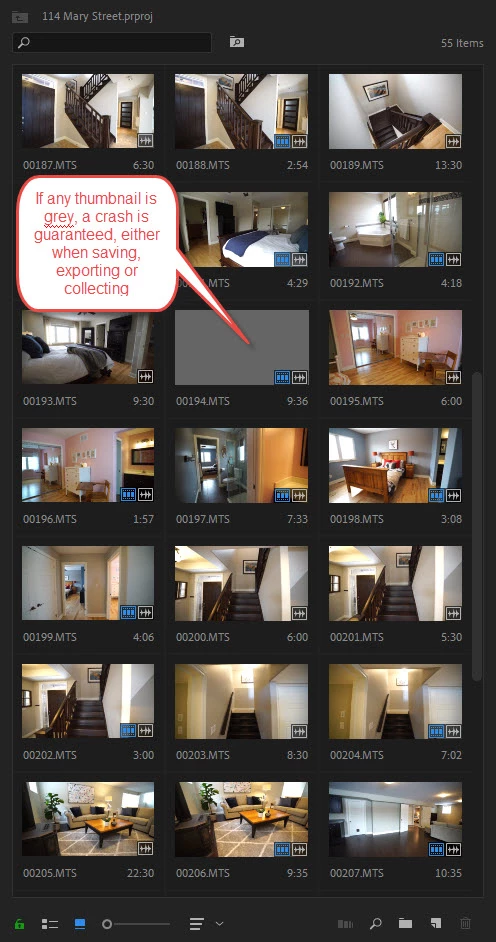
The issue: often, when opening a project, a preview thumbnail is not created for a random clip(s) (see attached image below). Whenever this happens, a crash is guaranteed either when I a) Try to export, b) Try to save & close PPro, c) When collecting files for backup.

Why it's a problem: At times, I can't do a final render, without opening/closing/quitting/restarting/restarting machine multiple times until by some miracle all thumbnails have rendered, and I can export. It's not b/c of the clip, the missing thumbnail would be for any clip in the project, and is different every time. At times I have had to screw around for an hour or two just to export a simple project.

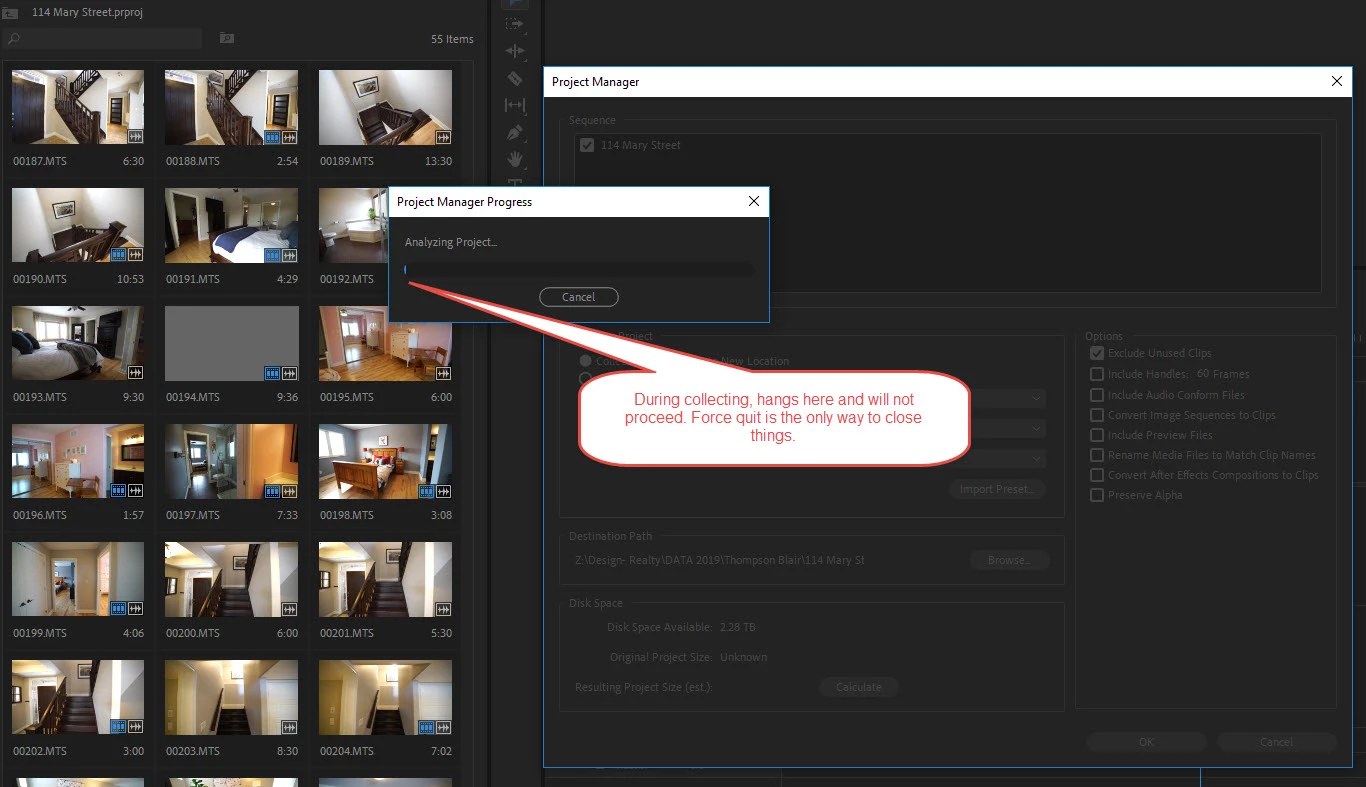
This is a HUGE issue for me when collecting. My business is in creating many small projects, and I backup to an external drive. I'd say half the time I open a project, there is a thumbnail issue and when I collect it hangs at the 'Analyzing Project...' stage (see image below), requiring a force-quit. If I've got 50 projects to back up, this literally adds hours to my day.

I've tried:

  • Disabling CUDA
  • Clearing cache
  • Importing project into another project
  • Re-starting everything, even the machine
  • Working with only PPro open
  • Turning hover scrub off
  • Updated graphics drivers
  • Most recent version of PPro
  • Building a completely new PC thinking it was a hardware issue. That was a very expensive effort to fix this.
  • Waving a burning chicken leg over my monitors

... and lots of other stuff. LOTS of other stuff. The only thing that sometimes works is to view the bin in list view (not thumbnails) but this is unworkable b/c I NEED to use hover scrub thumbnails feature to edit. And I still get crashes, just not as often. So that is no solution at all.

PC, latest CC, updated Win 10 pro. Most of my footage files come from Sony a7s, the files are .MTS.

I need a solution here, folks, this is killing my productivity and at times even my ability to deliver.
    This topic has been closed for replies.

    5 replies

    Inspiring
    July 21, 2021

    Hi Schmalan,

    It may sound stupid but have you ever tried to change the thumbnail display?
    I doubt it will work but you never know.

    Good luck and I hope you find a solution bacause this issue sound crazy. 

    G.
    Eikonotopio
    Participating Frequently
    January 7, 2020

    I have irritated Adobe support many times with this thing, and so far no solution since 2018 editions when first appeared. The only thing that makes me not to destroy my pc is this. Every time it appears, i open PP, delete all the cache before opening project, then make a new project and import the previous project there, creating thumbs from scratch. As soon as everything is ok, I try to work as much as I can, cause next time I might do the same again...

    Participating Frequently
    July 18, 2021

    @Eikonotopio I'm not sure how you do your project import; I couldn't make that work. But I figured out another workaround. I open Bridge on my 2nd screen and use it to look at my photos. When I choose a still to add to the timeline I check its filename, then use the search box in Premiere to find that photo. It's a hassle but after spending several hours searching for a solution this is the best I've found. 

    😣

    R Neil Haugen
    Legend
    July 18, 2021

    Importing a the contents of a project is easy, though quite a few users don't know how it works. Go to the Media Browser panel, navigate to the old project file, select it and right-click/Import. You can select entire project or specific sequences.


    Neil

    Everyone's mileage always varies ...
    Known Participant
    October 28, 2019

    I've the exact same issue. Thi started happening with the latest versions of CC2018 and borrowed into cc2019. 
    Fresh PC with several SSD ( cache, project, media ). Before this buggy versions I've never had a problem and never had to be so careful using media browser instead of just drag and dropping files and further more I've NEVER had to import the entire avchd directory structure to edit files.
    Now editing in Premiere has become just loosing and waisting time with stupid bugs.
    Same files ( no avchd structure ) in Resolve work fine.
    Many users are facing this problem but looks like Adobe just not hearing us at all.
    It's simply frustrating.

    Legend
    February 18, 2019

    Couple things I can suggest.

    1. Step 3H from the Troubleshooter linked below.

    2. Step 2C.

    3. Use the right tool for the job.  The right tool for file management is a file manager.  (Don't use Project Manager.)

    https://forums.adobe.com/message/9253602#9253602

    SchmalanAuthor
    Known Participant
    February 18, 2019

    3H: Yep, all saved to my local C drive, an SSD, within a dropbox folder hierarchy.

    2C: Using Media Browser; I currently drag & drop footage from an explorer window into the Project window. Is utilizing the Media Browser a better practice somehow?

    When you say, "The right tool for file management is a file manager.  (Don't use Project Manager.)", are you referring to collecting files for backup? Or importing to project / importing from SD card?

    Thanks,

    Alan

    R Neil Haugen
    Legend
    February 18, 2019

    First, uploading AVCHD files require a different process than "standard" mp4/mov files. With AVCHD like those mts files, you cannot just grab the video files ... you need the folder structure with all the separately-stored meta info. So ... grab the top-level folder and copy the folder structure to a computer folder.

    Next, those are much more complex files for meta-handling because the file meta info isn't stored IN the file! So on ingesting into Pr, you need to use the Media Browser panel to navigate to the media folders and select/ingest.

    This will give a much more stable and reliable use of that media within Pr.

    Neil

    Everyone's mileage always varies ...
    R Neil Haugen
    Legend
    February 17, 2019

    The issue is probably in those MTS files or workflow.

    How are you getting them onto your computer ... uploading complete folder-structure from card, grabbing just files, what? And how do you ingest them into Pr?

    Neil

    Everyone's mileage always varies ...
    SchmalanAuthor
    Known Participant
    February 18, 2019

    I Drag & drop files from an SD card into a folder on a local SSD drive. FWIW, it's a folder within my dropbox  hierarchy, so on C: drive. I then start up PPro, create a new project (which is also saved into the Dropbox folder, but not the same folder as the footage), and then drag and drop the video files (mostly .MTS) onto the project window from a windows Explorer folder. I don't use the Media Browser in PPro.

    Thanks,

    Alan

    Legend
    February 19, 2019

    I Drag & drop files from an SD card into a folder

    Don't do that.  Always copy the entire card.

    And don't use Dropbox folders for anything you're working on.

    Have a dedicated Media drive.  Don't put anything on C: other than Windows and Programs.

    Finally, do use the Media Browser for all Import duties.