
eugenias45013348
Participant
March 29, 2018
Answered

[URGENTE] Importo mis videos al Adobe Premiere y se ven violetas

  • March 29, 2018
  • 5 replies
  • 39942 views

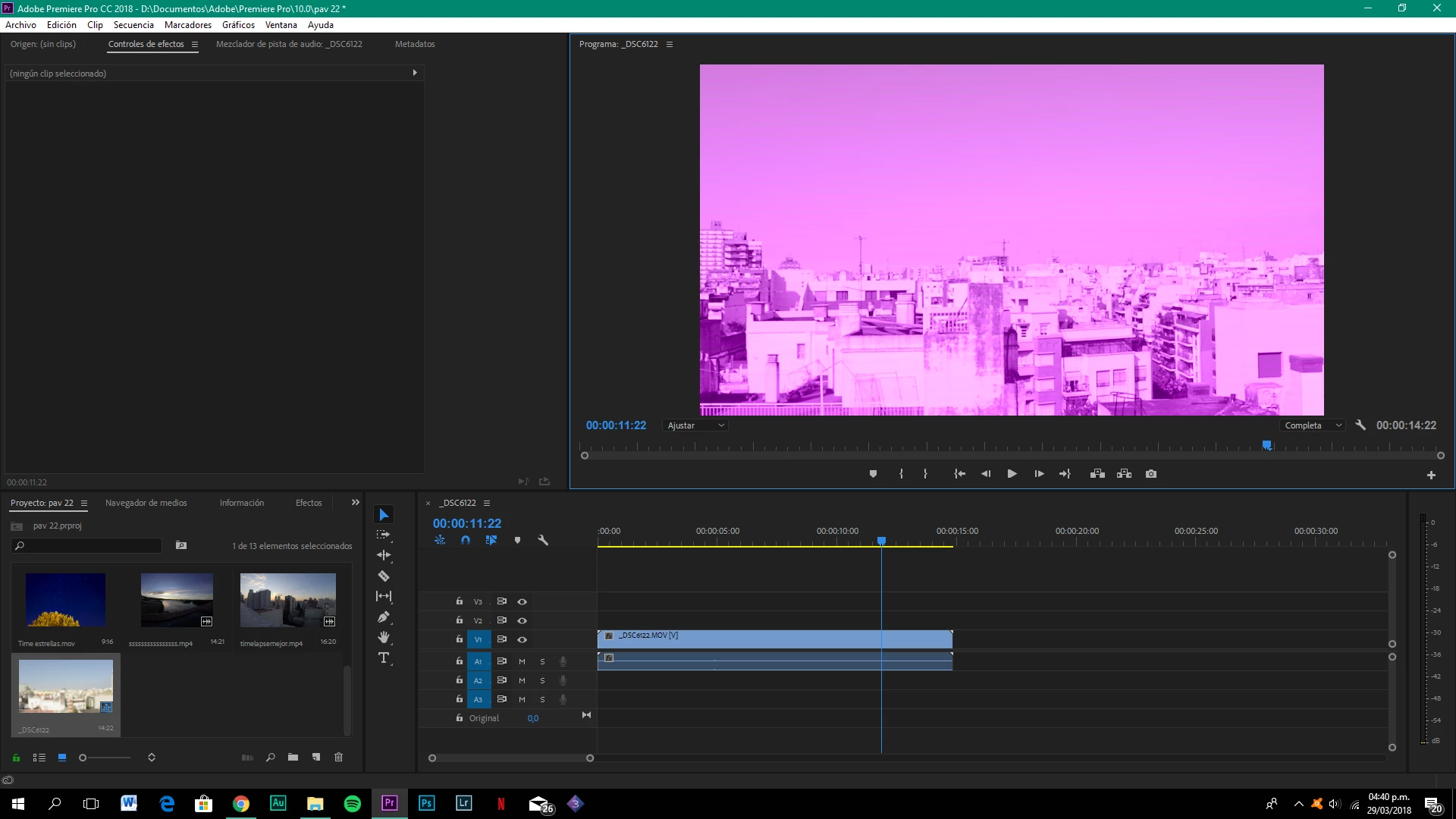
Hola! Cuando importo videos al Adobe Premiere CC 2018 se ven violetas y algunos también con rayas verdes y no encuentro la solucion.  adjunto una foto de lo que sucede, necesito hacer un trabajo urgente y no puedo!!
This topic has been closed for replies.
Correct answer Byron Cortez

Try changing the Mercury Playback Engine GPU acceleration:

File / Project Settings / General...

Then change the acceleration to Software Only to test:

If not works fine, try with other.

Regards!

5 replies

nathalyt60578754
Participant
May 1, 2019

Thank you man!!!!

Participant
December 13, 2018

muchas gracias amigo, la vdd no acostumbro comentar las publicaciones pero me haz ayudado bastante, excelente aportación!!!!

Community Expert
December 19, 2018

Listo de nada! Me alegro haberte ayudado :-)

Byron.
Participant
January 4, 2019

Hola.. se me actualizo del premier cc 2018 al 2019 y me aprecio el problema de mis vídeo se ven rosas con verde, realice lo que ustedes nos indicaron y desapareció, después al exportar aparece el mismo problema, los vídeos se ven ven mientras edito pero al exportar vuelven color rosa y verde.

luis_m_p6211036
Participant
August 20, 2018

GRACIAS A TODOS. ME SALVARON LA VIDA A MI TAMBIEN. HE RESUELTO EL PROBLEMA CON SUS AYUDAS. GRACIAS HERMANOS.

Community Expert
August 20, 2018

De nada Luis.

Saludos!

Byron.
Byron CortezCommunity ExpertCorrect answer
Community Expert
March 29, 2018

Try changing the Mercury Playback Engine GPU acceleration:

File / Project Settings / General...

Then change the acceleration to Software Only to test:

If not works fine, try with other.

Regards!

Byron.
eugenias45013348
Participant
March 29, 2018

Thank you very much!! It worked

Community Expert
March 29, 2018

You're welcome!

Byron.
John T Smith
Community Expert
Community Expert
March 29, 2018

More information needed for someone to help... please click below and provide the requested information

-Troubleshooting https://forums.adobe.com/thread/2261475

-Premiere Pro Video Editing Information FAQ http://forums.adobe.com/message/4200840

Do not count on Windows to be fully up to date when it comes to device drivers

Go to the vendor site to be sure you have an updated driver for your graphic adapter

•nVidia Driver Downloads http://www.nvidia.com/Download/index.aspx?lang=en-us

•ATI Driver Autodetect http://support.amd.com/en-us/download/auto-detect-tool

There are also intermittent reports that the newest driver is not always the best driver due to driver bugs or compatibility issues, so you MAY need to try an earlier driver version