
Participant
July 12, 2020
Answered

Using alpha mov files in Premiere Pro

  • July 12, 2020
  • 1 reply
  • 1792 views

An editor created (what I think) is an animated mov alpha file with my business logo moving across the screen.

I inserted it on the V2 track so that it appears over the opening a video clip (in transparancy).
The file isn't visible at all even when placed before the beginning of the video clip on Premiere Pro 14 (my pc won't support a higher version).

1. Can alphas / transparencies be used by Pre Pro?
2. Is mov the correct format?
3. Is there an effect I need to add so the alpha becomes visible.

File attached. (Update: file unattached after helpful response.)
Thanks!
This topic has been closed for replies.
Correct answer Ann Bens

Maybe the file does not have a alpha channel.

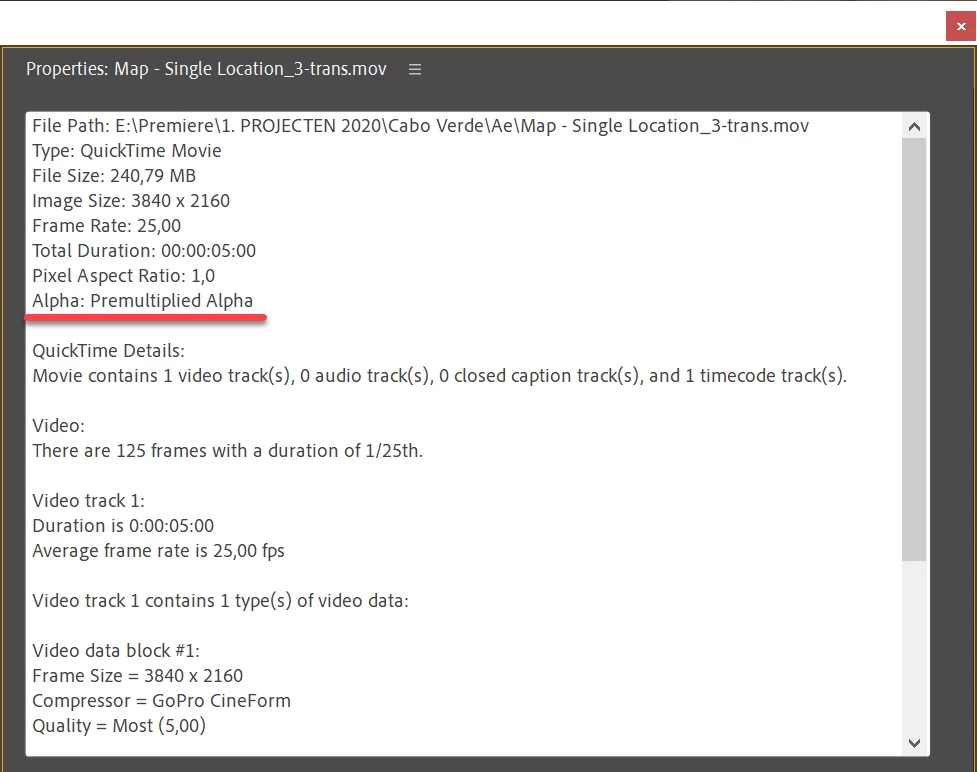
Right click on clip in project window and open the properties and see if it has an alpha channel.

Maybe the file is zoomed in on the timeline which makes the logo 'disappear'.

File does not match the sequence settings.

Right click on the clip in the timeline and Set to Framesize.

1 reply

Ann Bens
Community Expert
Ann BensCommunity ExpertCorrect answer
Community Expert
July 12, 2020

Maybe the file does not have a alpha channel.

Right click on clip in project window and open the properties and see if it has an alpha channel.

Maybe the file is zoomed in on the timeline which makes the logo 'disappear'.

File does not match the sequence settings.

Right click on the clip in the timeline and Set to Framesize.

Participant
July 12, 2020

Oh my gosh, Ann Bens, this was the ANSWER.
Set to Frame Size.
Oh, happy day.
BOOM in 1.
Thanks so much!