Known Participant
July 28, 2024
Question

Using FireCut plugin to cut silence and after I do, my Premiere Pro is unusably-laggy

  • July 28, 2024
  • 3 replies
  • 1793 views

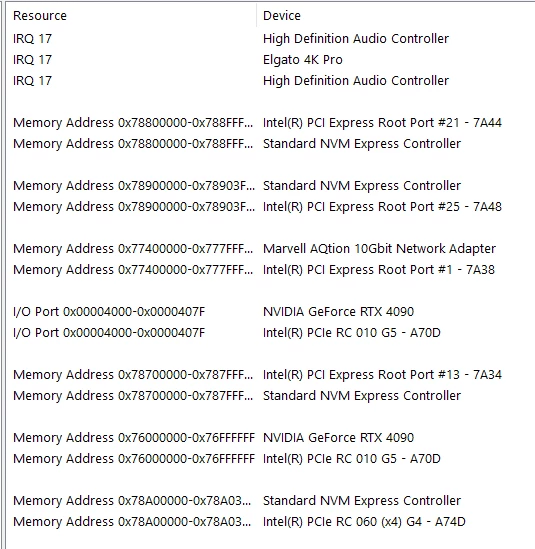
So I recently got a new PC with a 4090, a i9 14900K processor, and 64 GB of RAM. I have been trying to use a plugin for the first time known as "FireCut" to cut out silences, and when it does its job, the timeline is unusably laggy when trying to sort through the footage. There are probably more than 1000 cuts, but with that being said, should my premiere be lagging this bad given my specs? Is there a setting I'm missing or something?


I will add, I had 3 sources to use when recording, so I had to consolidate and merge them into 1 video source (meaning 3 1080p sources all together, 5760 horizontal pixels), so that also probably has to do with it, but even then, should it be this laggy? I've tried putting playback resolution down to 1/4 and all of that, but still to no avail. So I'm not sure if it's Premiere, the plugin I'm using (which isn't open while I edit), or my computer. Some insight would be super helpful as I'm in a time crunch right now and not sure what to do or where the issue is. I feel like given the computer I have, I shouldn't be having these issues. 


Here are my specs just in case I missed anything. Thanks so much!


3 replies

R Neil Haugen
Legend
July 28, 2024

That is a major sequence you're working with there. What is your actual sequence framesize?


And of course, the more fps, the heavier the processing load also.

Everyone's mileage always varies ...
Known Participant
July 29, 2024

It's 1920x1080 for the actual framesize. Yeah man, I figured it was pretty heavy. Using the three individual 1920x1080 60fps videos and cutting manually has been just fine though, so that's where I feel like the plugin is causing some issues, I just don't get why after it does its cutting it stays laggy. The creator of the plugin said something about it recreating the footage except with cuts, so maybe it's duplicating everything or something?


Thanks for the reply.

kglad
Community Expert
Community Expert
July 28, 2024

in the future, to find the best place to post your message, use the list here, https://community.adobe.com/

p.s. i don't think the adobe website, and forums in particular, are easy to navigate, so don't spend a lot of time searching that forum list. do your best and we'll move the post (like this one has already been moved) if it helps you get responses.


<"moved from cc desktop bugs">
Known Participant
July 29, 2024

Thank you, my fault. Much appreciated.

Known Participant
July 28, 2024

ALSO, I am recording and editing in 60fps. Maybe that's a part of it as well? Still feel like it shouldn't be an issue, but maybe I'm wrong.