
Inspiring
July 10, 2022
Answered

V 22.5--How to clear the Transcript panel in the Text window- when you don't need captions

  • July 10, 2022
  • 3 replies
  • 19820 views

My problem-

I load a clip in the timeline, I invoke the Text window, go ro the Transcript tab, and click Start Transcription. All is well, allowing for the 40% error rate i have to fix- but hey, who's complaining...


The problem is, after I select Export to Text File I'm ready to clear the Transcript window and do it all over again with a new clip. 


And I cannot find any Clear Transcript command of any kind in the immediate universe. Not under the 3-dot popup where by design it OUGHT to be, not anywhere in the immediate vacinity.


I need the transcript for pre-edits, AKA, paper cits-- not captions! Do I seriously have to generate a captions track from the transcript, clear it to clear the Text window, is that the only way? Anybody tested this?


Where is the Clear Transcript buttonWITHIN the Transcript tab???


Best, as always,

Loren
 

Correct answer Warren Heaton

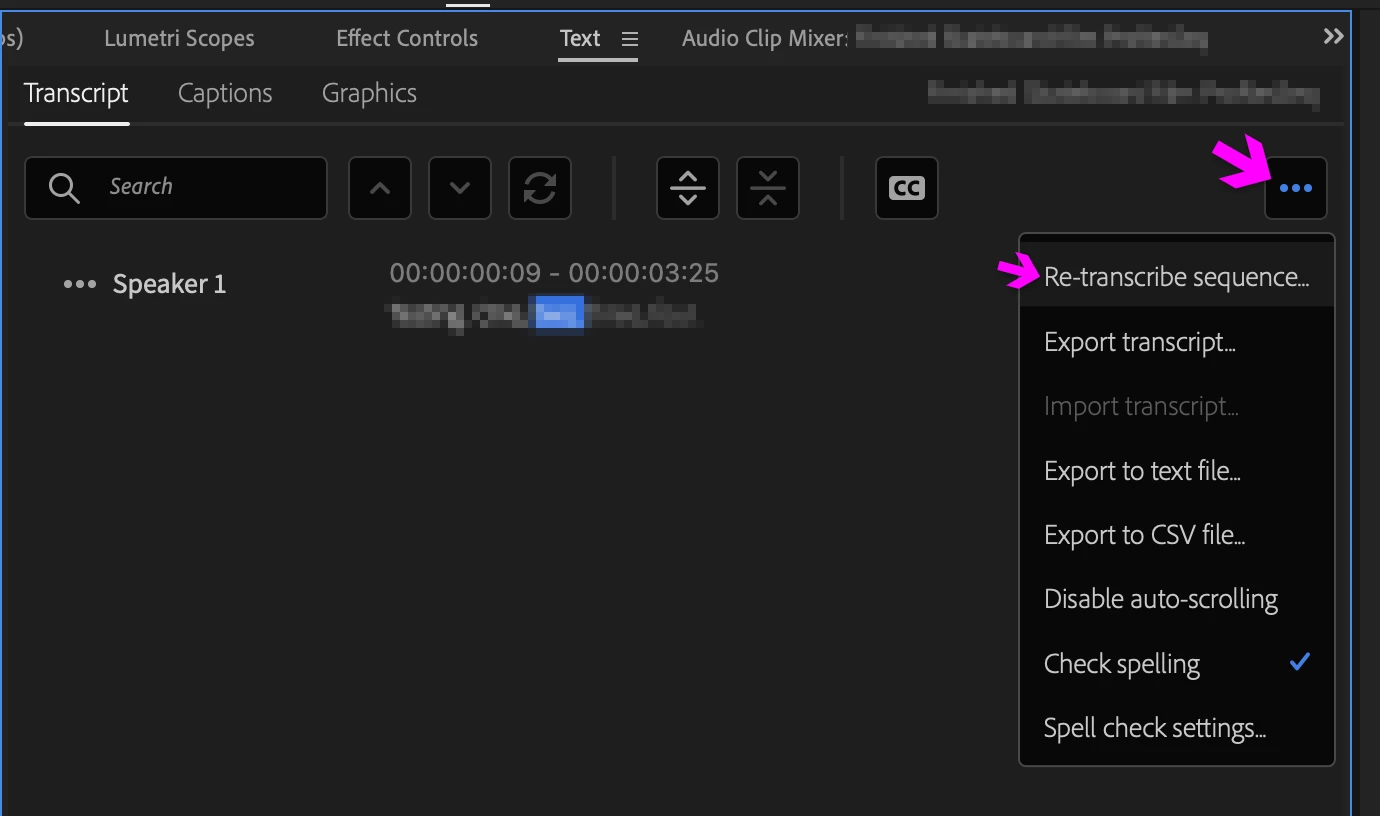
Speech to Text is a Sequence level feature, not a Clip level feature with a specific workflow for the purpose of creating captions.  As such, we're transcribing the Sequence when we click the "Transcribe sequence" button in the Text panel.


If you wanted to use this feature for transcribing source clips instead, I'd go with creating a new Sequence for each clip as the resulting transcribed Sequences can be used as source later (including the resulting Captions, if created); however, you can delete the current Clip form the Sequence, insert another Clip, and then choose "Re-transcribe Sequence" from the ellipsis pop-up menu from the Transcirpt tab.


3 replies

Inspiring
June 20, 2024

hi there, I solved a similar issue by lassowing all the dialogue clips in my timeline, right click menu and select 'Ignore Transcript'.

This cleared the current text in the text panel and allowed the option to retranscribe the sequence.

IslandFox
Participating Frequently
November 7, 2025

THIS! TY

Stan Jones
Community Expert
Community Expert
July 11, 2022

You can also use the "re-transcribe" option (under the 3 dots menu). Do NOT pick merge. It will create a new transcription.


Depending on how you are setting up your sequence, you can use in and out points. There is an "in - out" bug in 22.4 fixed in 22.5.


Stan


Inspiring
July 18, 2022

 Noted. Thank you, Stan.


Best, as always,

Loren

-Lor -
Warren Heaton
Community Expert
Warren HeatonCommunity ExpertCorrect answer
Community Expert
July 10, 2022

Speech to Text is a Sequence level feature, not a Clip level feature with a specific workflow for the purpose of creating captions.  As such, we're transcribing the Sequence when we click the "Transcribe sequence" button in the Text panel.


If you wanted to use this feature for transcribing source clips instead, I'd go with creating a new Sequence for each clip as the resulting transcribed Sequences can be used as source later (including the resulting Captions, if created); however, you can delete the current Clip form the Sequence, insert another Clip, and then choose "Re-transcribe Sequence" from the ellipsis pop-up menu from the Transcirpt tab.


aTomician
Inspiring
February 22, 2024


quote

Speech to Text is a Sequence level feature, not a Clip level feature


Are you sure about this - just that I've been struggling with a transcript problem that ironically was fixed at clip level in the end.


So I created a transcript for a clip, but no captions.  However, it translated it in entirely the wrong language, so I changed the settings, but when I went back to the transcript, the "Re-transcribe sequence" option was greyed out.

I spent a while on this just trying to get rid of the transcript so I can create a new one.  I even completely deleted the sequence and created a new one, dragged the footage into it and the old transcript popped up again!


Eventually I found that if I right-click on the clip in the project panel, I get an option on the clip to Re-Transcribe - but this option is always greyed out on the sequence options.


I dunno, maybe this is a new thing?

Regards, aTomician
Stan Jones
Community Expert
Community Expert
February 22, 2024

@aTomician,


@Warren Heaton10841144's post was from July 2022 before "text-based editing" and the change to have Source clip transcription in addition to (static) sequence transcripts.


Right-click in the Project panel is an easy way to access Source media clips transcribe and re-transcribe options. Doing this with a Sequence in the Project Panel only works if you have created a STATIC (sequence) transcription - and then "Re-transcribe sequence" is active.


There is a learning curve for the new features, and more work is being done in the public Beta version.


Stan