

Video artifacts after rendering - AMD video cards - how to avoid?
I'm getting random video artifacts when I render in my timeline. Having read through many discussion threads on this topic, I believe this may be related to the hardware I'm running.
I'm running a Late-2013 MacPro 3 GHz 8-core with 64 GB RAM and AMD FirePro D700 video cards which have 6 GB RAM.
Software: I'm running Mac OS X Sierra 10.12.6 and Premiere 11.1.2 (22 Build.)
My footage is 2k (2048 x 1080) ProRes 422 and the timeline is a 1920 x 1080 with ProRes 422 preview files.
As an example, on the clip seen in screenshot (magnified a bit) I applied two Lumetri Color effects (one for the overall correction, plus a secondary CC for the interviewee's face. Two effects because I cropped the secondary - you can't see it in my screen grab, but the interview subject is seen on frame left and he gets a different correction.)
I'm getting periodic, and random artifacts like this.
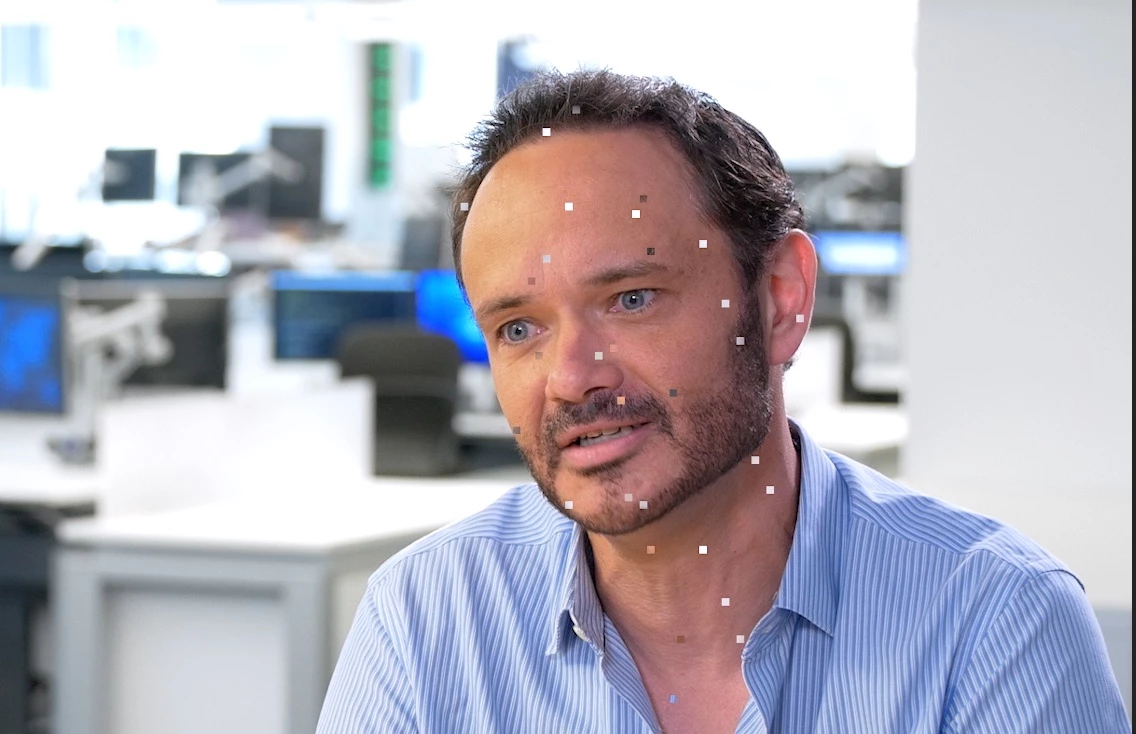
I re-rendered this section in Mercury Playback Engine Software Only mode - and it came out clean.
Am I doomed to super-slow renders? Do AMD Video Cards still not work well with Premiere? Or is there a workaround?
I haven't had time to test whether other video editing apps like Final Cut X would experience similar problems.
I have had the video card AND the motherboard replaced on my computer, recently, by Apple, after experiencing a lot of problems with video card-assisted rendering earlier this year.
Another observation - although my video won't play back smoothly in real time once the Lumetri effects are applied - if I do play it back with the assistance of the AMD video cards - I do see these artifacts during playback. Not consistently on particular frames, they occur seemingly at random. If I turn off the cards - playback w/ Mercury Playback Engine Software Only - I do not see the artifacts (I also get much choppier playback, as you'd expect.)
I look forward to everyone's thoughts on this.
 AdChoices