
Participating Frequently
December 15, 2022
Question

Video audio syncs correctly in QT player, but is out of sync in Premiere

  • December 15, 2022
  • 1 reply
  • 454 views

Hello! I have a video that plays correctly (video and audio is synced) when I play it back on either Quicktime player (macOS) or Windows media player (Windows).


However, when I import it to Premiere Pro, and create a squence based on it (sequence settings created automatically using the video), the video and audio is out of sync.


The video in this case is a downloaded stream recording (created during an Accelevents event).


Any ideas? I've attached data from QT's inspector for the video.
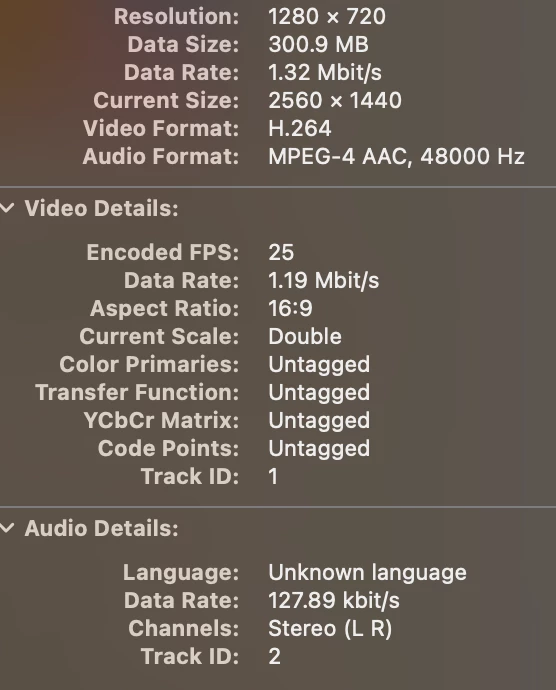
This topic has been closed for replies.

1 reply

Kevin-Monahan
Community Manager
Community Manager
December 15, 2022

Hi Daniel,

Sorry. This is a VFR clip. Download the freeware Shutter Encoder. Create a ProRes LT transcode of the file. Is it working now? Let us know.


Thanks,
Kevin

Kevin Monahan - Sr. Community & Engagement Strategist – Pro Video and Audio
Participating Frequently
December 15, 2022

Thank you Kevin. By VFR, you mean variable frame rate correct?


Unfortuantely I work in a corporate environment and it is not easy to just "download freeware" onto our workstations. Is there a native Premiere way or other Adobe software I could use to remedy this? Looking online, I see Media Encoder being suggested, after which nudging and relinking of the audio track is still required.


If it is the case that VFR is the culpret, and we cannot obtain the video otherwise, then I can make the case that we'll simply need to add nudging the audio into place as a work around.

Kevin-Monahan
Community Manager
Community Manager
December 19, 2022

Hi Daniel,

Yes, variable frame rate video is difficult to play back. If using Shutter Encoder can't work for you, see if your software can record with constant frame rates. If that is not possible, you can purchase a hardware device to record your streams properly to forego the step of transcoding using open-source applications like Shutter Encoder. I hope the info helps.


Thanks,
Kevin

Kevin Monahan - Sr. Community & Engagement Strategist – Pro Video and Audio