
Video Clips Disappeared From Sequence, but Audio Remains
I am editing a long form documentary (2 hours).
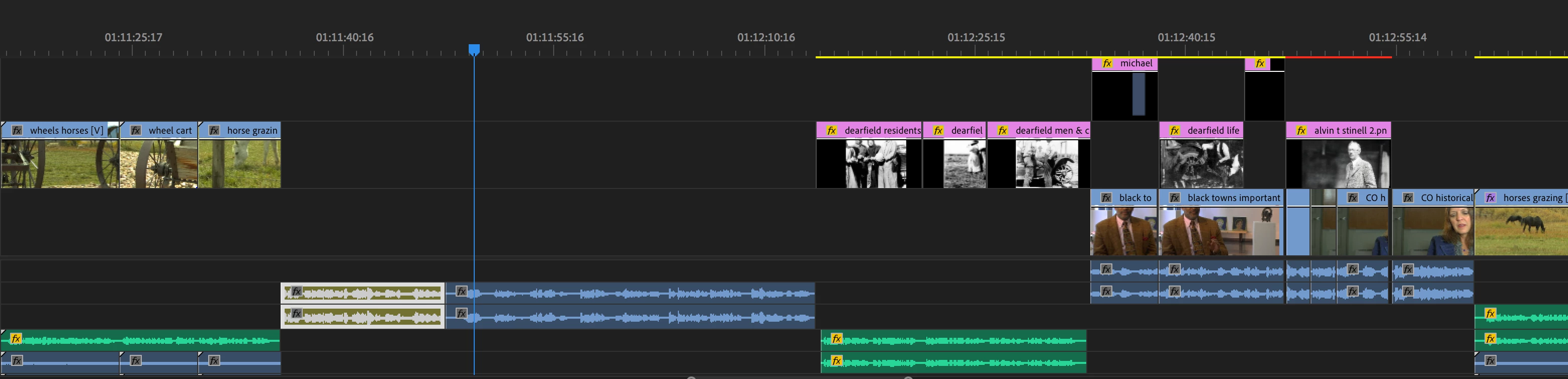
This morning I opened the program as usual to begin work. In my sequence I find that the video portion of some clips are missing. The audio is there and plays fine, but the video is missing, as if I made an audio only edit.
Other clips in the timeline are fine before and after some of the clips where the video has just disappeared and the audio remains. It seems random. Has anyone else encountered this problem?
I have tried:
deleting media cache
changing rendering/playback settings under project settings
disconnecting my second monitor
rendering the clip
As you can see in the screenshot where there is audio, the video is gone, but appears before and after. Where the playhead is was a thumbnail of an interview, now only the audio is there and plays. This is happening as several points in my sequence and appears random. Has anyone else encountered this problem? I am on a deadline to complete a PBS program and it is unfortunate to lose half a days work trying to sort this out.
I am working on a mac laptop, but this doesn't seem to be a hardware problem as I use Premiere to edit other long-form programs as well.
With thanks,
Charles
[Personal information removed by moderator.]
 AdChoices