
Participating Frequently
January 5, 2022
Question

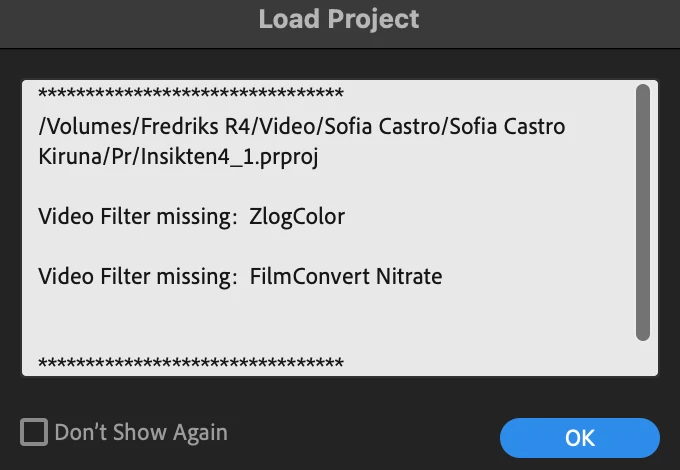
Video filters missing (Premiere Pro 22.1.2)

  • January 5, 2022
  • 3 replies
  • 1989 views

Hey everyone,


Suddenly when opening Premiere Pro it says that "video filter missing". I have re-installed both the plugins and Premiere Pro but the problem is still there. Plugins are: Zlog Color and Film Convert Nitrate.


I can find the plugins in Premiere effects tab, but they doesn't work when i drag them to the clips, this problem just happened from one day to another.


I'm running the latest version of Pr (22.1.2), on a new Macbook Pro M1 Pro 16"

Any help would be apriciated!


This topic has been closed for replies.

3 replies

Participant
January 9, 2022

Did you manage to sort this? I'm having the same issue.

Participant
January 10, 2022

Nop. I hade a deadline friday. so hade du to do it without filmconvert.

Participant
January 6, 2022

Same prob here. Came back from holiday and the error is there. And i tried everything. can seems to make it work. Have du reportet et to filmcovert?

fgilleAuthor
Participating Frequently
January 6, 2022

Film Convert actually released an update yesterday for Mac M1 users for this problem, i downloaded it but didn't try it yet

Participant
January 6, 2022

hmmm latest update i can find is from

Version 3.20 / Date: 15 Dec 2021 / MAC

Fix for Premiere Pro v22.1.1 on M1

Legend
January 5, 2022

check with the people who created zlogcolor to see if there's a compatibility issue with the latest version of premiere.  You can also revert to the previous version of premiere that was working. If you deleted the previous version, you can install it from the creative cloud app