 Adobe Community

- Home
- Premiere Pro
- Discussions
- Re: Video is blurry when exporting, including new ...
- Re: Video is blurry when exporting, including new ...

Copy link to clipboard
Copied
I'm working on a video to show how to do a robotic surgery. When exporting, the video appears blurry. I have tried several different settings, including using H.264 Format and Youtube 1080p, High Quality 1080p HD presets. My source video is admittedly not the highest quality but I would like at least the new text that I put over the video to appear sharp in the exported video. Any help would be appreciated!


 2 Correct answers


Your sequence settings are set to a very small resolution. So you are scaling up the tiny resolution to be displayed at 1920x1080. That includes the text, even if it's looking okay in the Program Monitor. You need to go into your sequence settings and increase that to 1920x1080. You'll need to resize the video to fit the new resolution. On export, the low res video will look the same but the text should be sharper.
Otherwise, the export settings look fine for a 1920x1080 video. Just gotta chan
...

Did you resize the text along with the video?
You need to resize the video independent of the text, then add the text over the resized video in the new larger sequence. You will probably have to re-create the text at the new sequence size.
 9
Replies
9
9
Replies
9


Copy link to clipboard
Copied
Is the text sharp when you play back inside Premiere? Are you doing any resizing when you export? Is the text blurry when you view the resulting file on your computer, of after uploading to Youtube/Vimeo/etc.?
Copy link to clipboard
Copied
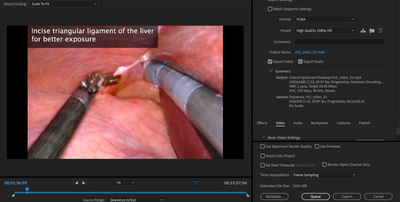
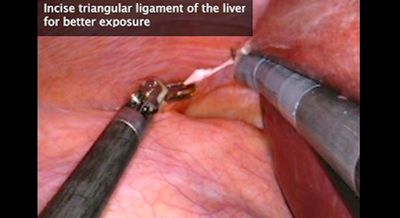
In Premiere it does look sharp in the preview. The text is blurry on the resulting file on my computer, I have not tried uploading it since it will likely be uploaded for publication elsewhere. I have attached screenshots here.
Copy link to clipboard
Copied
A pic of your export settings with the summary tab would be helpful.
Without knowing more I'm assuming you have sequence settings that match your lower quality video file, and if the sequence resolution is set low for that, then I'm pretty sure your text is also going to be constrained to that low resolution, even if you increase the size on export.
Copy link to clipboard
Copied
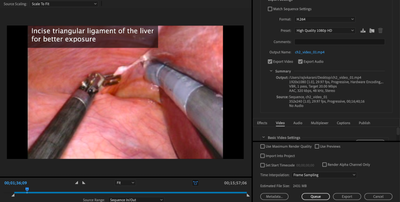
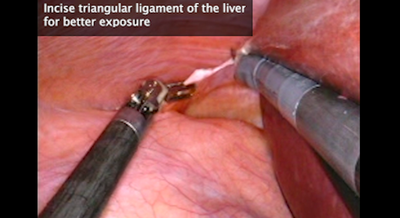
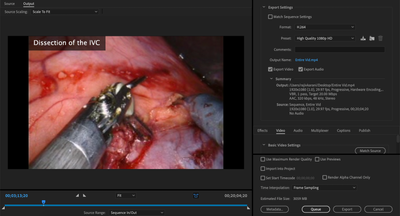
Attached are screenshots of the export page and the resulting video. I'm not sure if you can tell from the screenshot, but the text appears very clear and crisp in the preview in the screenshot of the export page. However, it ends up blurry in the resulting video. Is there anything I can do to get the crisp text/video exported?
Copy link to clipboard
Copied
Your sequence settings are set to a very small resolution. So you are scaling up the tiny resolution to be displayed at 1920x1080. That includes the text, even if it's looking okay in the Program Monitor. You need to go into your sequence settings and increase that to 1920x1080. You'll need to resize the video to fit the new resolution. On export, the low res video will look the same but the text should be sharper.
Otherwise, the export settings look fine for a 1920x1080 video. Just gotta change that sequence frame size.
Copy link to clipboard
Copied
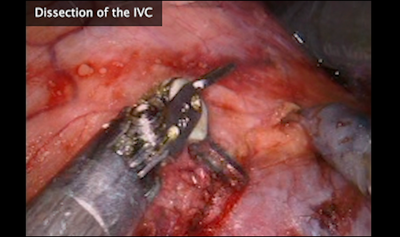
Thanks for your help. I did just change the sequence size, and resizd the video to fit the new resolution but am getting the same end result. New screenshots below. Any idea why it is still appearing blurry?

Copy link to clipboard
Copied
If the souce is 352x240 you will never get a sharp HD image: try 640x480.
Copy link to clipboard
Copied
Did you resize the text along with the video?
You need to resize the video independent of the text, then add the text over the resized video in the new larger sequence. You will probably have to re-create the text at the new sequence size.
Copy link to clipboard
Copied
Thank you! This worked.


 AdChoices